

AI Art Generator - AI Yearbook

5M+
Installs
Smart AI DEV
Developer
-
Generative AI
Category
-
Rated for 3+
Content Rating
-
summerdaysc@outlook.com
Developer Email
-
https://coolsummerdev.com/artgenerator-privacy-policy/
Privacy Policy
Screenshots

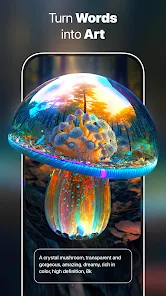
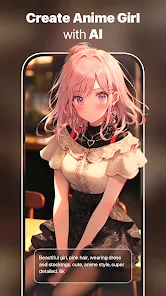
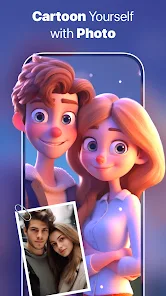
editor reviews
AI Yearbook is an app that lets you turn your photos into retro yearbook-style portraits, complete with those classic 80s and 90s school picture vibes. It sits in the photo editing and AI generation category, something you'd grab from Google Play or the App Store if you're feeling nostalgic or just want a laugh. The main draw is uploading a selfie and getting back a set of images that look like they came straight out of a high school yearbook from decades ago, with hairstyles, lighting, and outfits that match the era. When you first open it after downloading and installing—which is free, by the way—it immediately hits you with a clean, straightforward menu that doesn't overwhelm you with options. The premise is simple, and that first impression is pretty inviting if you're curious about how you'd look in a different decade.
Once you start using it, the experience is mostly smooth. You snap or upload a clear front-facing photo, and within a minute or two, the app processes it and hands you a gallery of generated images. The interface is minimal, so you're not digging through layers of settings or filters. Onboarding is quick: you choose a style, let the AI work, and then you can save or share the results. I did notice that the quality of the output heavily depends on your source photo—poor lighting or weird angles lead to weird, distorted faces, which can be a bit jarring. A practical tip is to use a well-lit, straight-on shot for best results. The whole process is fun the first few times, but it does get repetitive since there's not much else to do within the app once you've generated your yearbook photos.
After spending some time with AI Yearbook, I think it's a neat gimmick for anyone who enjoys jumping on viral photo trends or wants a quick dose of nostalgia. It's not something you'd use daily, though, and that's where it feels limited compared to broader AI art tools like Remini or FaceApp, which offer way more styles and editing options. The app is different in that it's laser-focused on one specific aesthetic, so if you're into that retro school look, you'll get a kick out of it. But if you're looking for versatility or long-term value, you might uninstall it after a week. I kept it installed because it's a fun party trick, but I can see most people moving on pretty fast.
features
- 🖼️ Retro yearbook styles: The app specializes in generating photo sets that mimic 80s and 90s school portraits, including classic haircuts and clothing looks. It's more niche than apps like Remini, which enhance photos in general, but this focus makes it perfect for themed outputs.
- ⚡ Quick processing: generates results in under two minutes from a single selfie, so you're not stuck waiting around. Compared to Meitu or PicsArt, which can be slower with AI filters, this app feels snappy for its specific purpose.
- 📸 No complex edits: you just upload a photo and choose a style, no manual tweaking required. It's far simpler than Photoshop Express or Lightroom, which require skill, making it accessible for casual users.
pros
- 🖼️ Simple one-click generation: anyone can get results without learning any tools. Apps like FaceApp have more variety but need more steps, so this wins on ease of use.
- ⚡ Nostalgic appeal: the retro theme is a strong hook that other general photo apps don't offer in the same way. Remini focuses on restoration, not specific era looks.
- 📸 Free to download: no upfront cost, so you can test it risk-free unlike some premium apps. It's a solid choice for a quick laugh with friends.
cons
- 🖼️ Limited output variety: you only get yearbook-style images, so it gets old fast. FaceApp or YouCam Perfect offer dozens of effects, making them more reusable over time.
- ⚡ Inconsistent quality: dark or angled photos produce poor AI results. Remini handles low-quality images better with its enhancement algorithms.
- 📸 Requires internet: offline processing is not supported, which can be annoying. Apps like Meitu allow some offline filters, giving them an edge in low-connectivity situations.
Articles
![]()
Guide
How to Update Google Play Store on Android 2026
![]()
Guide
How to Download Older Versions of Android Apps
![]()
Guide
How to Download Apps Without Google Play Store
![]()
Guide
What Is an APK File for Android?
If you use an Android phone, you may have seen the term APK while searching for apps or games online. Some websites offer an APK download instead of a Google Play install button. Some users also mention APK files when talking about apps that are not available in their region, older app versions, or Android games downloaded outside the Play Store.
![]()
Guide
How to Install Games from Google Play for Beginners
Installing games on an Android phone is usually simple, but for beginners, the process can still feel confusing at first. You may not know where to search, which button to tap, whether the game is safe, or why Google Play sometimes asks for account settings, storage access, or payment information. If you are using an Android phone for the first time, learning how to install games from Google Play is one of the easiest ways to get started.
![]()
Guide
How Useful Gemini Is for Everyday Questions and Quick Tasks
emini feels different from many AI apps because it is not only trying to be a chatbot. After using it for everyday questions, quick writing, image understanding, and planning, I think its biggest strength is convenience.
![]()
Guide
What to Know Before Downloading APKs
For many Android users, downloading an APK is a common way to install apps and games. Sometimes an app is not available in a certain country.
![]()
Guide
ChatGPT Review: Is It Still the Best AI App in 2026?
![]()
Guide
Seedance 2.0 vs Sora: The Future of AI Video Generation
The AI video race has intensified dramatically over the past two years. Platforms like Sora from OpenAI and Luma Dream Machine pushed the boundaries of text-to-video realism. Yet, despite their impressive outputs, most tools still operate as probabilistic generators—you describe a scene, and the model interprets it. Control remains limited. With the February 2026 release of Seedance 2.0, developed by ByteDance, the paradigm shifted. Internally known as Jimeng 2.0, Seedance does not position itself as just another video model. It positions itself as an AI Director. Rather than guessing what you want, Seedance 2.0 allows you to direct what happens. This distinction defines everything that follows.









Recommended Apps
![]()
Home Design 3D
Anuman4.2
![]()
Truth or Dare Game - Party App
Chouic4.8
![]()
Photo Collage Maker
Scoompa4.7![]()
Learn to Draw Flower
Creative APPS4.2![]()
FIFA World Cup 2026™
FIFA2.8![]()
Mirror Plus: Mirror with Light
Digitalchemy, LLC4.4![]()
Meitu- Photo Editor & AI Art
Meitu (China) Limited4.5![]()
Perplexity - Ask Anything
PerplexityAI4.7![]()
GhostTube SLS Camera Alternate
GhostTube4![]()
Boom Chip Blast: 2-Player
Black Pyramid 3D Games Studio0![]()
Healthy Benefits+
Solutran, Inc.4.5![]()
Deepcheck AI Search Assistant
rohe.ai4![]()
Idol Prank Video Call & Chat
LightCode Solutions4![]()
Face Shape - Pretty Scale
GlintTec Apps3.9![]()
Plant App - Plant Identifier
ScaleUp4.6












































