

How old do i look - Age app

1M+
Installs
Edia Studio
Developer
-
Entertainment
Category
-
Rated for 3+
Content Rating
-
ediastudio17@gmail.com
Developer Email
-
https://quickappninja.com/game-privacy-policy.html
Privacy Policy
Screenshots
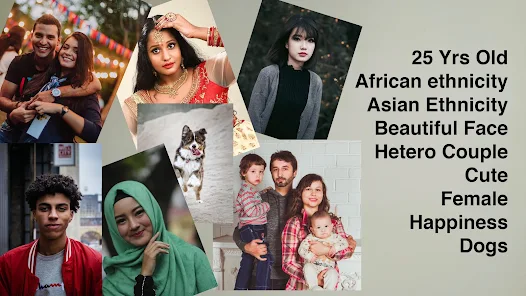
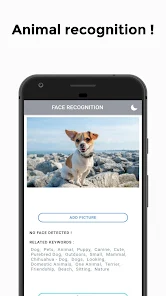
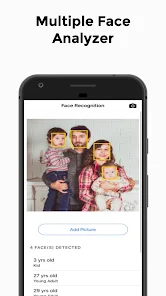
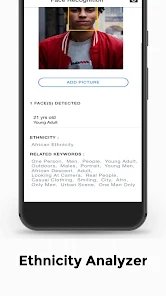
editor reviews
I tried out "How old do i look - Age," an app from Edia Studio that basically guesses your age based on a selfie. It falls under those playful, single-purpose photo utility tools you find all over the Google Play Store and the App Store. The whole idea is simple: you snap or upload a photo of a face, and the app spits out a number. I downloaded it mainly out of curiosity, since these age-guessing things pop up every now and then on social media. The install was quick, and it didn't ask for much—just camera permissions and a quick tap to start. First impression? The interface is pretty barebones, with a big button in the middle to take a photo. No clutter, no flashy ads on the main screen, which I actually appreciated. It's free to download, though there are in-app purchases and some banner ads that show up after a few uses. Registration wasn't required, so I could jump right in without creating an account.
After launching the app, I took a selfie in decent lighting. The scan takes about a second, and then it shows your estimated age right on the screen, along with a little percentage or confidence meter. It felt a bit like a party trick. I tested it with a few different photos—one with sunglasses, one with a hat, and a group shot. It handled the solo shots fine, but it got confused when there were multiple faces, often only analyzing the closest face. The interface is straightforward: you can switch between the front and back camera, and there's a small gallery icon to pick an existing photo. There's no real onboarding, just a one-sentence tip about lighting. A small practical tip: keep your face centered and avoid heavy shadows. The app doesn't save your photos by default, which is good for privacy, but it also means you have to screenshot if you want to share the result. The flow is smooth, but after five or six scans, an interstitial ad pops up, which breaks the rhythm a bit.
After playing around with it for a while, I'd say this app is really for a quick laugh or a casual icebreaker. It's not something you'd use for any serious purpose. If you're into comparing your "vibe age" with friends or just want a silly distraction for five minutes, this does the job. But honestly, it's not very accurate—it often misjudged my age by a few years, and it really struggles with different lighting and angles. Compared to something like FaceApp or Remini, which offer a whole suite of editing tools and better AI, this one feels very one-note. You might keep it installed if you enjoy showing it to people at parties, but I can see most users uninstalling it after a few tries because it doesn't do much else. It's free and lightweight, so it's not a waste of space, just not very useful long-term.
features
- 📸 The core function is dead simple: take a photo and get an age estimate. It works fast, usually under two seconds. Compared to FaceApp, which has a similar age filter but buries it under many other editing tools, this app focuses purely on age estimation. No extra fluff, just the result. But FaceApp's age filter is more consistent and often more accurate because it uses a more robust AI model trained on a larger dataset.
- 🔒 The app doesn't save your photos to the device automatically, and it doesn't upload them to a cloud server for processing (at least not obviously). This is a plus for privacy-conscious users. In contrast, many similar apps like "How Old Do I Look" or "Age Calculator" often request access to your entire photo library and may keep a copy of your images for analysis, which feels a bit intrusive.
- 🎨 The interface is very minimal, with a dark theme and large buttons. It's easy to navigate even for someone not tech-savvy. However, the design looks a bit dated and lacks polish compared to "YouCam Perfect," which offers a similar age-filter feature but within a more modern, feature-rich app with smoother animations and a cleaner layout.
- 💸 It's entirely free to start using. There are no trial periods or paywalls for the basic age detection. But you get served ads after a few scans. Some other apps, like "MsMr" (boy/girl love), charge upfront or lock the age detection feature behind a premium subscription, so this app is more accessible for a quick try.
pros
- ✅ It's truly a no-commitment tool. You don't need to sign up, log in, or share personal data. Just point and shoot. Apps like "Yahoo" or "Snapchat" force you into a full account setup before you can even access their basic camera filters.
- ✅ The speed is excellent. The analysis is near-instant, even on older phones. Some similar apps, like "AgeMe" or "Oldify", take a few seconds to process the image, but this one feels snappier.
- ✅ It's very lightweight. The app takes up very little storage space, maybe under 20 MB. This is great for phones with limited memory. In contrast, "FaceApp" or "Remini" can take over 100 MB and require constant data usage for their advanced features.
cons
- ❌ The accuracy is poor. It guessed me 5 years older in dim light and 3 years younger with bright overhead light. FaceApp and "YouCam Perfect" handle lighting variations much better, giving consistent results regardless of the environment.
- ❌ The app is very limited. It only estimates age for one face at a time and offers no other features like beauty filters, aging effects, or gender swaps. Apps like "SNOW" or "B612" offer age detection as one of dozens of fun effects, making them more versatile.
- ❌ The ads are intrusive. After just three scans, a full-screen video ad plays. You can't skip it for the first 5 seconds. "Age Calculator" or "MyAge" have smaller banner ads that are less disruptive to the flow.
- ❌ It fails with glasses and hats. The app often couldn't detect a face or gave wildly wrong estimates if I wore sunglasses or a baseball cap. Other apps like "Google Photos" or "Apple Photos" can still recognize faces and estimate ages more reliably even with accessories.
Articles
![]()
Guide
How to Update Google Play Store on Android 2026
![]()
Guide
How to Download Older Versions of Android Apps
![]()
Guide
How to Download Apps Without Google Play Store
![]()
Guide
What Is an APK File for Android?
If you use an Android phone, you may have seen the term APK while searching for apps or games online. Some websites offer an APK download instead of a Google Play install button. Some users also mention APK files when talking about apps that are not available in their region, older app versions, or Android games downloaded outside the Play Store.
![]()
Guide
How to Install Games from Google Play for Beginners
Installing games on an Android phone is usually simple, but for beginners, the process can still feel confusing at first. You may not know where to search, which button to tap, whether the game is safe, or why Google Play sometimes asks for account settings, storage access, or payment information. If you are using an Android phone for the first time, learning how to install games from Google Play is one of the easiest ways to get started.
![]()
Guide
How Useful Gemini Is for Everyday Questions and Quick Tasks
emini feels different from many AI apps because it is not only trying to be a chatbot. After using it for everyday questions, quick writing, image understanding, and planning, I think its biggest strength is convenience.
![]()
Guide
What to Know Before Downloading APKs
For many Android users, downloading an APK is a common way to install apps and games. Sometimes an app is not available in a certain country.
![]()
Guide
ChatGPT Review: Is It Still the Best AI App in 2026?
![]()
Guide
Seedance 2.0 vs Sora: The Future of AI Video Generation
The AI video race has intensified dramatically over the past two years. Platforms like Sora from OpenAI and Luma Dream Machine pushed the boundaries of text-to-video realism. Yet, despite their impressive outputs, most tools still operate as probabilistic generators—you describe a scene, and the model interprets it. Control remains limited. With the February 2026 release of Seedance 2.0, developed by ByteDance, the paradigm shifted. Internally known as Jimeng 2.0, Seedance does not position itself as just another video model. It positions itself as an AI Director. Rather than guessing what you want, Seedance 2.0 allows you to direct what happens. This distinction defines everything that follows.









Recommended Apps
![]()
Home Design 3D
Anuman4.2
![]()
Truth or Dare Game - Party App
Chouic4.8
![]()
Photo Collage Maker
Scoompa4.7![]()
Learn to Draw Flower
Creative APPS4.2![]()
FIFA World Cup 2026™
FIFA2.8![]()
Mirror Plus: Mirror with Light
Digitalchemy, LLC4.4![]()
Meitu- Photo Editor & AI Art
Meitu (China) Limited4.5![]()
Perplexity - Ask Anything
PerplexityAI4.7![]()
GhostTube SLS Camera Alternate
GhostTube4![]()
Boom Chip Blast: 2-Player
Black Pyramid 3D Games Studio0![]()
Healthy Benefits+
Solutran, Inc.4.5![]()
Deepcheck AI Search Assistant
rohe.ai4![]()
Idol Prank Video Call & Chat
LightCode Solutions4![]()
Face Shape - Pretty Scale
GlintTec Apps3.9![]()
Plant App - Plant Identifier
ScaleUp4.6












































