

Chatbot AI & Smart Assistant

10M+
Installs
Codespace Dijital
Developer
-
Generative AI
Category
-
Rated for 3+
Content Rating
-
aichat@codespaceapps.co
Developer Email
-
https://static.chatbotaiapp.co/privacy-en.html
Privacy Policy
Screenshots


editor reviews
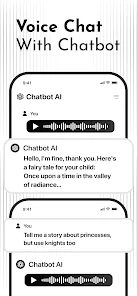
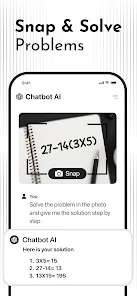
I've been messing around with Chatbot AI & Smart Assistant from Codespace Dijital, and honestly, it's one of those apps you download out of curiosity but end up keeping for the convenience. It's basically a general-purpose AI chatbot app on both Google Play and the App Store, designed for users who want quick answers, conversation practice, or just a bit of digital company. You can use it for trivia questions, help with writing emails, brainstorming ideas, or even casual chat when you're bored. When I first launched the app, the interface felt clean and approachable, not overwhelming like some other tools. It's free to download and install, though I noticed it has over 10 million installs on the Play Store. There were some optional in-app purchases and occasional ads, but nothing aggressive. My first impression? It felt like walking into a tidy room, easy to move around, no clutter.
After spending a few days with it, the hands-on experience was mostly smooth. The onboarding was short, just a quick intro and a request to enable notifications, which you can skip. The main chat window is basically a blank canvas where you type or use voice input. I found the voice recognition surprisingly decent, even with some background noise. Common tasks like asking for restaurant suggestions or drafting a quick reply to a friend worked fine. But there were moments when the bot would misunderstand a follow-up question or give a slightly off response, which made me rephrase things more than I'd like. Navigating between conversations felt intuitive, and I liked the “History” button for revisiting old chats. A small tip: if you want better results, be specific and try to avoid vague questions. The app also offers a few pre-made roleplay scenarios, which were fun for light entertainment but not life-changing. Overall, it does what you expect from a typical chatbot, but the experience isn't flawless.
After a week of use, I'd say this app is great for casual users who don't need ultra-specialized help, maybe someone wanting a more advanced Cleverbot or a lighter alternative to ChatGPT without the subscription. If you're a professional writer or researcher, you might feel limited because the depth just isn't there for complex topics. What sets it apart from similar apps is how fast and lightweight it feels; it doesn't hog your phone's resources. I'm keeping it installed because sometimes I just need a quick draft or a random fact without opening a browser. But I can see why someone might uninstall it after a few tries, especially if they expected deeper context awareness or fewer ads. It's a decent middle-ground app, not the best out there, not the worst either.
features
- 💬 Chat history that actually works; unlike some apps that lose your threads overnight, this one keeps everything organized under a History tab. You can scroll back days and pick up a conversation right where you left off, which is surprisingly rare for free bots.
- 🎙️ Voice input and output feel natural, way smoother than most chatbot apps like Replika or ChatGPT. The recognition handles accents fairly well, and the bot replies aloud if you want, making hands-free use a real option in the car or while cooking.
- 📝 Pre-made roleplay scenarios and prompts, which save you from staring at a blank screen. Compared to assistant bots like Google Assistant, this app actually tries to be creative, offering fictional conversations, character chats, or story starters. It's not deep, but it's playful.
pros
- 🚀 It's fast. Unlike ChatGPT's web version that sometimes takes a few seconds to respond, this app answers almost instantly, making chitchat feel more fluid and less like waiting for an email. It's great for impatient users like me.
- 🔋 Lightweight on resources. I've tried bots that drain battery or heat up the phone, but this one runs smoothly even on older devices. Compare it to Replika which tends to slow down after a few minutes, this is a breath of fresh air.
- 💰 Free core functionality. While many similar apps lock basic features behind paywalls, this one lets you chat endlessly without paying a cent. You only pay for extra flair like advanced voices or themes. It's a fair deal for budget users.
cons
- 🔄 Context gets lost easily. Unlike ChatGPT or Google Bard, which can remember a longer conversation thread, this bot often forgets what you just said three messages ago. You end up repeating yourself way too often, which breaks the flow.
- 📺 Ads interrupt too much. Compared to smaller apps that use subtle banners, this one hits you with full-screen video ads after every five or six exchanges. It's tolerable but can be annoying during a longer session.
- ℹ️ Accuracy is hit-and-miss. For factual queries like recent news or specific science details, it sometimes gives outdated or weird answers. Tools like Perplexity or Bing Chat are much better if you need reliable information on the fly.
Articles
![]()
Guide
How to Update Google Play Store on Android 2026
![]()
Guide
How to Download Older Versions of Android Apps
![]()
Guide
How to Download Apps Without Google Play Store
![]()
Guide
What Is an APK File for Android?
If you use an Android phone, you may have seen the term APK while searching for apps or games online. Some websites offer an APK download instead of a Google Play install button. Some users also mention APK files when talking about apps that are not available in their region, older app versions, or Android games downloaded outside the Play Store.
![]()
Guide
How to Install Games from Google Play for Beginners
Installing games on an Android phone is usually simple, but for beginners, the process can still feel confusing at first. You may not know where to search, which button to tap, whether the game is safe, or why Google Play sometimes asks for account settings, storage access, or payment information. If you are using an Android phone for the first time, learning how to install games from Google Play is one of the easiest ways to get started.
![]()
Guide
How Useful Gemini Is for Everyday Questions and Quick Tasks
emini feels different from many AI apps because it is not only trying to be a chatbot. After using it for everyday questions, quick writing, image understanding, and planning, I think its biggest strength is convenience.
![]()
Guide
What to Know Before Downloading APKs
For many Android users, downloading an APK is a common way to install apps and games. Sometimes an app is not available in a certain country.
![]()
Guide
ChatGPT Review: Is It Still the Best AI App in 2026?
![]()
Guide
Seedance 2.0 vs Sora: The Future of AI Video Generation
The AI video race has intensified dramatically over the past two years. Platforms like Sora from OpenAI and Luma Dream Machine pushed the boundaries of text-to-video realism. Yet, despite their impressive outputs, most tools still operate as probabilistic generators—you describe a scene, and the model interprets it. Control remains limited. With the February 2026 release of Seedance 2.0, developed by ByteDance, the paradigm shifted. Internally known as Jimeng 2.0, Seedance does not position itself as just another video model. It positions itself as an AI Director. Rather than guessing what you want, Seedance 2.0 allows you to direct what happens. This distinction defines everything that follows.









Recommended Apps
![]()
Home Design 3D
Anuman4.2
![]()
Truth or Dare Game - Party App
Chouic4.8
![]()
Photo Collage Maker
Scoompa4.7![]()
Learn to Draw Flower
Creative APPS4.2![]()
FIFA World Cup 2026™
FIFA2.8![]()
Mirror Plus: Mirror with Light
Digitalchemy, LLC4.4![]()
Meitu- Photo Editor & AI Art
Meitu (China) Limited4.5![]()
Perplexity - Ask Anything
PerplexityAI4.7![]()
GhostTube SLS Camera Alternate
GhostTube4![]()
Boom Chip Blast: 2-Player
Black Pyramid 3D Games Studio0![]()
Healthy Benefits+
Solutran, Inc.4.5![]()
Deepcheck AI Search Assistant
rohe.ai4![]()
Idol Prank Video Call & Chat
LightCode Solutions4![]()
Face Shape - Pretty Scale
GlintTec Apps3.9![]()
Plant App - Plant Identifier
ScaleUp4.6












































