

Find my Phone - Clap, Whistle

10M+
Installs
FunGear inc
Developer
-
Productivity
Category
-
Everyone
Content Rating
-
kimnv1205@gmail.com
Developer Email
-
https://wavez.vn/privacy-policy/
Privacy Policy
Screenshots

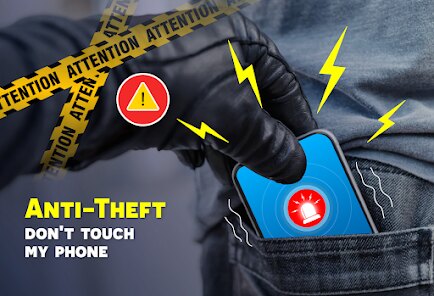

editor reviews
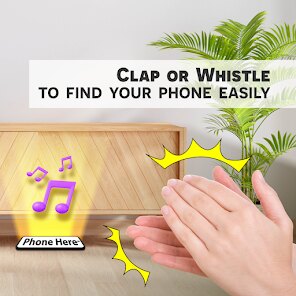
Find my Phone - Clap, Whistle is a utility app from FunGear Inc. that helps you locate your misplaced phone using sound or light. You basically clap, whistle, or shout, and if your phone hears it, it starts ringing or flashing - even if it's on silent. I downloaded it from the Play Store after the umpteenth time I lost my phone in the couch cushions. First impression? The interface is pretty straightforward: a big button to test the clap detection right away. No registration needed, it's free with some banner ads at the bottom, and it had around 10 million installs when I checked.
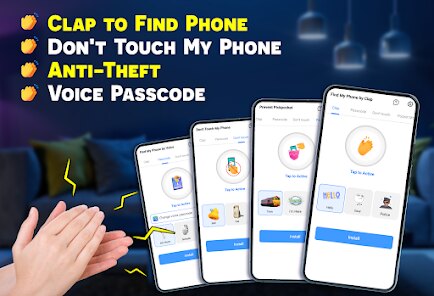
Once you open it, you're greeted by a simple dashboard showing the sensitivity slider and a list of trigger sounds. The onboarding takes maybe thirty seconds - just grant microphone permission and you're set. In daily use, you adjust the sensitivity so it doesn't go off every time someone sneezes nearby. I set mine to "high" for claps, and it worked fine in a quiet room, but in a noisy cafe, I had to whistle pretty loud. The main action is just leaving the app running in the background, and when you need to find your phone, you make the sound. One small tip: disable battery optimization for this app, or it might get killed by Android's doze mode.
After a week of using it, I'd say it's handy for people who frequently misplace their phone inside their home or office. But if you're someone who always knows where their phone is, you probably don't need it. Compared to apps like "Where's My Droid" which rely on sending an SMS command, this one is more immediate - no second device required. The downside? It drains a bit of battery since the microphone is always listening. I kept it installed because those moments of panic when your phone is on silent are real, but I can see someone uninstalling it if they find the constant mic access creepy or if it triggers accidentally too often. For a free app with no major strings attached, it does exactly what it promises.
features
- 🛠️ Clap detection works surprisingly well in quiet spaces, but I noticed it sometimes struggles in noisy environments where you'd think the mic would still catch the sharp sound. The sensitivity slider helps, but there's a trade-off between avoiding false alarms and missing actual claps.
- 🛠️ Whistle trigger is more reliable than I expected - it picks up a two-note whistle pattern better than a single loud whistle. This is where Find my Phone stands out compared to "Clap to Find My Phone" which only reacts to claps and often misinterprets loud music as a clap.
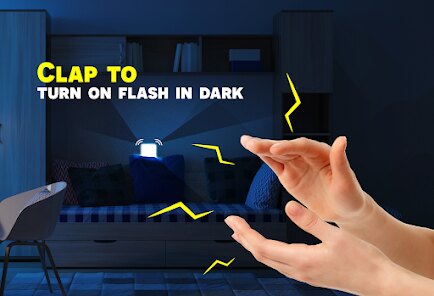
- 🛠️ Shouting detection is the weakest mode since it catches nearby chatter, but it works if you yell clearly. The real standout feature is the flashlight activation upon triggering - the phone both rings and flashes its LED, which is a lifesaver in dark rooms under furniture.
pros
- 👍 Hands-free activation is a big plus compared to apps like "Find My Phone - Clap Finder" which require you to tap a widget first. You can literally be in another room, clap, and your phone responds without touching anything.
- 👍 No sign-up or ads that interrupt usage - just the occasional banner at the bottom. Many similar utilities force you to watch a video ad before the ringtone plays, but this one stays out of your way.
- 👍 Battery drain is minimal if you tweak the settings - I lost maybe 3-4% extra per day, which is better than "Where's My Droid" that polls GPS constantly. It's a fair trade for the convenience.
cons
- 👎 Microphone permission is always on while the app is active, which makes some people uncomfortable. Apps like "Cerberus" offer a sound trigger that only activates after a missed call, which feels less intrusive.
- 👎 Sensitivity calibration can be hit or miss - at the medium setting, my phone ignored my claps twice but went off when a door slammed. "Clap to Find Phone" has a learning mode that adapts to your environment over time.
- 👎 Background service can get killed by aggressive battery optimizers on Samsung or Xiaomi phones. You have to manually whitelist it, while "Where's My Droid" uses a persistent notification that keeps the service alive more reliably.
- 👎 The app is useless if you lose your phone outside a quiet range since you need to be close enough for the mic to hear you. In a loud public space, you're better off with a remote finder app.
Articles
![]()
Guide
How to Update Google Play Store on Android 2026
![]()
Guide
How to Download Older Versions of Android Apps
![]()
Guide
How to Download Apps Without Google Play Store
![]()
Guide
What Is an APK File for Android?
If you use an Android phone, you may have seen the term APK while searching for apps or games online. Some websites offer an APK download instead of a Google Play install button. Some users also mention APK files when talking about apps that are not available in their region, older app versions, or Android games downloaded outside the Play Store.
![]()
Guide
How to Install Games from Google Play for Beginners
Installing games on an Android phone is usually simple, but for beginners, the process can still feel confusing at first. You may not know where to search, which button to tap, whether the game is safe, or why Google Play sometimes asks for account settings, storage access, or payment information. If you are using an Android phone for the first time, learning how to install games from Google Play is one of the easiest ways to get started.
![]()
Guide
How Useful Gemini Is for Everyday Questions and Quick Tasks
emini feels different from many AI apps because it is not only trying to be a chatbot. After using it for everyday questions, quick writing, image understanding, and planning, I think its biggest strength is convenience.
![]()
Guide
What to Know Before Downloading APKs
For many Android users, downloading an APK is a common way to install apps and games. Sometimes an app is not available in a certain country.
![]()
Guide
ChatGPT Review: Is It Still the Best AI App in 2026?
![]()
Guide
Seedance 2.0 vs Sora: The Future of AI Video Generation
The AI video race has intensified dramatically over the past two years. Platforms like Sora from OpenAI and Luma Dream Machine pushed the boundaries of text-to-video realism. Yet, despite their impressive outputs, most tools still operate as probabilistic generators—you describe a scene, and the model interprets it. Control remains limited. With the February 2026 release of Seedance 2.0, developed by ByteDance, the paradigm shifted. Internally known as Jimeng 2.0, Seedance does not position itself as just another video model. It positions itself as an AI Director. Rather than guessing what you want, Seedance 2.0 allows you to direct what happens. This distinction defines everything that follows.









Recommended Apps
![]()
Home Design 3D
Anuman4.2
![]()
Truth or Dare Game - Party App
Chouic4.8
![]()
Photo Collage Maker
Scoompa4.7![]()
Learn to Draw Flower
Creative APPS4.2![]()
FIFA World Cup 2026™
FIFA2.8![]()
Mirror Plus: Mirror with Light
Digitalchemy, LLC4.4![]()
Meitu- Photo Editor & AI Art
Meitu (China) Limited4.5![]()
Perplexity - Ask Anything
PerplexityAI4.7![]()
GhostTube SLS Camera Alternate
GhostTube4![]()
Boom Chip Blast: 2-Player
Black Pyramid 3D Games Studio0![]()
Healthy Benefits+
Solutran, Inc.4.5![]()
Deepcheck AI Search Assistant
rohe.ai4![]()
Idol Prank Video Call & Chat
LightCode Solutions4![]()
Face Shape - Pretty Scale
GlintTec Apps3.9![]()
Plant App - Plant Identifier
ScaleUp4.6











































