

Suno - AI Music & Songs Maker

10M+
Installs
Suno, Inc
Developer
-
Generative AI
Category
-
Teen
Content Rating
-
support@suno.com
Developer Email
-
https://suno.com/privacy
Privacy Policy
Screenshots


editor reviews
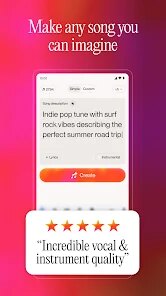
So I finally gave in and downloaded Suno, this AI music generator that everyone's been talking about on social media. It's basically one of those new wave creative apps where you type in a prompt and it spits out a full song with vocals, instruments, and everything. On Google Play it shows over 10 million downloads, and yeah, it's free to install, but you quickly realize you need credits to keep making songs unless you're patient with the daily free ones. First thing I noticed after launching it was how clean and almost too simple the interface looks. There's no tutorial popping up, just a big bar asking what kind of song you want. It feels exciting but also a little intimidating because you're not sure if the AI will actually understand your weird idea. No forced signup at first, which I liked, but eventually you'll want to create an account to save stuff.
Once you start using it, the experience is pretty smooth for the most part. You type in something like "upbeat synth pop about getting lost in a grocery store" and within like 30 seconds you get two versions to choose from. The interface lets you switch between instrumental and full vocal modes, which is neat. I found myself spending way too much time tweaking the genre tags and style prompts. The generated vocals can sound shockingly good one moment, then totally robotic the next. There's this weird thing where the AI sometimes mumbles words or invents lyrics that don't quite rhyme. But honestly, the first time you hear a song that actually sounds like a real track, it's kind of magical. You can extend songs, regenerate verses, and even influence the structure by describing intros or bridges. The free tier gives you like 5 credits a day, which runs out fast once you start experimenting with different styles.
After a couple weeks of using it, I'd say Suno is perfect if you're the type who loves messing around with creative ideas but has zero musical talent or patience for learning instruments. It's also great for making silly songs with friends or generating background music for videos. But if you're a serious musician looking for something to actually produce polished tracks, you'll probably get frustrated with the lack of control over details. Compared to something like Udio or AIVA, Suno feels more casual and fun-focused rather than production-ready. What keeps me coming back is that moment when the AI nails a vibe I couldn't have created myself. What makes me want to uninstall is the credit system that feels a bit stingy and the fact that songs can sound kind of samey after a while. It's a toy you'll love for a week, then maybe open once a month for a laugh.
features
- 🎵 Prompt-to-song generation – Unlike Amper Music which focuses on instrumental loops, Suno actually generates full songs with vocals, harmonies, and multiple instruments from just a text description. You type a few words about mood, genre, and topic, and within seconds the AI delivers two complete versions. It's wild how it can interpret abstract prompts like "chill lo-fi about rainy afternoons with a hint of 90s nostalgia" and turn that into something listenable.
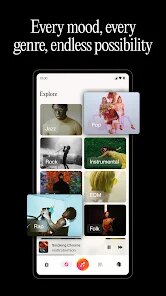
- 🎵 Style and genre tags – You can combine tags like "acoustic folk, female vocals, melancholic" or "heavy metal, double bass drums, aggressive" to steer the sound. This is way more flexible than tools like Soundraw that limit you to preset mood sliders. The AI actually understands genre conventions, so a jazz prompt gives you swung rhythms and brass sections.
- 🎵 Song extension and variation – After generating a song, you can extend it by adding new sections like a bridge or outro, or ask for alternative versions with different instrument focus. This iterative process makes the app feel more like a creative partner than a one-shot generator, which is something tools like Boomy don't offer as naturally.
pros
- 👍 Creative freedom for non-musicians – Unlike GarageBand or FL Studio which require actual music knowledge, Suno lets anyone create complete songs without touching a single instrument. You don't need to know chords, scales, or mixing. It's like having a whole band in your pocket that follows your descriptions.
- 👍 Speed of generation – Compared to Udio or MusicLM, Suno is noticeably faster. You get full song outputs in 30 seconds or less, which makes experimenting addictive. You can try 10 different prompts in 5 minutes, something that would take hours with real production.
- 👍 Vocal quality surprises – While not perfect, when Suno works well, the vocals sound remarkably human with emotion and breath control. Other AI music tools often produce robotic or garbled vocals. Suno has moments where you forget it's AI-generated.
cons
- 👎 Inconsistent vocal quality – Sometimes the vocals sound crisp and expressive, other times they mumble, stutter, or invent gibberish lyrics that don't match the prompt. Udio handles lyrical coherence better in my experience.
- 👎 Stingy free tier – You get only 5 credits per day, and each generation uses credit even if the song is terrible. AIVA and other tools offer more generous free trials or unlimited generations with limitations. It feels like you're constantly running out of tries.
- 👎 Lack of fine control – You can't edit individual tracks, adjust mixing levels, or fix specific notes. Garagaband or BandLab give you full hands-on control. Suno is all or nothing, which frustrates users who want to polish specific parts of the song.
Articles
![]()
Guide
How to Update Google Play Store on Android 2026
![]()
Guide
How to Download Older Versions of Android Apps
![]()
Guide
How to Download Apps Without Google Play Store
![]()
Guide
What Is an APK File for Android?
If you use an Android phone, you may have seen the term APK while searching for apps or games online. Some websites offer an APK download instead of a Google Play install button. Some users also mention APK files when talking about apps that are not available in their region, older app versions, or Android games downloaded outside the Play Store.
![]()
Guide
How to Install Games from Google Play for Beginners
Installing games on an Android phone is usually simple, but for beginners, the process can still feel confusing at first. You may not know where to search, which button to tap, whether the game is safe, or why Google Play sometimes asks for account settings, storage access, or payment information. If you are using an Android phone for the first time, learning how to install games from Google Play is one of the easiest ways to get started.
![]()
Guide
How Useful Gemini Is for Everyday Questions and Quick Tasks
emini feels different from many AI apps because it is not only trying to be a chatbot. After using it for everyday questions, quick writing, image understanding, and planning, I think its biggest strength is convenience.
![]()
Guide
What to Know Before Downloading APKs
For many Android users, downloading an APK is a common way to install apps and games. Sometimes an app is not available in a certain country.
![]()
Guide
ChatGPT Review: Is It Still the Best AI App in 2026?
![]()
Guide
Seedance 2.0 vs Sora: The Future of AI Video Generation
The AI video race has intensified dramatically over the past two years. Platforms like Sora from OpenAI and Luma Dream Machine pushed the boundaries of text-to-video realism. Yet, despite their impressive outputs, most tools still operate as probabilistic generators—you describe a scene, and the model interprets it. Control remains limited. With the February 2026 release of Seedance 2.0, developed by ByteDance, the paradigm shifted. Internally known as Jimeng 2.0, Seedance does not position itself as just another video model. It positions itself as an AI Director. Rather than guessing what you want, Seedance 2.0 allows you to direct what happens. This distinction defines everything that follows.









Recommended Apps
![]()
Home Design 3D
Anuman4.2
![]()
Truth or Dare Game - Party App
Chouic4.8
![]()
Photo Collage Maker
Scoompa4.7![]()
Learn to Draw Flower
Creative APPS4.2![]()
FIFA World Cup 2026™
FIFA2.8![]()
Mirror Plus: Mirror with Light
Digitalchemy, LLC4.4![]()
Meitu- Photo Editor & AI Art
Meitu (China) Limited4.5![]()
Perplexity - Ask Anything
PerplexityAI4.7![]()
GhostTube SLS Camera Alternate
GhostTube4![]()
Boom Chip Blast: 2-Player
Black Pyramid 3D Games Studio0![]()
Healthy Benefits+
Solutran, Inc.4.5![]()
Deepcheck AI Search Assistant
rohe.ai4![]()
Idol Prank Video Call & Chat
LightCode Solutions4![]()
Face Shape - Pretty Scale
GlintTec Apps3.9![]()
Plant App - Plant Identifier
ScaleUp4.6












































