

Moblo - 3D furniture modeling

1M+
Installs
MYTIforge
Developer
-
Art & Design
Category
-
Everyone
Content Rating
-
support@moblo3d.app
Developer Email
-
https://www.moblo3d.app/
Privacy Policy
Screenshots
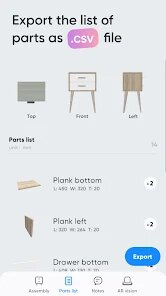
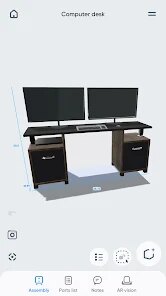
editor reviews
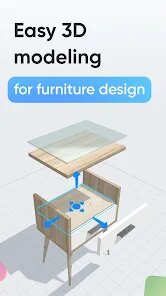
I first came across Moblo while browsing for furniture design tools on Google Play. It's a 3D modeling app specifically for interior planning and furniture creation, which puts it in the niche of home design apps. Unlike something like SketchUp or general 3D editors, Moblo focuses entirely on making furniture — you can build custom tables, shelves, beds, or even room layouts from scratch. The app is free to download, though there are in-app purchases for extra features, and from what I saw, it has around 50,000+ installs. When I launched it for the first time, the interface felt surprisingly clean for a mobile 3D tool. No forced account registration popped up immediately, which I appreciated. The initial impression was that it's aiming for casual users who want to visualize furniture without dealing with overly complex CAD software.
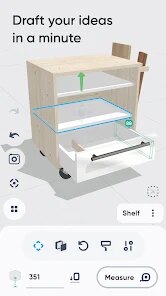
After opening a new project, I was greeted with a basic 3D workspace and a toolbar at the bottom. The onboarding is minimal — there's no long tutorial, just a few tooltips. I started by selecting a cube shape, then resized it to mimic a small side table. The pinch-to-zoom and rotate gestures responded smoothly, though I did have to get used to the snap-to-grid behavior. The main actions involve picking shapes, adjusting dimensions, and applying materials like wood or metal. Adding legs to the table meant stacking cylinders, which worked but took a few tries to align properly. One small tip I picked up: use the color swatches early to differentiate parts, or you'll end up with a gray mess. Daily usage would probably involve a lot of trial and error with positioning, since the dragging isn't always precise on a phone screen.
After spending about an hour with Moblo, I can see why someone into DIY furniture or interior design would enjoy it. It's much more accessible than something like Blender or Fusion 360 for mobile, but it also lacks the polish of a dedicated PC tool like SketchUp Free. The standout difference is how it simplifies 3D creation into bite-sized steps — you don't need to learn complex terminology. That said, if you're looking for realistic room rendering or advanced lighting, this app won't satisfy you. I'd probably keep it installed if I were planning a custom bookshelf, but for general room planning, I'd lean toward apps like Planner 5D. It's a decent middle ground for hobbyists who want to sketch furniture ideas on the go without committing to a subscription.
features
- 🛋️ Moblo lets you build furniture piece by piece using basic shapes, which feels more like digital woodworking than what you get in Room Planner or MagicPlan. Those apps focus on scanning rooms, while Moblo pushes you to create from zero.
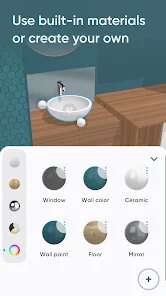
- 🛋️ The material library includes realistic textures like oak, steel, and fabric, which you can apply with a single tap. In comparison, SketchUp's free version has a bigger library but requires more effort to navigate on mobile.
- 🛋️ You can export your model as an OBJ file for 3D printing, which is rare among casual design apps. Apps like Homestyler don't offer this at all, making Moblo a practical choice for hobbyists who want to print their own furniture.
pros
- 👍 Moblo is free to start, unlike SketchUp Free which limits cloud storage unless you pay. You can build and export without hitting a paywall early on.
- 👍 The learning curve is gentle. Where apps like Shapr3D demand a stylus and prior CAD experience, Moblo works fine with just your finger on a phone.
- 👍 Offline functionality matters. While Planner 5D requires an internet connection for most features, Moblo lets you model anywhere — even on a bus.
cons
- 👎 The precision tools are lacking. In apps like Onshape, you can input exact millimeter values, but Moblo only offers sliders and drag controls, so accuracy suffers.
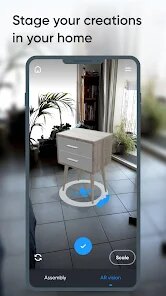
- 👎 No native room scanning. Apps like MagicPlan let you map a real room with your camera, but Moblo forces you to guess dimensions manually.
- 👎 The undo button sometimes skips several steps at once. Compared to the smooth history in SketchUp, Moblo's undo feels unpredictable when you make a mistake.
- 👎 Material application is limited per face. You can't assign different textures to separate sides of a cube easily, which feels restrictive if you're used to blender's options.
Articles
![]()
Guide
How to Update Google Play Store on Android 2026
![]()
Guide
How to Download Older Versions of Android Apps
![]()
Guide
How to Download Apps Without Google Play Store
![]()
Guide
What Is an APK File for Android?
If you use an Android phone, you may have seen the term APK while searching for apps or games online. Some websites offer an APK download instead of a Google Play install button. Some users also mention APK files when talking about apps that are not available in their region, older app versions, or Android games downloaded outside the Play Store.
![]()
Guide
How to Install Games from Google Play for Beginners
Installing games on an Android phone is usually simple, but for beginners, the process can still feel confusing at first. You may not know where to search, which button to tap, whether the game is safe, or why Google Play sometimes asks for account settings, storage access, or payment information. If you are using an Android phone for the first time, learning how to install games from Google Play is one of the easiest ways to get started.
![]()
Guide
How Useful Gemini Is for Everyday Questions and Quick Tasks
emini feels different from many AI apps because it is not only trying to be a chatbot. After using it for everyday questions, quick writing, image understanding, and planning, I think its biggest strength is convenience.
![]()
Guide
What to Know Before Downloading APKs
For many Android users, downloading an APK is a common way to install apps and games. Sometimes an app is not available in a certain country.
![]()
Guide
ChatGPT Review: Is It Still the Best AI App in 2026?
![]()
Guide
Seedance 2.0 vs Sora: The Future of AI Video Generation
The AI video race has intensified dramatically over the past two years. Platforms like Sora from OpenAI and Luma Dream Machine pushed the boundaries of text-to-video realism. Yet, despite their impressive outputs, most tools still operate as probabilistic generators—you describe a scene, and the model interprets it. Control remains limited. With the February 2026 release of Seedance 2.0, developed by ByteDance, the paradigm shifted. Internally known as Jimeng 2.0, Seedance does not position itself as just another video model. It positions itself as an AI Director. Rather than guessing what you want, Seedance 2.0 allows you to direct what happens. This distinction defines everything that follows.









Recommended Apps
![]()
Home Design 3D
Anuman4.2
![]()
Truth or Dare Game - Party App
Chouic4.8
![]()
Photo Collage Maker
Scoompa4.7![]()
Learn to Draw Flower
Creative APPS4.2![]()
FIFA World Cup 2026™
FIFA2.8![]()
Mirror Plus: Mirror with Light
Digitalchemy, LLC4.4![]()
Meitu- Photo Editor & AI Art
Meitu (China) Limited4.5![]()
Perplexity - Ask Anything
PerplexityAI4.7![]()
GhostTube SLS Camera Alternate
GhostTube4![]()
Boom Chip Blast: 2-Player
Black Pyramid 3D Games Studio0![]()
Healthy Benefits+
Solutran, Inc.4.5![]()
Deepcheck AI Search Assistant
rohe.ai4![]()
Idol Prank Video Call & Chat
LightCode Solutions4![]()
Face Shape - Pretty Scale
GlintTec Apps3.9![]()
Plant App - Plant Identifier
ScaleUp4.6











































