
Kpop Demon Draw and Coloring

1K+
Installs
Youssoft LTD
Developer
-
Art & Design
Category
-
Everyone
Content Rating
-
admin@youssoft.net
Developer Email
-
https://mobydrop.com/privarcypolicy.html
Privacy Policy
Screenshots
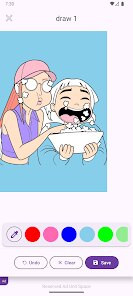
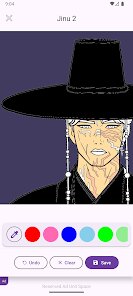
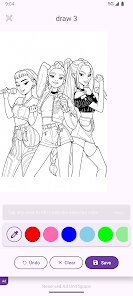
editor reviews
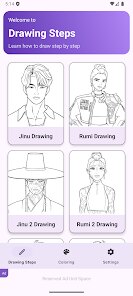
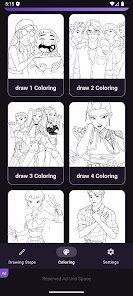
Kpop Demon Draw and Coloring is a digital coloring book app built specifically for fans of K-pop, particularly those who enjoy the darker, more edgy fantasy aesthetics often associated with certain groups and concepts. Instead of a generic art app, it falls into the niche of fandom-focused creative tools. When you first download and install it from Google Play or the App Store, the initial impression is that it's a straightforward, free-to-use app with optional in-app purchases for additional content packs. The launch screen is simple, and you can start coloring immediately without needing to register or sign up, which is a big plus. You'll see a grid of demon-inspired K-pop character line art, ready to be filled in. It feels like a treat for anyone who loves both coloring for relaxation and their favorite idols, though the art style leans very specific, not for everyone.
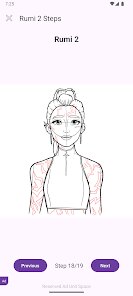
After you open the app, the actual hands-on experience is surprisingly simple. The interface is clean and uncluttered. You pick a picture from the gallery, and you are taken to a full-screen coloring canvas. The tools are basic but effective: a range of solid colors, a few gradient options, a paint bucket for filling large areas, and a brush for details. Onboarding is almost nonexistent, but you really don't need a tutorial. You just tap a color and tap the area you want to fill. For daily use, I found myself picking a drawing and spending 10–15 minutes filling in the line art while listening to music. The app is smooth and responsive, no lag when zooming into intricate parts. A small practical tip: the undo button is your best friend for fixing a color spill. The only slightly confusing moment was figuring out that the color palette is limited unless you buy the premium packs. It feels complete for casual fun but limited for serious artists.
After using Kpop Demon Draw and Coloring for a while, I have a mixed personal take. It is genuinely enjoyable if you are a hardcore fan who loves the specific demon-inspired K-pop aesthetic and just wants to unwind. The art is detailed and captures the vibe well. However, if you are looking for a full-featured coloring app with endless possibilities, like Pigment or Colorfy, this feels barebones. The main difference is its focused theme, which is both its charm and its weakness. Someone who is not into that specific dark K-pop look will likely uninstall it quickly after seeing the limited image library and color options. I kept it installed because I enjoy the niche theme for quick relaxation sessions, but I can see many users getting bored once they color all the free pictures. The in-app purchases for more images feel a bit pricey for what you get, so it is a tough sell unless you are truly dedicated.
features
- 🖌️ The core feature is the curated line art: each drawing features K-pop characters with demon horns, wings, and dark accessories. Unlike generic coloring apps like Colorfy, which offer everything from mandalas to animals, this app is laser-focused on one specific aesthetic. This makes it perfect for fans of that style, but also means the selection is niche and limited compared to broader apps.
- 🖌️ The coloring tools are intentionally basic. You get a paint bucket, a brush, and a color picker with solid and gradient fills. There is no layering, blending, or advanced brush customization. This makes the app incredibly easy to pick up and use for a quick 5-minute session, unlike Procreate which is powerful but requires learning. It is a trade-off between simplicity and depth.
- 🖌️ The app offers a small set of free images and then locks the rest behind a paywall. Each pack costs a small fee to unlock. In contrast, apps like Happy Color give you a huge library of free daily images. The business model here feels like a bait-and-switch because after coloring the few free ones, you are immediately asked to pay for more, which can be frustrating for casual users.
pros
- 👍 Its biggest strength is the highly specific and well-drawn art style. If you love the dark fantasy K-pop concept (think Dreamcatcher or ATEEZ's darker eras), you won't find this exact aesthetic in other coloring apps like Pigment or Recolor. The line art is clean and captures the vibe perfectly, making each finished piece feel rewarding.
- 👍 The app is extremely easy to use with zero learning curve. You open it and color immediately. No ads interrupt your session, which is a huge plus compared to many free coloring apps that show a video ad after every fill. This makes it a relaxing, distraction-free experience.
- 👍 The offline functionality is a hidden strength. You can download the images and color without an internet connection. This is great for commutes or travel, something that apps like Colorfy sometimes struggle with as they require online verification for their image packs.
cons
- 👎 The most obvious weakness is the very limited free content. You can finish all free images in one sitting. After that, you have to pay for packs that are not cheap. Compared to apps like Happy Color which give you hundreds of free images daily with ads, this feels stingy and might drive casual users away immediately.
- 👎 There is no community or sharing feature built into the app. You cannot easily share your finished artwork within the app or see what others have created. Apps like Recolor have strong social features where you can follow artists and get inspired. Here, you color alone, which feels a bit isolating.
- 👎 The color palette is very small unless you buy the premium palettes. The basic palette only offers around 20 colors. For any serious color blending or shading, you will be frustrated. Pigment offers a massive color wheel and custom color creation for free, making this app feel restrictive for anyone wanting more creative control.
Articles
![]()
Guide
How to Update Google Play Store on Android 2026
![]()
Guide
How to Download Older Versions of Android Apps
![]()
Guide
How to Download Apps Without Google Play Store
![]()
Guide
What Is an APK File for Android?
If you use an Android phone, you may have seen the term APK while searching for apps or games online. Some websites offer an APK download instead of a Google Play install button. Some users also mention APK files when talking about apps that are not available in their region, older app versions, or Android games downloaded outside the Play Store.
![]()
Guide
How to Install Games from Google Play for Beginners
Installing games on an Android phone is usually simple, but for beginners, the process can still feel confusing at first. You may not know where to search, which button to tap, whether the game is safe, or why Google Play sometimes asks for account settings, storage access, or payment information. If you are using an Android phone for the first time, learning how to install games from Google Play is one of the easiest ways to get started.
![]()
Guide
How Useful Gemini Is for Everyday Questions and Quick Tasks
emini feels different from many AI apps because it is not only trying to be a chatbot. After using it for everyday questions, quick writing, image understanding, and planning, I think its biggest strength is convenience.
![]()
Guide
What to Know Before Downloading APKs
For many Android users, downloading an APK is a common way to install apps and games. Sometimes an app is not available in a certain country.
![]()
Guide
ChatGPT Review: Is It Still the Best AI App in 2026?
![]()
Guide
Seedance 2.0 vs Sora: The Future of AI Video Generation
The AI video race has intensified dramatically over the past two years. Platforms like Sora from OpenAI and Luma Dream Machine pushed the boundaries of text-to-video realism. Yet, despite their impressive outputs, most tools still operate as probabilistic generators—you describe a scene, and the model interprets it. Control remains limited. With the February 2026 release of Seedance 2.0, developed by ByteDance, the paradigm shifted. Internally known as Jimeng 2.0, Seedance does not position itself as just another video model. It positions itself as an AI Director. Rather than guessing what you want, Seedance 2.0 allows you to direct what happens. This distinction defines everything that follows.









Recommended Apps
![]()
Home Design 3D
Anuman4.2
![]()
Truth or Dare Game - Party App
Chouic4.8
![]()
Photo Collage Maker
Scoompa4.7![]()
Learn to Draw Flower
Creative APPS4.2![]()
FIFA World Cup 2026™
FIFA2.8![]()
Mirror Plus: Mirror with Light
Digitalchemy, LLC4.4![]()
Meitu- Photo Editor & AI Art
Meitu (China) Limited4.5![]()
Perplexity - Ask Anything
PerplexityAI4.7![]()
GhostTube SLS Camera Alternate
GhostTube4![]()
Boom Chip Blast: 2-Player
Black Pyramid 3D Games Studio0![]()
Healthy Benefits+
Solutran, Inc.4.5![]()
Deepcheck AI Search Assistant
rohe.ai4![]()
Idol Prank Video Call & Chat
LightCode Solutions4![]()
Face Shape - Pretty Scale
GlintTec Apps3.9![]()
Plant App - Plant Identifier
ScaleUp4.6












































