

Crafto

50M+
Installs
Kutumb App
Developer
-
Art & Design
Category
-
Everyone
Content Rating
-
support@crafto.app
Developer Email
-
https://primetrace.com/crafto-privacy-policy
Privacy Policy
Screenshots

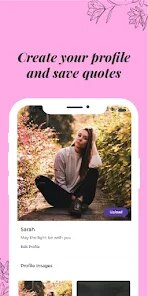

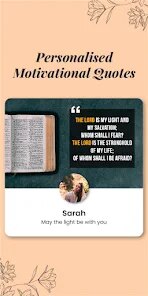
editor reviews
Crafto is a digital content creation and editing app available on both the Google Play Store and Apple's App Store. It primarily belongs to the photo and video editing category, but it also includes tools for making posters, banners, and social media graphics. Users mainly turn to Crafto when they need to quickly put together eye-catching visuals without opening heavy desktop software. I first came across it while looking for a lightweight alternative to full-featured editors, and the install count seemed decent, though I don't recall the exact number. Downloading it was free, and after launching the app, the initial impression was that the interface looked clean but a bit crowded with templates. There's no forced registration right away, which I appreciated, though some in-app purchases and occasional ads pop up after you start using it.
Once you start working with Crafto, the hands-on experience is mostly straightforward. The onboarding screen shows a quick walkthrough of the main sections: Edit Photo, Design Poster, and Video Maker. I began by tapping “Edit Photo” and uploading an image from my gallery. The editing tools are laid out in a bottom toolbar, and you adjust brightness, contrast, or saturation by sliding your finger across the screen. It felt smooth, though I did get confused for a second when I tried to crop the image — the crop icon looked more like a rotate icon. A small practical tip: if you double-tap any adjustment slider, it resets to default, which saved me from messing up my edits. The sticker and text options are fun for casual projects, but loading a few stickers caused a slight lag on my older phone.
After spending a few days with Crafto, I think it's best suited for people who need quick edits on the go — students making project posters, small business owners creating promotional posts, or anyone who just wants to add filters and text without learning layers and masks. If you're a serious photographer or designer, you'll likely find it limiting because you can't do precise selections or curve adjustments. Compared to apps like Canva, Crafto feels faster to launch but has a much smaller library of templates and fonts. What made me keep it installed was the no-registration start and the fact that it doesn't demand huge storage space. Still, the ads can be annoying, and I can see myself uninstalling it if I ever need more advanced tools.
features
- 🎨 One-tap background removal – Crafto lets you remove the background from any photo with a single tap. In PicCollage, you have to manually outline the subject, which takes more time. I tested it on a photo of my cat, and the edges came out surprisingly clean, even around stray fur.
- 🎨 Built-in meme generator – Unlike Canva, which requires you to select a blank canvas and manually add text boxes, Crafto has a dedicated meme mode that automatically formats the top and bottom text. This makes creating reaction memes nearly instant.
- 🎨 Offline sticker pack – Many editing apps stream stickers from the cloud, but Crafto includes a solid set of offline stickers. This was helpful when I was on the subway with no signal, and I could still add cat ears and sunglasses to a friend's photo without waiting.
- 🎨 Quick collage templates – The collage feature offers over 50 grid layouts, and you can swap images by dragging them to a new slot. In Adobe Express, rearranging images feels clunky, but here it's as simple as pinch and drop.
pros
- ✅ No account needed to start – Right after installing, you can start editing without signing up. Canva pushes you to create an account immediately, which always annoyed me. Crafto respects your time by letting you jump straight into the tools.
- ✅ Lightweight and fast – The app takes up less than 100 MB on my phone, and it opens faster than PicsArt. I used it on a budget Android and didn't experience major crashes, which made it a reliable choice for quick edits.
- ✅ Clean export options – You can export images as JPG or PNG, and videos as MP4 without a watermark on the free version. Many free editors, like InShot, force a watermark unless you pay, but Crafto keeps the output clean for standard use.
cons
- ❌ Limited font selection – Crafto only offers about 30 fonts, and most of them are basic sans-serif styles. Canva has hundreds of fonts, so if you want unique typography, you'll have to bring your own or look elsewhere.
- ❌ No layer system – You can't move elements forward or backward like in Photoshop Express. I tried to overlay text on a sticker, and it just stayed behind it with no way to adjust the stacking order, which was frustrating.
- ❌ Ads appear too often – Every time you go back to the main menu, a full-screen ad plays. PicCollage also has ads, but they're usually less frequent and skipable after five seconds. Crafto's ads feel more intrusive in daily use.
- ❌ Video editing is basic – You can only trim and add music to videos. There's no option for transitions, speed control, or text overlays on clips. CapCut offers all of those for free, so Crafto's video side feels underdeveloped.
Articles
![]()
Guide
How to Update Google Play Store on Android 2026
![]()
Guide
How to Download Older Versions of Android Apps
![]()
Guide
How to Download Apps Without Google Play Store
![]()
Guide
What Is an APK File for Android?
If you use an Android phone, you may have seen the term APK while searching for apps or games online. Some websites offer an APK download instead of a Google Play install button. Some users also mention APK files when talking about apps that are not available in their region, older app versions, or Android games downloaded outside the Play Store.
![]()
Guide
How to Install Games from Google Play for Beginners
Installing games on an Android phone is usually simple, but for beginners, the process can still feel confusing at first. You may not know where to search, which button to tap, whether the game is safe, or why Google Play sometimes asks for account settings, storage access, or payment information. If you are using an Android phone for the first time, learning how to install games from Google Play is one of the easiest ways to get started.
![]()
Guide
How Useful Gemini Is for Everyday Questions and Quick Tasks
emini feels different from many AI apps because it is not only trying to be a chatbot. After using it for everyday questions, quick writing, image understanding, and planning, I think its biggest strength is convenience.
![]()
Guide
What to Know Before Downloading APKs
For many Android users, downloading an APK is a common way to install apps and games. Sometimes an app is not available in a certain country.
![]()
Guide
ChatGPT Review: Is It Still the Best AI App in 2026?
![]()
Guide
Seedance 2.0 vs Sora: The Future of AI Video Generation
The AI video race has intensified dramatically over the past two years. Platforms like Sora from OpenAI and Luma Dream Machine pushed the boundaries of text-to-video realism. Yet, despite their impressive outputs, most tools still operate as probabilistic generators—you describe a scene, and the model interprets it. Control remains limited. With the February 2026 release of Seedance 2.0, developed by ByteDance, the paradigm shifted. Internally known as Jimeng 2.0, Seedance does not position itself as just another video model. It positions itself as an AI Director. Rather than guessing what you want, Seedance 2.0 allows you to direct what happens. This distinction defines everything that follows.









Recommended Apps
![]()
Home Design 3D
Anuman4.2
![]()
Truth or Dare Game - Party App
Chouic4.8
![]()
Photo Collage Maker
Scoompa4.7![]()
Learn to Draw Flower
Creative APPS4.2![]()
FIFA World Cup 2026™
FIFA2.8![]()
Mirror Plus: Mirror with Light
Digitalchemy, LLC4.4![]()
Meitu- Photo Editor & AI Art
Meitu (China) Limited4.5![]()
Perplexity - Ask Anything
PerplexityAI4.7![]()
GhostTube SLS Camera Alternate
GhostTube4![]()
Boom Chip Blast: 2-Player
Black Pyramid 3D Games Studio0![]()
Healthy Benefits+
Solutran, Inc.4.5![]()
Deepcheck AI Search Assistant
rohe.ai4![]()
Idol Prank Video Call & Chat
LightCode Solutions4![]()
Face Shape - Pretty Scale
GlintTec Apps3.9![]()
Plant App - Plant Identifier
ScaleUp4.6












































