
AR Draw Sketch - Trace & Paint

5K+
Installs
MØ Studios
Developer
-
Art & Design
Category
-
Everyone
Content Rating
-
mostudios7@gmail.com
Developer Email
-
https://sites.google.com/view/mostudios/privacy-policy
Privacy Policy
Screenshots
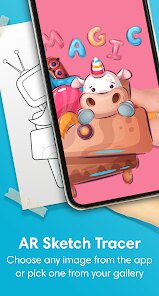
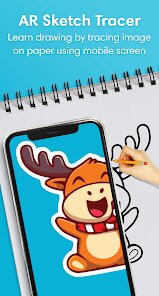
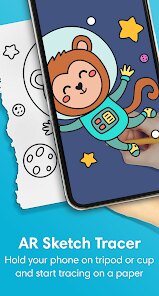
editor reviews
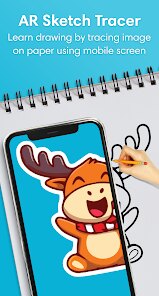
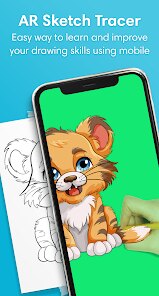
So, AR Draw Sketch - Trace & Paint is one of those apps that uses your phone's camera to help you draw. It's basically a tracing tool, but not in the old-school way with paper and a lightbox. You pick an image from their library or upload your own, the app puts it on your screen, and you can see the outline through your paper. It's meant for people who want to learn to draw or just need a hand getting proportions right. I downloaded it because I saw someone online using it to make a pretty decent portrait, and I figured it was worth a shot. As soon as I opened it, I got a clean, straightforward layout without too many pop-ups, which was a relief. It's free to install, and I think it's pretty popular on the Play Store, given the download count, but I did notice there's a premium version hidden in the menus.
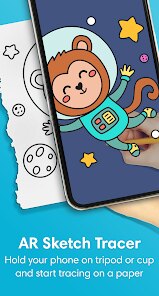
The real experience starts when you actually try to trace something. You prop your phone up on a stand or a stack of books, lay your paper over it, and the app projects the image onto the screen. The calibration part threw me off at first. You have to adjust the brightness and lock the image so it doesn't move when you breathe. Once I figured that out, it became smooth. I picked a simple flower, set the opacity just right, and started tracing. The app doesn't lag much, and the interface is minimal, which is good because you're not trying to fiddle with menus while holding a pencil. One thing I liked was that you can adjust the image size and rotation directly on the screen with your fingers, so you don't have to move the phone around as much. It's not perfect for complex images with lots of details, but for basic shapes and outlines, it works surprisingly well.
After using it for a week, I think this app fills a specific niche. If you're a total beginner who wants to get over the fear of a blank page, or if you're someone who just wants to make custom greeting cards or wall art without much fuss, it's a solid tool. But if you're already comfortable with freehand drawing, you might find it more limiting than helpful. Compared to something like using a real lightbox or even a basic drawing app on a tablet, AR Draw Sketch is more of a crutch than a creative tool. The main reason I keep it installed is for the occasional project where accuracy matters, like tracing a logo or a complicated lettering style. But I could also see someone uninstalling it quickly if they find the setup annoying or if they just don't want to rely on tracing to make art.
features
- 🖼️ Image tracing through the camera is the core trick. You place your paper over the phone, and the app overlays the reference image, letting you see the lines as you draw. It's a clean, direct way to learn proportions without needing an expensive projector or tablet.
- 🖱️ The interface stays out of your way once you start drawing. There are no floating buttons or distracting menus when you're in trace mode. This is a big deal because the biggest problem with other trace apps like "SketchAR" is that they clutter the screen with ads and settings you have to close first.
- 📏 You can tweak the reference image's size, rotation, and opacity with simple pinch and swipe gestures. This flexibility means you're not locked into the original image's layout, which helps when you want to fit a drawing into a specific area of your paper. This is something "Drawing Desk" lacks unless you pay for it.
pros
- 👍 The app is genuinely beginner-friendly. You don't need any drawing background to get a usable result on your first try. That's more than I can say for "Learn to Draw" apps that just give you step-by-step tutorials without real tracing support.
- 👍 It works with any image from your gallery, not just pre-loaded ones. This is great for personal projects like tracing family photos or custom logos. Other apps like "Trace Table" often restrict you to their own limited library unless you upgrade.
- 👍 The brightness adjustment is actually good. You can dim the image to match the lighting in your room, which prevents eye strain and makes the lines easier to see through normal printer paper. "Paper by WeTransfer" doesn't even offer this feature.
cons
- 👎 The calibration process is finicky. You have to lock the image in place perfectly, and if you bump the phone even slightly, the whole setup goes out of alignment. "SketchAR" handles this more smoothly with a lock screen mode that's harder to accidentally break.
- 👎 It drains your battery fast. Keeping the camera and screen on at high brightness for tracing kills your phone's charge. A real lightbox or even a tablet with a drawing app like "Procreate" doesn't have this problem.
- 👎 It doesn't handle complex images well. Detailed portraits or busy scenes become a messy blur on the screen, and the app doesn't have a way to simplify the outlines. "Da Vinci Eye" does a better job at converting photos into clean line art automatically.
Articles
![]()
Guide
How to Update Google Play Store on Android 2026
![]()
Guide
How to Download Older Versions of Android Apps
![]()
Guide
How to Download Apps Without Google Play Store
![]()
Guide
What Is an APK File for Android?
If you use an Android phone, you may have seen the term APK while searching for apps or games online. Some websites offer an APK download instead of a Google Play install button. Some users also mention APK files when talking about apps that are not available in their region, older app versions, or Android games downloaded outside the Play Store.
![]()
Guide
How to Install Games from Google Play for Beginners
Installing games on an Android phone is usually simple, but for beginners, the process can still feel confusing at first. You may not know where to search, which button to tap, whether the game is safe, or why Google Play sometimes asks for account settings, storage access, or payment information. If you are using an Android phone for the first time, learning how to install games from Google Play is one of the easiest ways to get started.
![]()
Guide
How Useful Gemini Is for Everyday Questions and Quick Tasks
emini feels different from many AI apps because it is not only trying to be a chatbot. After using it for everyday questions, quick writing, image understanding, and planning, I think its biggest strength is convenience.
![]()
Guide
What to Know Before Downloading APKs
For many Android users, downloading an APK is a common way to install apps and games. Sometimes an app is not available in a certain country.
![]()
Guide
ChatGPT Review: Is It Still the Best AI App in 2026?
![]()
Guide
Seedance 2.0 vs Sora: The Future of AI Video Generation
The AI video race has intensified dramatically over the past two years. Platforms like Sora from OpenAI and Luma Dream Machine pushed the boundaries of text-to-video realism. Yet, despite their impressive outputs, most tools still operate as probabilistic generators—you describe a scene, and the model interprets it. Control remains limited. With the February 2026 release of Seedance 2.0, developed by ByteDance, the paradigm shifted. Internally known as Jimeng 2.0, Seedance does not position itself as just another video model. It positions itself as an AI Director. Rather than guessing what you want, Seedance 2.0 allows you to direct what happens. This distinction defines everything that follows.









Recommended Apps
![]()
Home Design 3D
Anuman4.2
![]()
Truth or Dare Game - Party App
Chouic4.8
![]()
Photo Collage Maker
Scoompa4.7![]()
Learn to Draw Flower
Creative APPS4.2![]()
FIFA World Cup 2026™
FIFA2.8![]()
Mirror Plus: Mirror with Light
Digitalchemy, LLC4.4![]()
Meitu- Photo Editor & AI Art
Meitu (China) Limited4.5![]()
Perplexity - Ask Anything
PerplexityAI4.7![]()
GhostTube SLS Camera Alternate
GhostTube4![]()
Boom Chip Blast: 2-Player
Black Pyramid 3D Games Studio0![]()
Healthy Benefits+
Solutran, Inc.4.5![]()
Deepcheck AI Search Assistant
rohe.ai4![]()
Idol Prank Video Call & Chat
LightCode Solutions4![]()
Face Shape - Pretty Scale
GlintTec Apps3.9![]()
Plant App - Plant Identifier
ScaleUp4.6












































