

iCut: Video Editor & Maker

500K+
Installs
iCut -Video Editor & Video Maker App
Developer
-
Video Players & Editors
Category
-
Everyone
Content Rating
-
team@icutservice.com
Developer Email
-
https://www.icut.studio/about/privacy.html?lang=en
Privacy Policy
Screenshots
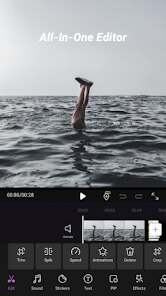
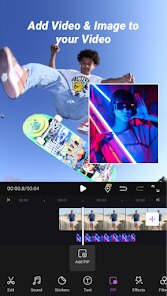

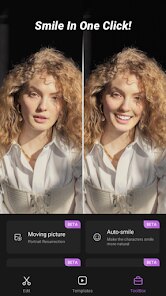
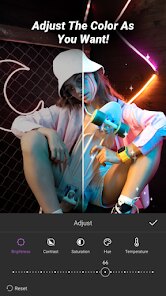
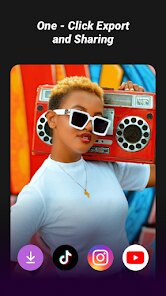
editor reviews
iCut is a mobile video editing app that focuses on making the editing process quick and straightforward, particularly for users who want to create content for social media. It falls under the category of casual video editors and is aimed at people who don't need professional-grade tools but still want polished results. The main draw for a typical user is the promise of cutting, trimming, merging clips, and adding music or effects without a steep learning curve. After downloading it from the Play Store, where it has a decent install count and is free to download, the first impression is a clean, dark-themed interface that immediately presents a "New Project" button. The launch is fast, and there's no mandatory registration, which is a big plus. You can start editing right away, though there are some in-app purchases for premium features and the occasional ad that pops up after exporting a video.
Once you start using iCut, the hands-on experience is mostly smooth. The onboarding process is minimal; you tap "New Project," select your video clips from your gallery, and you're dropped into a timeline that looks familiar if you've used any editor before. The interface is intuitive for basic tasks—cutting a video is as easy as dragging the edge of a clip or using the split tool. Adding background music is straightforward, as the app provides a small library of free tracks and lets you import your own. A practical tip I found is that the app handles multiple layers of audio well, allowing you to lower the original video volume without it sounding robotic. However, there are moments of confusion, like when you try to apply transitions; the app sometimes lags briefly before previewing the effect. The export button is prominent, and it renders videos relatively quickly, which is a relief for impatient users like me.
After using iCut for a while, I'd say it's a solid choice for casual creators who need to pump out quick edits for TikTok or Instagram Stories. It's not for someone who needs keyframing, chroma key, or advanced color grading—those users should look at CapCut or Kinemaster. What sets iCut apart is its simplicity; it strips away the clutter that other apps pile on. I can see someone keeping it installed for those "I need this done in five minutes" moments, but I'd probably uninstall it if I started doing more serious editing. The free version is generous enough, but the premium watermark removal and extra effects might nudge you to pay if you care about branding. Compared to InShot, another popular app, iCut feels lighter and less bloated, but InShot offers more consistent performance with effects and filters. It's a fair trade-off.
features
- 🎬 Auto Beat Sync: iCut stands out with its automatic beat detection feature, which aligns your video cuts to the rhythm of the chosen background music. In contrast, apps like CapCut offer manual beat markers, but iCut's syncing feels more effortless, especially for users who aren't musically inclined. You just pick a track, and the app adjusts transitions and clip lengths to match the tempo, saving time on tedious adjustments.
- 🎬 Storyboard First: Unlike typical editors like InShot, where you drag files into a timeline right away, iCut presents a storyboard view first. This allows you to rearrange your clips visually before committing to editing details. It's a small change but makes a big difference when you're experimenting with the order of scenes without dealing with the timeline's complexity.
- 🎬 One-Tap Filters: The app offers preset filters that apply to entire videos with a single tap, and they look surprisingly tasteful for a free tool. While Kinemaster requires you to adjust multiple sliders for color grading, iCut delivers instant transformations, like vintage or cinematic looks, that feel native to the clip's lighting. The only catch is that you can't customize these filters further without paying.
pros
- ✨ Super Simple UI: The best thing about iCut is how clean the interface is. Compared to apps like Adobe Premiere Rush, which can overwhelm you with buttons and panels, iCut keeps everything minimal. You can find the cut, split, and audio tools without hunting around. It feels like the app was designed by someone who hates clutter as much as I do.
- ✨ Fast Export Speed: For a free app, iCut exports 1080p videos surprisingly quickly. While Kinemaster can take ages on older phones, iCut rendered a two-minute clip in under 30 seconds on my mid-range device. This is a game-changer when you're on a tight schedule.
- ✨ Low Storage Footprint: The app takes up very little space compared to competitors like VivaVideo, which can hog over 300MB. iCut sits at around 80MB, making it ideal for phones with limited storage or older models that struggle with heavy apps.
cons
- 🛑 Limited Effects Library: The app's effects and stickers are sparse compared to CapCut, which offers a massive collection. In iCut, you get about 20 transitions and 30 stickers, and most require a premium subscription to unlock. This can feel restrictive if you're used to having endless options.
- 🛑 No Keyframe Animation: Advanced users will miss the ability to animate text or elements with keyframes. While InShot provides basic keyframing for positions and opacity, iCut doesn't support any custom animation. This makes it hard to create dynamic titles or motion graphics without external tools.
- 🛑 Occasional Stability Issues: I experienced a few crashes when applying multiple overlay tracks simultaneously. Compared to Kinemaster, which handles heavy projects more gracefully, iCut can become unstable with complex edits, forcing you to restart and lose progress if you forget to save manually.
Articles
![]()
Guide
How to Update Google Play Store on Android 2026
![]()
Guide
How to Download Older Versions of Android Apps
![]()
Guide
How to Download Apps Without Google Play Store
![]()
Guide
What Is an APK File for Android?
If you use an Android phone, you may have seen the term APK while searching for apps or games online. Some websites offer an APK download instead of a Google Play install button. Some users also mention APK files when talking about apps that are not available in their region, older app versions, or Android games downloaded outside the Play Store.
![]()
Guide
How to Install Games from Google Play for Beginners
Installing games on an Android phone is usually simple, but for beginners, the process can still feel confusing at first. You may not know where to search, which button to tap, whether the game is safe, or why Google Play sometimes asks for account settings, storage access, or payment information. If you are using an Android phone for the first time, learning how to install games from Google Play is one of the easiest ways to get started.
![]()
Guide
How Useful Gemini Is for Everyday Questions and Quick Tasks
emini feels different from many AI apps because it is not only trying to be a chatbot. After using it for everyday questions, quick writing, image understanding, and planning, I think its biggest strength is convenience.
![]()
Guide
What to Know Before Downloading APKs
For many Android users, downloading an APK is a common way to install apps and games. Sometimes an app is not available in a certain country.
![]()
Guide
ChatGPT Review: Is It Still the Best AI App in 2026?
![]()
Guide
Seedance 2.0 vs Sora: The Future of AI Video Generation
The AI video race has intensified dramatically over the past two years. Platforms like Sora from OpenAI and Luma Dream Machine pushed the boundaries of text-to-video realism. Yet, despite their impressive outputs, most tools still operate as probabilistic generators—you describe a scene, and the model interprets it. Control remains limited. With the February 2026 release of Seedance 2.0, developed by ByteDance, the paradigm shifted. Internally known as Jimeng 2.0, Seedance does not position itself as just another video model. It positions itself as an AI Director. Rather than guessing what you want, Seedance 2.0 allows you to direct what happens. This distinction defines everything that follows.









Recommended Apps
![]()
Home Design 3D
Anuman4.2
![]()
Truth or Dare Game - Party App
Chouic4.8
![]()
Photo Collage Maker
Scoompa4.7![]()
Learn to Draw Flower
Creative APPS4.2![]()
FIFA World Cup 2026™
FIFA2.8![]()
Mirror Plus: Mirror with Light
Digitalchemy, LLC4.4![]()
Meitu- Photo Editor & AI Art
Meitu (China) Limited4.5![]()
Perplexity - Ask Anything
PerplexityAI4.7![]()
GhostTube SLS Camera Alternate
GhostTube4![]()
Boom Chip Blast: 2-Player
Black Pyramid 3D Games Studio0![]()
Healthy Benefits+
Solutran, Inc.4.5![]()
Deepcheck AI Search Assistant
rohe.ai4![]()
Idol Prank Video Call & Chat
LightCode Solutions4![]()
Face Shape - Pretty Scale
GlintTec Apps3.9![]()
Plant App - Plant Identifier
ScaleUp4.6












































