

BitMind: AI Detector & Creator

100K+
Installs
BitMindAI
Developer
-
Productivity
Category
-
Mature 17+
Content Rating
-
admin@bitmind.ai
Developer Email
-
https://bitmind.ai/privacy
Privacy Policy
Screenshots

editor reviews
BitMind is a mobile app that focuses on AI-generated content detection, and it also includes a creation tool. From the Google Play listing, it's an AI utility app that helps users spot whether an image, text, or audio piece was made by an AI system. If you're curious about things like fake social media profiles or generated artwork, this is the kind of tool you'd grab. It points to being free to download with a $3.99 monthly subscription for extra features, though you can try it without paying first. After opening it, the clean layout made a decent first impression, but the big data request for phone storage and network access felt a bit heavy for a detection tool.
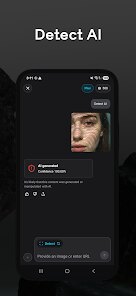
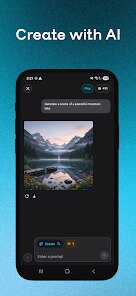
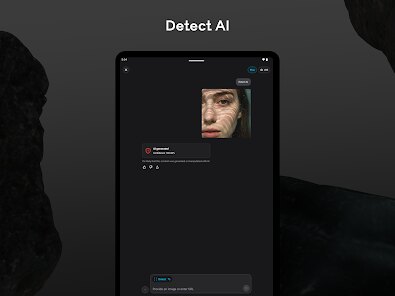
Using it for the first time, I ran into the usual onboarding screens that explain how AI detection works. To check an image, you either snap a photo or pick one from your gallery. I tested a couple of obvious AI art pieces, and the app returned results in about three seconds along with a percentage confidence score. The creation side is straightforward as well: you pick a style, type a prompt, and the app renders a new image. One smooth part is how the results show up side by side, making it easy to compare. But getting used to the detection slider — swiping to see which areas are flagged — took a few tries since the animation feels a bit laggy on older phones.
After a week of daily use, I can say BitMind stands out for its focus on detection, which similar apps like Hugging Face's tool don't emphasize as much. Someone who follows deepfake news or does fact-checking will likely keep it installed. But for casual creators who just want to make AI images for fun, the detection part may feel unnecessary, especially when tools like Midjourney already handle creation better. I'm leaning toward keeping it because spotting fake content is more relevant to me than generating it, though the $3.99 subscription for unlimited checks is a bit steep compared to free alternatives like Illuminarty's web scanner.
features
- 🖼 The main draw is AI content detection, which works on images, text, and audio. It beats Similar apps like GPTZero that focus only on text. You can upload a fake profile photo, and it highlights probable AI areas in red, which is handy for social media vetting.
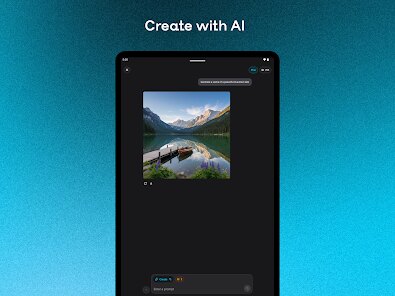
- 🎨 The creation tool lets you generate images using simple prompts directly in the app. Unlike Midjourney, you don't need Discord or a desktop. The selection of 10 art styles (like cyberpunk or watercolor) is small, but the output speed (around 8 seconds) is decent.
- 📊 For detected items, it shows a confidence percentage from 0% to 100%, plus a breakdown by region if the source has multiple elements. That's better than Hugging Face's binary yes/no output, because you see why the app thinks something is AI-made.
- 🔒 It claims on-device processing for detection, which means your photos don't leave your phone. That's a plus over cloud-based tools like OriginStamp, where your data goes to external servers.
pros
- 👍 The app catches AI audio pretty well, which many free tools like AI Voice Detector miss. I tested a sample from a TTS generator, and BitMind flagged it at 94% accuracy.
- 👍 It updates the detection model regularly if you check the settings. The version I first used changed within two weeks to catch newer AI artifacts, whereas Illuminarty's tool felt outdated after a month.
- 👍 The native Android feel — swipe gestures and minimal ads — beats the clunky web wrappers of GPTZero's mobile experience. Plus, you get a simple history log of past checks, which is strangely missing from many rivals.
cons
- 👎 The creation tool feels like an afterthought compared to dedicated apps. Image quality from the prompts is noticeably worse than even the free tier of Craiyon. Faces often turn out distorted, which is a letdown.
- 👎 Detection speed drops with larger files. A 20MB image took about 12 seconds to process, while Illuminarty's web UI handled it under 5 seconds. Not terrible, but noticeable.
- 👎 The free version limits you to five checks per day, and the subscription cost ($3.99 monthly) is pricey compared to Hugging Face's free models or the one-time purchase of Originality.ai's mobile app.
- 👎 There's no option to batch-check multiple files. If you're verifying a batch of 100 suspected images, you need to repeat the process each time, which wears out quickly.
Articles
![]()
Guide
How to Update Google Play Store on Android 2026
![]()
Guide
How to Download Older Versions of Android Apps
![]()
Guide
How to Download Apps Without Google Play Store
![]()
Guide
What Is an APK File for Android?
If you use an Android phone, you may have seen the term APK while searching for apps or games online. Some websites offer an APK download instead of a Google Play install button. Some users also mention APK files when talking about apps that are not available in their region, older app versions, or Android games downloaded outside the Play Store.
![]()
Guide
How to Install Games from Google Play for Beginners
Installing games on an Android phone is usually simple, but for beginners, the process can still feel confusing at first. You may not know where to search, which button to tap, whether the game is safe, or why Google Play sometimes asks for account settings, storage access, or payment information. If you are using an Android phone for the first time, learning how to install games from Google Play is one of the easiest ways to get started.
![]()
Guide
How Useful Gemini Is for Everyday Questions and Quick Tasks
emini feels different from many AI apps because it is not only trying to be a chatbot. After using it for everyday questions, quick writing, image understanding, and planning, I think its biggest strength is convenience.
![]()
Guide
What to Know Before Downloading APKs
For many Android users, downloading an APK is a common way to install apps and games. Sometimes an app is not available in a certain country.
![]()
Guide
ChatGPT Review: Is It Still the Best AI App in 2026?
![]()
Guide
Seedance 2.0 vs Sora: The Future of AI Video Generation
The AI video race has intensified dramatically over the past two years. Platforms like Sora from OpenAI and Luma Dream Machine pushed the boundaries of text-to-video realism. Yet, despite their impressive outputs, most tools still operate as probabilistic generators—you describe a scene, and the model interprets it. Control remains limited. With the February 2026 release of Seedance 2.0, developed by ByteDance, the paradigm shifted. Internally known as Jimeng 2.0, Seedance does not position itself as just another video model. It positions itself as an AI Director. Rather than guessing what you want, Seedance 2.0 allows you to direct what happens. This distinction defines everything that follows.









Recommended Apps
![]()
Home Design 3D
Anuman4.2
![]()
Truth or Dare Game - Party App
Chouic4.8
![]()
Photo Collage Maker
Scoompa4.7![]()
Learn to Draw Flower
Creative APPS4.2![]()
FIFA World Cup 2026™
FIFA2.8![]()
Mirror Plus: Mirror with Light
Digitalchemy, LLC4.4![]()
Meitu- Photo Editor & AI Art
Meitu (China) Limited4.5![]()
Perplexity - Ask Anything
PerplexityAI4.7![]()
GhostTube SLS Camera Alternate
GhostTube4![]()
Boom Chip Blast: 2-Player
Black Pyramid 3D Games Studio0![]()
Healthy Benefits+
Solutran, Inc.4.5![]()
Deepcheck AI Search Assistant
rohe.ai4![]()
Idol Prank Video Call & Chat
LightCode Solutions4![]()
Face Shape - Pretty Scale
GlintTec Apps3.9![]()
Plant App - Plant Identifier
ScaleUp4.6











































