
Rumble

5,000,000+
Installs
Rumble Inc
Developer
-
Video Players & Editors
Category
-
Rated for 12+
Content Rating
-
support@rumble.com
Developer Email
-
https://rumble.com/s/privacy
Privacy Policy
Screenshots
editor reviews
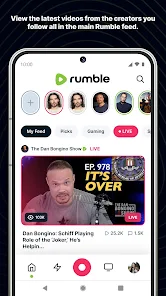
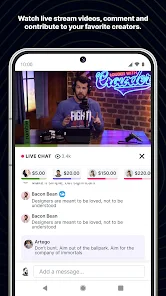
Rumble is a video-sharing platform that positions itself as a free-speech alternative to mainstream giants like YouTube. I first heard about it through some creators who felt their content was being unfairly restricted elsewhere, so I figured I would check it out. After downloading the app from the Google Play Store — it is free to install, by the way — I launched it and was greeted by a fairly standard video feed layout. The first impression was that it looked a bit rough around the edges compared to what I am used to, but it was straightforward enough. The app does not push you to sign up right away, which I appreciated, though you do need an account if you want to comment or upload anything.
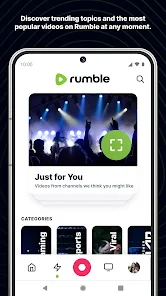
Actually using the app felt familiar but a little clunky at times. The home screen shows a mix of trending videos and suggested content, and you can swipe up to move to the next clip, similar to TikTok. Navigating between categories like News, Sports, or Politics is easy enough, and the search function works well for finding specific channels. One thing I noticed is that the video player itself is basic — no speed controls or picture-in-picture mode by default, which felt like a small but noticeable miss. Uploading a video was painless: you tap the plus icon, pick your file, add a title and description, and hit publish. The process is smooth, but the app did not give me any tips on tags or thumbnails, so it feels a bit barebones compared to what creators might expect.
After spending a few days scrolling and uploading, I have mixed feelings. This app is clearly built for people who value unrestricted speech above all else, and if that is your main concern, you will probably enjoy it here. But if you are used to the polished experience of YouTube or even Vimeo, Rumble feels like a step back in terms of design and features. There are fewer ads, which is nice, but the content can be pretty uneven in quality. I can see keeping it installed for specific creators I follow who moved here, but I would not use it as my main video app. It does what it promises, but it is not trying to win you over with slick extras.
features
- 😊 Content moderation is way more relaxed here compared to YouTube. I have seen videos that would probably get flagged or demonetized on other platforms, which is exactly why some creators and viewers prefer Rumble. It feels less like you are walking on eggshells with every upload.
- 😊 The monetization model seems more creator-friendly on paper. Rumble offers a revenue share that some say is better than YouTube's, and they even help license content to third parties. If you are a smaller creator looking to actually make money, that is a genuine plus.
- 😊 Video uploads are straightforward and do not have as many hoops to jump through. On YouTube, you deal with constant policy checks and manual reviews, but Rumble just lets you post. It is refreshing if you are tired of the bureaucracy on bigger platforms.
- 😊 The library of live news and political commentary is much more diverse than what you find on mainstream apps. If you want perspectives that are not typically given airtime elsewhere, Rumble has you covered without heavy editorializing.
pros
- 👍 Rumble loads videos faster than YouTube on my end, especially during peak hours. I have noticed fewer buffering issues even with 1080p content, which makes for a smoother viewing experience when I am on a weaker connection.
- 👍 The app takes up way less storage space compared to YouTube or TikTok. It is not bloated with extra features or heavy graphics, so if your phone is older, this is a practical advantage worth considering.
- 👍 Search results on Rumble feel more neutral and less algorithm-driven than on YouTube. I do not get the same push toward clickbait or trending fluff, which is nice when I am looking for specific, niche content.
cons
- 👎 The video player lacks basic quality-of-life features. No adjustable playback speed, no mini-player mode, and the resolution options are limited. YouTube has had these things for years, so it feels dated by comparison.
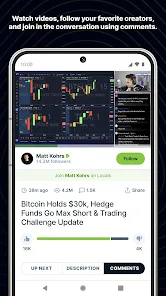
- 👎 The comment section is often a mess. Moderation is minimal, so you see a lot of spam, off-topic rants, or just low-effort posts. On Reddit or YouTube, at least there is some filtering in place.
- 👎 Content discovery is weak. The app does not recommend videos based on your history very well, so you end up scrolling through the same type of stuff. Twitter or TikTok are much better at helping you find new, interesting creators.
- 👎 Notifications are glitchy. I have missed uploads from channels I follow because the app just did not ping me. On Instagram or YouTube, notifications are reliable, which is a big deal if you want to stay updated.
Articles
![]()
Guide
How to Update Google Play Store on Android 2026
![]()
Guide
How to Download Older Versions of Android Apps
![]()
Guide
How to Download Apps Without Google Play Store
![]()
Guide
What Is an APK File for Android?
If you use an Android phone, you may have seen the term APK while searching for apps or games online. Some websites offer an APK download instead of a Google Play install button. Some users also mention APK files when talking about apps that are not available in their region, older app versions, or Android games downloaded outside the Play Store.
![]()
Guide
How to Install Games from Google Play for Beginners
Installing games on an Android phone is usually simple, but for beginners, the process can still feel confusing at first. You may not know where to search, which button to tap, whether the game is safe, or why Google Play sometimes asks for account settings, storage access, or payment information. If you are using an Android phone for the first time, learning how to install games from Google Play is one of the easiest ways to get started.
![]()
Guide
How Useful Gemini Is for Everyday Questions and Quick Tasks
emini feels different from many AI apps because it is not only trying to be a chatbot. After using it for everyday questions, quick writing, image understanding, and planning, I think its biggest strength is convenience.
![]()
Guide
What to Know Before Downloading APKs
For many Android users, downloading an APK is a common way to install apps and games. Sometimes an app is not available in a certain country.
![]()
Guide
ChatGPT Review: Is It Still the Best AI App in 2026?
![]()
Guide
Seedance 2.0 vs Sora: The Future of AI Video Generation
The AI video race has intensified dramatically over the past two years. Platforms like Sora from OpenAI and Luma Dream Machine pushed the boundaries of text-to-video realism. Yet, despite their impressive outputs, most tools still operate as probabilistic generators—you describe a scene, and the model interprets it. Control remains limited. With the February 2026 release of Seedance 2.0, developed by ByteDance, the paradigm shifted. Internally known as Jimeng 2.0, Seedance does not position itself as just another video model. It positions itself as an AI Director. Rather than guessing what you want, Seedance 2.0 allows you to direct what happens. This distinction defines everything that follows.









Recommended Apps
![]()
Home Design 3D
Anuman4.2
![]()
Truth or Dare Game - Party App
Chouic4.8
![]()
Photo Collage Maker
Scoompa4.7![]()
Learn to Draw Flower
Creative APPS4.2![]()
FIFA World Cup 2026™
FIFA2.8![]()
Mirror Plus: Mirror with Light
Digitalchemy, LLC4.4![]()
Meitu- Photo Editor & AI Art
Meitu (China) Limited4.5![]()
Perplexity - Ask Anything
PerplexityAI4.7![]()
GhostTube SLS Camera Alternate
GhostTube4![]()
Boom Chip Blast: 2-Player
Black Pyramid 3D Games Studio0![]()
Healthy Benefits+
Solutran, Inc.4.5![]()
Deepcheck AI Search Assistant
rohe.ai4![]()
Idol Prank Video Call & Chat
LightCode Solutions4![]()
Face Shape - Pretty Scale
GlintTec Apps3.9![]()
Plant App - Plant Identifier
ScaleUp4.6












































