

iHeart: Music, Radio, Podcasts

50,000,000+
Installs
iHeartMedia, Inc.
Developer
-
Entertainment
Category
-
Rated for 12+
Content Rating
-
android@iheartradio.com
Developer Email
-
https://www.iheart.com/privacy
Privacy Policy
Screenshots
editor reviews
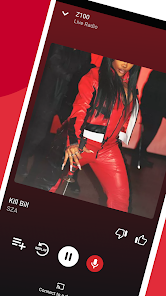
IHeart is an all-in-one audio app that brings together live radio, music streaming, and podcasts under one roof. It is a free download available on Google Play and the App Store, with well over 100 million installs. After downloading and launching the app, the first impression is that of a busy, polished media hub. It asks you to pick your favorite genres, artists, and shows right away, which helps it tailor stations and suggestions instantly. The registration process is quick, and while you can jump right in without signing up, you lose the ability to save favorites or sync across devices. The free tier includes ads that run between songs and during live shows, but they feel standard for a service supported by ads. What caught my attention the first time was how fast it started playing a local radio station—almost no buffering.
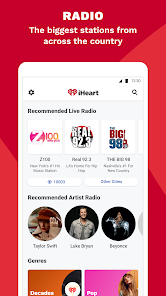
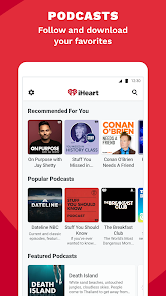
When you start using the app, the experience feels straightforward but a bit cluttered at first. The main screen is divided into tabs like For You, Radio, Music, and Podcasts, with a search bar sitting at the top. Tapping Radio shows a long list of local stations by city or genre, and you can tap one to hear the live broadcast instantly. The music section gives you premade playlists based on your chosen artists, but you cannot search for and play a specific song on demand unless you pay for the iHeart Radio Plus subscription. The podcast section is easy to navigate, with trending shows and new episodes updated regularly. A common flow is opening the app, picking a podcast you follow, and listening while driving or doing chores—playback is smooth and supports background listening. One small but nice feature is the sleep timer, which I use often to fall asleep to talk radio without draining the battery overnight.
After using iHeart for a few weeks, I think it is a solid choice if you love live radio and podcast discovery. It stands out because it centralizes local AM/FM stations, which many music streaming apps like Spotify or Apple Music do not offer. The personalization feels decent—it learns what you skip and what you replay. But if you want full control over music playback, like picking any song from a huge library, iHeart will disappoint. You are better off with Spotify or YouTube Music for that. I keep iHeart installed for its local news and talk shows, but I rarely use the music section. Compared to TuneIn Radio, iHeart has better podcast integration, but it does not cover as many international stations. Overall, it is a keeper for radio fans, but music lovers may uninstall it within a week.
features
- 📍 Real-Time Live Radio – iHeart lets you stream over 1,500 live radio stations from across the US, covering local news, sports, and talk shows. TuneIn Radio offers similar live streaming, but iHeart focuses heavily on iHeartMedia-owned stations, giving you deeper access to popular hosts like Ryan Seacrest or Steve Harvey. The outstanding feature is the seamless switching between stations based on your location without buffering delays.
- 🎧 Podcast Library Integration – The app has a massive catalog of both iHeart exclusives and third-party podcasts, with playlists curated by mood or topic. Unlike Spotify, which buries podcasts behind music features, iHeart puts them front and center, making discovery easier. What makes it stand out is the ability to live tune into podcast host talk shows, blending on-demand and live content.
- 🎵 Custom Artist Radio Stations – You can create a station based on any artist or song, and the app generates a continuous mix of similar tracks. Compared to Pandora, which pioneered this, iHeart mixes in live radio clips and interviews between songs, giving a more varied listening experience. The extra touch is seeing behind-the-scenes content from iHeart events tied to the artist.
pros
- 🔊 Free Live Local Radio – Unlike Spotify or Apple Music, which charge for streaming live sports and talk, iHeart offers thousands of local AM/FM stations for free with ads. You can catch breaking news or game broadcasts without a subscription, which is a major win for cord-cutters.
- 📡 Podcast Exclusives – iHeart produces original podcasts like Stuff You Should Know and The Bobby Bones Show, which you cannot find on other platforms like Stitcher or Google Podcasts. These exclusives often include ad-free versions or early drops for premium subscribers.
- 🎤 Event Integration – The app connects to the iHeartRadio Music Festival and awards shows, offering live streams and backstage interviews. This ties the digital experience to real-world events, something TuneIn or SiriusXM lack.
cons
- 🔇 Limited On-Demand Music – Unlike Spotify or Apple Music, you cannot pick and play individual songs unless you pay for iHeart Radio Plus. The free version only gives you skips and curated stations, which feels restrictive for music lovers.
- 📶 Heavy Ad Load – The free tier plays ads between every few songs, more frequently than Pandora or iHeart's own older version. This can be annoying during long drives or workouts, pushing you toward the paid plan.
- 🌍 Weak International Coverage – Compared to TuneIn Radio, which covers global stations from Asia to Europe, iHeart is heavily US-centric. If you want to stream a station from London or Tokyo, you are out of luck.
- 💾 UI Clutter – The app has too many tabs and promotional banners for live shows or merchandise, making navigation feel messy next to the cleaner layout of Spotify or Apple Music. It takes extra taps to find your saved podcasts.
Articles
![]()
Guide
How to Update Google Play Store on Android 2026
![]()
Guide
How to Download Older Versions of Android Apps
![]()
Guide
How to Download Apps Without Google Play Store
![]()
Guide
What Is an APK File for Android?
If you use an Android phone, you may have seen the term APK while searching for apps or games online. Some websites offer an APK download instead of a Google Play install button. Some users also mention APK files when talking about apps that are not available in their region, older app versions, or Android games downloaded outside the Play Store.
![]()
Guide
How to Install Games from Google Play for Beginners
Installing games on an Android phone is usually simple, but for beginners, the process can still feel confusing at first. You may not know where to search, which button to tap, whether the game is safe, or why Google Play sometimes asks for account settings, storage access, or payment information. If you are using an Android phone for the first time, learning how to install games from Google Play is one of the easiest ways to get started.
![]()
Guide
How Useful Gemini Is for Everyday Questions and Quick Tasks
emini feels different from many AI apps because it is not only trying to be a chatbot. After using it for everyday questions, quick writing, image understanding, and planning, I think its biggest strength is convenience.
![]()
Guide
What to Know Before Downloading APKs
For many Android users, downloading an APK is a common way to install apps and games. Sometimes an app is not available in a certain country.
![]()
Guide
ChatGPT Review: Is It Still the Best AI App in 2026?
![]()
Guide
Seedance 2.0 vs Sora: The Future of AI Video Generation
The AI video race has intensified dramatically over the past two years. Platforms like Sora from OpenAI and Luma Dream Machine pushed the boundaries of text-to-video realism. Yet, despite their impressive outputs, most tools still operate as probabilistic generators—you describe a scene, and the model interprets it. Control remains limited. With the February 2026 release of Seedance 2.0, developed by ByteDance, the paradigm shifted. Internally known as Jimeng 2.0, Seedance does not position itself as just another video model. It positions itself as an AI Director. Rather than guessing what you want, Seedance 2.0 allows you to direct what happens. This distinction defines everything that follows.









Recommended Apps
![]()
Home Design 3D
Anuman4.2
![]()
Truth or Dare Game - Party App
Chouic4.8
![]()
Photo Collage Maker
Scoompa4.7![]()
Learn to Draw Flower
Creative APPS4.2![]()
FIFA World Cup 2026™
FIFA2.8![]()
Mirror Plus: Mirror with Light
Digitalchemy, LLC4.4![]()
Meitu- Photo Editor & AI Art
Meitu (China) Limited4.5![]()
Perplexity - Ask Anything
PerplexityAI4.7![]()
GhostTube SLS Camera Alternate
GhostTube4![]()
Boom Chip Blast: 2-Player
Black Pyramid 3D Games Studio0![]()
Healthy Benefits+
Solutran, Inc.4.5![]()
Deepcheck AI Search Assistant
rohe.ai4![]()
Idol Prank Video Call & Chat
LightCode Solutions4![]()
Face Shape - Pretty Scale
GlintTec Apps3.9![]()
Plant App - Plant Identifier
ScaleUp4.6












































