

AXS Tickets

5,000,000+
Installs
AXS, LLC
Developer
-
Entertainment
Category
-
Rated for 3+
Content Rating
-
apps.android@axs.com
Developer Email
-
http://www.axs.com/se/about-privacy-policy.html
Privacy Policy
Screenshots


editor reviews
AXS is one of those ticket-selling platforms you end up with on your phone when the band you love announces a tour and your usual app doesn't carry the show. It's a primary ticket marketplace, meaning it sells directly from venues and event organizers rather than letting strangers resell to each other. Millions of people have downloaded it from both Google Play and the App Store, and it's free to install. Right after opening the app, you're greeted by a feed of upcoming events sorted by location or popularity. There's no immediate demand to register—you can browse shows freely, but buying obviously requires an account. The first impression is pretty clean, though the homepage can feel a bit cluttered with too many concert posters at once.
When you actually start looking for tickets, the app moves quickly. You pick a city or let it detect yours, then browse by date or genre. Tapping an event brings up a seating chart that shows real-time availability. What I liked was that you can see exactly which sections still have tickets before you commit. The checkout process is standard—pick your seats, review the price with fees, then pay. AXS uses something called AXS Mobile ID, which is a digital barcode that updates constantly to prevent screenshots from working. That's useful for security but can be confusing the first time you show it at a gate. One practical tip: enable Face ID or fingerprint login right away, because the app logs you out often and retyping passwords gets old fast.
After using AXS for a few concerts, I'd say it's fine for what it does, but nothing special. It works best if you're buying directly from major venues like the O2 Arena or Madison Square Garden. The transfer process for giving tickets to friends is easier than Ticketmaster's clunky system, which is a real plus. But the app can feel sluggish during high-demand on-sales, and the fees are just as painful as everywhere else. I'd keep it installed if I regularly attend events at AXS venues, but for random local shows, I'd probably uninstall it afterward. People who hate dealing with paper tickets or PDFs will appreciate the digital-first approach, while anyone who prefers StubHub's resale marketplace might find AXS too limited.
features
- 🎫 Real-time interactive seating charts let you zoom into sections and see exact row availability before picking, which beats Ticketmaster's clunkier map that often lags during high traffic.
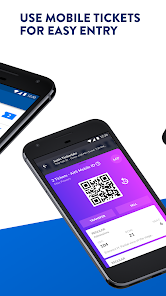
- 🎫 AXS Mobile ID generates a rotating QR code that refreshes every few seconds, making it nearly impossible to copy or fake—something StubHub's static barcodes can't guarantee.
- 🎫 The app offers a "Smart Price" feature on some events, adjusting ticket costs based on demand dynamically, similar to how airlines price seats, which is rare among primary ticket sellers.
- 🎫 Transferring tickets to friends is straightforward: you just enter their email or phone number, and the ticket moves instantly to their AXS account, unlike Ticketmaster's often confusing "send" workflow that requires both parties to have accounts.
pros
- ✅ The overall user interface is noticeably faster and less bloated than Ticketmaster's app, especially when browsing events or loading seat maps on older phones.
- ✅ Customer support via in-app chat actually responds within minutes during my tests, whereas StubHub's support often takes hours or pushes you to automated replies.
- ✅ AXS tends to show fewer "platinum" or "verified resale" listings tricked into the main inventory, so you see the real face-value price first without sifting through marked-up resales.
cons
- ❌ The app's event discovery is weak compared to Dice or Songkick—searching for small local gigs often returns nothing, even when those venues use AXS on desktop.
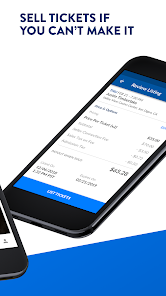
- ❌ Once you buy tickets, there's no option to list them for resale within the app for most events, unlike StubHub which lets you sell instantly.
- ❌ The forced use of AXS Mobile ID means you can't screenshot a ticket and send it to someone, which is annoying when the recipient doesn't want to install another app just to get in.
- ❌ The app crashes occasionally during checkout, especially on Android, and you lose your selected seats if that happens—something I've never experienced with Ticketmaster.
Articles
![]()
Guide
How to Update Google Play Store on Android 2026
![]()
Guide
How to Download Older Versions of Android Apps
![]()
Guide
How to Download Apps Without Google Play Store
![]()
Guide
What Is an APK File for Android?
If you use an Android phone, you may have seen the term APK while searching for apps or games online. Some websites offer an APK download instead of a Google Play install button. Some users also mention APK files when talking about apps that are not available in their region, older app versions, or Android games downloaded outside the Play Store.
![]()
Guide
How to Install Games from Google Play for Beginners
Installing games on an Android phone is usually simple, but for beginners, the process can still feel confusing at first. You may not know where to search, which button to tap, whether the game is safe, or why Google Play sometimes asks for account settings, storage access, or payment information. If you are using an Android phone for the first time, learning how to install games from Google Play is one of the easiest ways to get started.
![]()
Guide
How Useful Gemini Is for Everyday Questions and Quick Tasks
emini feels different from many AI apps because it is not only trying to be a chatbot. After using it for everyday questions, quick writing, image understanding, and planning, I think its biggest strength is convenience.
![]()
Guide
What to Know Before Downloading APKs
For many Android users, downloading an APK is a common way to install apps and games. Sometimes an app is not available in a certain country.
![]()
Guide
ChatGPT Review: Is It Still the Best AI App in 2026?
![]()
Guide
Seedance 2.0 vs Sora: The Future of AI Video Generation
The AI video race has intensified dramatically over the past two years. Platforms like Sora from OpenAI and Luma Dream Machine pushed the boundaries of text-to-video realism. Yet, despite their impressive outputs, most tools still operate as probabilistic generators—you describe a scene, and the model interprets it. Control remains limited. With the February 2026 release of Seedance 2.0, developed by ByteDance, the paradigm shifted. Internally known as Jimeng 2.0, Seedance does not position itself as just another video model. It positions itself as an AI Director. Rather than guessing what you want, Seedance 2.0 allows you to direct what happens. This distinction defines everything that follows.









Recommended Apps
![]()
Home Design 3D
Anuman4.2
![]()
Truth or Dare Game - Party App
Chouic4.8
![]()
Photo Collage Maker
Scoompa4.7![]()
Learn to Draw Flower
Creative APPS4.2![]()
FIFA World Cup 2026™
FIFA2.8![]()
Mirror Plus: Mirror with Light
Digitalchemy, LLC4.4![]()
Meitu- Photo Editor & AI Art
Meitu (China) Limited4.5![]()
Perplexity - Ask Anything
PerplexityAI4.7![]()
GhostTube SLS Camera Alternate
GhostTube4![]()
Boom Chip Blast: 2-Player
Black Pyramid 3D Games Studio0![]()
Healthy Benefits+
Solutran, Inc.4.5![]()
Deepcheck AI Search Assistant
rohe.ai4![]()
Idol Prank Video Call & Chat
LightCode Solutions4![]()
Face Shape - Pretty Scale
GlintTec Apps3.9![]()
Plant App - Plant Identifier
ScaleUp4.6












































