
Amazon Prime Video

500,000,000+
Installs
Amazon Mobile LLC
Developer
-
Entertainment
Category
-
Rated for 12+
Content Rating
-
aiv-android-feedback-na@amazon.com
Developer Email
-
http://www.amazon.com/gp/help/customer/display.html?nodeId=468496
Privacy Policy
Screenshots

editor reviews
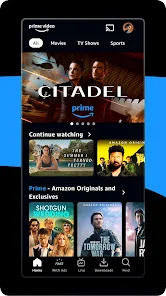
So I finally caved and downloaded Amazon Prime Video from the Google Play Store. It's basically a streaming service, right up there with Netflix and Hulu, but it's tied to your Amazon Prime subscription. The main draw for me was that I already pay for Prime for the shipping, so getting this included felt like a no-brainer. When you first launch the app, it hits you with that familiar Amazon orange and a pretty standard layout showcasing movies and shows. It's a bit cluttered at first glance because they push their own originals, rentable movies, and live TV channels all on the same page. Registration is automatic since you just log in with your Amazon credentials, which is nice, but the free download doesn't mean everything is free to watch. There's a ton of content included with Prime, but a lot of popular new releases still require you to rent or buy them separately, which can be annoying.
Using it day-to-day, the interface is mostly fine but has some quirks. Browsing through categories like action or comedy feels smooth enough, but sometimes I scroll past a title I want to watch, tap on it, only to find it needs an extra payment. That's a letdown. The video player itself does the job well, with solid playback and the option to download stuff for offline viewing, which is a lifesaver on flights. One thing that caught me off guard was how some menus, like the one for managing downloaded episodes, feel a bit hidden or less responsive than on other apps like Netflix. I also noticed the search isn't great at filtering between what's free with my subscription and what costs extra, so I often end up accidentally browsing movies I don't want to pay for. But once I find something good, the streaming quality is crisp, and the integration with my Fire TV stick makes picking up where I left off across devices pretty seamless.
After using it for a few weeks, I think it's a solid pick if you're already in the Amazon ecosystem. The best part is definitely the extra content you get at no additional cost on top of your Prime membership, especially shows like "The Boys" or classic movies. But for someone who doesn't have Prime, its value drops significantly because you'd be paying a subscription fee for a library that often feels smaller and older than competitors like Netflix or Disney+, plus you still have to buy popular movies. What makes it different is the bonus of live sports, like Thursday Night Football, and the channels you can add on, but the constant upselling of rentals makes it feel a bit greedy. I'll probably keep it installed since I already have Prime for shipping, but if I wasn't locked in, I'd likely uninstall it for something more straightforward like HBO Max.
features
- 🎬 One thing that really sets Amazon Prime Video apart from, say, Netflix, is the way it bundles a massive library of movies and shows with your existing Prime membership. You don't have to pay extra just to access the core catalog, which feels like a steal if you already shop on Amazon. Plus, you get access to a rotating selection of popular titles that aren't always tied to a subscription fee, unlike Paramount+ which often requires upgrades for new releases.
- 📺 Another standout feature is the X-Ray function. When you're watching a show or movie, you can tap the screen and instantly see info about the actors, music, and even trivia for that exact scene. It's a neat trick that I've never seen done as smoothly on Hulu or Peacock, and it makes you feel like a film buff without any extra effort.
- 📥 The ability to download content for offline viewing is also a huge plus, but what makes it different from similar apps like Disney+ is the sheer volume of titles you can download. I've saved entire seasons of shows for long plane rides without worrying about data caps, and the app manages the storage fairly well, letting you pick video quality to save space.
pros
- 👍 The biggest strength has to be the value for money. Since it comes free with Amazon Prime, you're essentially getting a streaming service for the price of faster shipping. Compared to Netflix, where you pay a premium for nothing extra, it's a no-brainer for anyone who already uses Amazon for shopping.
- 👍 Another major plus is the inclusion of live sports, like Thursday Night Football. Most competitors like Apple TV+ or Max don't offer live sports at all, so this is a unique draw that keeps me coming back during football season, even if I'm not in the mood for a movie.
- 👍 The integration with other Amazon devices, like Fire TV and Alexa, is seamless. I can just shout at my Echo to play a specific show, and it fires up right on my TV. This kind of convenience is something you just don't get with a service like Hulu unless you've invested in their specific hardware.
cons
- 👎 A big drawback is the messy user interface. It feels cluttered with ads for rentals and add-on channels, unlike Netflix which keeps things clean and focused on your subscription. I often find myself scrolling through a wall of pay-per-view options before I stumble on the free stuff.
- 👎 Another weakness is the lackluster original content lineup compared to Disney+ or Netflix. Sure, they have a few hits like "The Boys," but the library overall feels hit-or-miss, with a lot of low-budget shows and movies that just don't hold up against what competitors produce.
- 👎 The search function is frustratingly bad. I've typed in direct movie titles, and the app shows me a mix of unrelated rentals and channels before the actual Prime Video option. On HBO Max, the search is much more precise, and it doesn't push paid content on me as aggressively.
Articles
![]()
Guide
How to Update Google Play Store on Android 2026
![]()
Guide
How to Download Older Versions of Android Apps
![]()
Guide
How to Download Apps Without Google Play Store
![]()
Guide
What Is an APK File for Android?
If you use an Android phone, you may have seen the term APK while searching for apps or games online. Some websites offer an APK download instead of a Google Play install button. Some users also mention APK files when talking about apps that are not available in their region, older app versions, or Android games downloaded outside the Play Store.
![]()
Guide
How to Install Games from Google Play for Beginners
Installing games on an Android phone is usually simple, but for beginners, the process can still feel confusing at first. You may not know where to search, which button to tap, whether the game is safe, or why Google Play sometimes asks for account settings, storage access, or payment information. If you are using an Android phone for the first time, learning how to install games from Google Play is one of the easiest ways to get started.
![]()
Guide
How Useful Gemini Is for Everyday Questions and Quick Tasks
emini feels different from many AI apps because it is not only trying to be a chatbot. After using it for everyday questions, quick writing, image understanding, and planning, I think its biggest strength is convenience.
![]()
Guide
What to Know Before Downloading APKs
For many Android users, downloading an APK is a common way to install apps and games. Sometimes an app is not available in a certain country.
![]()
Guide
ChatGPT Review: Is It Still the Best AI App in 2026?
![]()
Guide
Seedance 2.0 vs Sora: The Future of AI Video Generation
The AI video race has intensified dramatically over the past two years. Platforms like Sora from OpenAI and Luma Dream Machine pushed the boundaries of text-to-video realism. Yet, despite their impressive outputs, most tools still operate as probabilistic generators—you describe a scene, and the model interprets it. Control remains limited. With the February 2026 release of Seedance 2.0, developed by ByteDance, the paradigm shifted. Internally known as Jimeng 2.0, Seedance does not position itself as just another video model. It positions itself as an AI Director. Rather than guessing what you want, Seedance 2.0 allows you to direct what happens. This distinction defines everything that follows.









Recommended Apps
![]()
Home Design 3D
Anuman4.2
![]()
Truth or Dare Game - Party App
Chouic4.8
![]()
Photo Collage Maker
Scoompa4.7![]()
Learn to Draw Flower
Creative APPS4.2![]()
FIFA World Cup 2026™
FIFA2.8![]()
Mirror Plus: Mirror with Light
Digitalchemy, LLC4.4![]()
Meitu- Photo Editor & AI Art
Meitu (China) Limited4.5![]()
Perplexity - Ask Anything
PerplexityAI4.7![]()
GhostTube SLS Camera Alternate
GhostTube4![]()
Boom Chip Blast: 2-Player
Black Pyramid 3D Games Studio0![]()
Healthy Benefits+
Solutran, Inc.4.5![]()
Deepcheck AI Search Assistant
rohe.ai4![]()
Idol Prank Video Call & Chat
LightCode Solutions4![]()
Face Shape - Pretty Scale
GlintTec Apps3.9![]()
Plant App - Plant Identifier
ScaleUp4.6












































