

Bird — Ride Electric

10,000,000+
Installs
Bird Rides, Inc.
Developer
-
Travel & Local
Category
-
Rated for 3+
Content Rating
-
hello@bird.co
Developer Email
-
http://www.bird.co/privacy
Privacy Policy
Screenshots

editor reviews
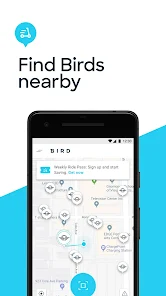
Bird — Ride Electric is a micromobility app that lets you find, unlock, and ride electric scooters and bikes parked around many cities. I first downloaded it from Google Play because I needed a quick way to cover the last mile from the train station to my office, and the install was fast since the app is free. After launching it, the first impression is straightforward: a map shows nearby vehicles, and there's a big "scan to ride" button. It doesn't ask for much upfront, just email registration and payment info, which felt pretty standard. The app has been installed over 10 million times, so it's clearly popular, and while there are no forced ads, you do see occasional ride credit offers pop up, and in-app purchases are limited to buying ride bundles or unlocking a membership.
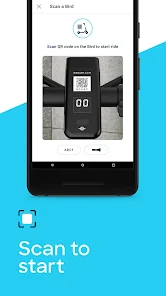
Using the app day-to-day is actually smoother than I expected. The main screen is a map with little scooter icons scattered around, and tapping one shows the battery level and estimated cost. The onboarding took me about two minutes: I scanned a scooter's QR code, a countdown started, and I was rolling. The interface is minimal but has a small quirk—sometimes the map takes a second to center on your location, so you might need to let it load before picking a vehicle. A common sequence is scanning, riding, then ending the trip in the app, where the charge appears instantly. I found it handy that you can reserve a scooter for a few minutes while you walk to it, which prevents someone else from grabbing it. The battery indicator is reliable, though I once grabbed one with 20% charge and it died halfway, so triple-check that percentage before heading uphill.
After a few weeks, I think this app is perfect for tourists or commuters who need flexible, one-way trips without the hassle of owning a scooter. It's not for someone who drives everywhere or lives in a suburb without coverage. What sets it apart from Lime or Spin is the sheer number of vehicles available in most cities, plus the ride bundles that cut costs per trip. I ended up keeping it installed because it's handy when public transport stops early, but I can see people uninstalling if they move to a non-service area or find the per-minute pricing adds up fast. The interface feels simple enough that anyone can hop on, though the map loading hiccup can be annoying when you're in a rush.
features
- 🛴 Real-time availability: The app shows exactly where each scooter is, including battery level and cost, so you can pick one with enough charge for your trip. Lime also does this, but Bird's map seems more accurate with live updates, and I rarely found a phantom scooter that wasn't there.
- 🛴 Reserve function: You can hold a scooter for up to 30 minutes for free, which is great when you're rushing to an exit and don't want it taken. This feature is similar to Spin's reserve, but Bird's timer is more generous, giving you extra time if you're slightly delayed.
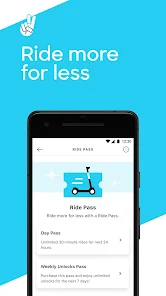
- 🛴 Ride bundles: The app offers packages like 100 minutes for $30, which lowers the cost per ride compared to Lime's pay-as-you-go model. This is a standout because it makes frequent use cheaper, especially for daily commuters who plan ahead.
- 🛴 Helmet access: Bird includes a free helmet code with your first ride, which is a nice safety touch that Lime doesn't always offer. It's a small thing, but it made me feel more prepared compared to other apps where you have to bring your own.
pros
- ⭐ Pricing transparency: Bird shows the exact cost before you ride, including any unlock fees, which is clearer than Lime's sometimes vague estimates. I have never been hit with a surprise charge.
- ⭐ Wide availability: In my city, Bird has more scooters on the street than Spin, so I never struggle to find one nearby. This is its biggest edge for me.
- ⭐ Simple checkout: Ending the ride and seeing the payment processed in seconds is smoother than what I've seen in some competitors like Voi, where billing sometimes lags.
cons
- ❌ Battery reliability: Scooters with low battery (under 30%) can die mid-ride, especially on hills, and you have to walk or pay for a new one. Lime's scooters seem to have more consistent power management.
- ❌ Map loading delay: The app's map often hangs for a few seconds when you open it, which is frustrating if you're trying to grab a scooter quickly. Spin's app loads faster on my phone.
- ❌ Parking restrictions: Bird docks you if you park in unauthorized zones, but the rules are sometimes unclear, leading to unexpected fines. Lime provides clearer geofencing warnings.
Articles
![]()
Guide
How to Update Google Play Store on Android 2026
![]()
Guide
How to Download Older Versions of Android Apps
![]()
Guide
How to Download Apps Without Google Play Store
![]()
Guide
What Is an APK File for Android?
If you use an Android phone, you may have seen the term APK while searching for apps or games online. Some websites offer an APK download instead of a Google Play install button. Some users also mention APK files when talking about apps that are not available in their region, older app versions, or Android games downloaded outside the Play Store.
![]()
Guide
How to Install Games from Google Play for Beginners
Installing games on an Android phone is usually simple, but for beginners, the process can still feel confusing at first. You may not know where to search, which button to tap, whether the game is safe, or why Google Play sometimes asks for account settings, storage access, or payment information. If you are using an Android phone for the first time, learning how to install games from Google Play is one of the easiest ways to get started.
![]()
Guide
How Useful Gemini Is for Everyday Questions and Quick Tasks
emini feels different from many AI apps because it is not only trying to be a chatbot. After using it for everyday questions, quick writing, image understanding, and planning, I think its biggest strength is convenience.
![]()
Guide
What to Know Before Downloading APKs
For many Android users, downloading an APK is a common way to install apps and games. Sometimes an app is not available in a certain country.
![]()
Guide
ChatGPT Review: Is It Still the Best AI App in 2026?
![]()
Guide
Seedance 2.0 vs Sora: The Future of AI Video Generation
The AI video race has intensified dramatically over the past two years. Platforms like Sora from OpenAI and Luma Dream Machine pushed the boundaries of text-to-video realism. Yet, despite their impressive outputs, most tools still operate as probabilistic generators—you describe a scene, and the model interprets it. Control remains limited. With the February 2026 release of Seedance 2.0, developed by ByteDance, the paradigm shifted. Internally known as Jimeng 2.0, Seedance does not position itself as just another video model. It positions itself as an AI Director. Rather than guessing what you want, Seedance 2.0 allows you to direct what happens. This distinction defines everything that follows.









Recommended Apps
![]()
Home Design 3D
Anuman4.2
![]()
Truth or Dare Game - Party App
Chouic4.8
![]()
Photo Collage Maker
Scoompa4.7![]()
Learn to Draw Flower
Creative APPS4.2![]()
FIFA World Cup 2026™
FIFA2.8![]()
Mirror Plus: Mirror with Light
Digitalchemy, LLC4.4![]()
Meitu- Photo Editor & AI Art
Meitu (China) Limited4.5![]()
Perplexity - Ask Anything
PerplexityAI4.7![]()
GhostTube SLS Camera Alternate
GhostTube4![]()
Boom Chip Blast: 2-Player
Black Pyramid 3D Games Studio0![]()
Healthy Benefits+
Solutran, Inc.4.5![]()
Deepcheck AI Search Assistant
rohe.ai4![]()
Idol Prank Video Call & Chat
LightCode Solutions4![]()
Face Shape - Pretty Scale
GlintTec Apps3.9![]()
Plant App - Plant Identifier
ScaleUp4.6












































