
Transit: Bus & Subway Times

10,000,000+
Installs
Transit, Inc.
Developer
-
Travel & Local
Category
-
Rated for 3+
Content Rating
-
info@transitapp.com
Developer Email
-
https://transit.app/privacy
Privacy Policy
Screenshots
editor reviews
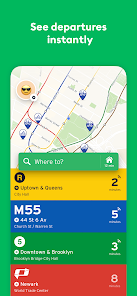
Transit is a public transport app that helps people navigate buses, subways, trains, and ride-shares in real-time. It pulls live schedules and service updates from over 300 cities around the world. I downloaded it because getting around without a car in my city felt messy using Google Maps for everything. After launching it, the first impression was surprisingly clean. No sign-up wall, no giant map cluttered with unrelated stores. It asked for my location and immediately showed nearby stops with upcoming arrival minutes. For a free app with millions of installs on Google Play and the App Store, that directness felt refreshing. Registration is optional, and the app does show ads, but they never interrupted the core trip-planning flow.
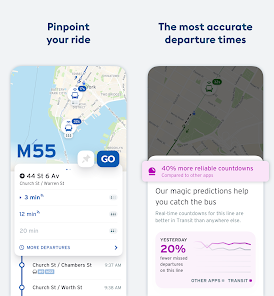
Using Transit daily feels like having a local transit buddy. The interface uses a simple card layout: each nearby route appears as a row showing the name and waiting time. Tap one, and you see a line of real-time vehicle positions moving along the map. Onboarding is nonexistent, you just start. I usually open it, check when the next bus arrives, and hop out the door. The most useful moment was when it warned me my usual bus was delayed by nine minutes, letting me grab coffee instead of freezing at the stop. One tip: you can save favorite routes and stops, which makes the home screen way more useful. A small confusing bit was the GO feature, which combines multiple transit options into one trip. It works well but sometimes suggests a bus that arrives two minutes sooner than the train I prefer, so I ignore it.
After a few months, I appreciate Transit most for its focus. It doesn't try to be a maps app or a taxi app. It just tracks public transport well. Someone who relies on bikeshare or walking might find it less useful, but for bus and subway commuters, it's great. Compared to Moovit or Citymapper, Transit feels less cluttered and more social thanks to crowdsourced reports from other riders. I will probably keep it installed because it saves me time. The only reason I could see uninstalling it is if my city's transit system stopped sharing real-time data, though that is rare.
features
- 🚍 Real-time vehicle tracking: Transit shows exactly where each bus or train is on the route map, unlike Google Maps which mostly relies on static timetables. This means you actually see if the bus is stuck in traffic or running early.
- 🚍 Crowdsourced rider reports: Users can report if a bus is crowded, late, or missing. This adds a layer of street-level accuracy that apps like Apple Maps completely lack. I've avoided packed buses twice because of a report from another rider.
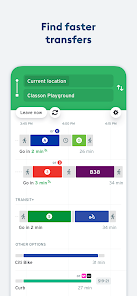
- 🚍 Multi-mode trip planning: The Go feature mixes subway, bus, bike-share, Uber, and walking into one route. Citymapper does this too, but Transit integrates Uber prices directly without leaving the app, saving extra taps.
- 🚍 Offline schedules and widgets: You can download route data for offline use, and the iOS widgets show upcoming departures without opening anything. Moovit's widget is slower and sometimes fails to refresh.
pros
- ✅ Simpler interface than Moovit: Moovit overloads you with news feeds and social features. Transit just shows routes and real-time info without the clutter.
- ✅ Better real-time accuracy than Google Maps: Google Maps often shows scheduled times, but Transit pulls actual GPS positions from transit agencies more reliably in most cities.
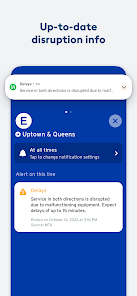
- ✅ Integrated transit alerts from local agencies: Transit forwards official service alerts directly, while Citymapper sometimes misses last-minute changes. I found out about a track closure five minutes earlier on Transit.
cons
- ❌ Limited coverage for small cities: Transit works well in major metros, but for towns like Santa Fe or smaller European cities, Moovit often has more routes and better data.
- ❌ No walking or cycling navigation: Unlike Citymapper, you cannot use Transit for directions on foot or bike. It is purely public transport plus ride-share, which feels limited sometimes.
- ❌ Occasional slow updates on less popular routes: I noticed a bus route running every 30 minutes sometimes showed stale times. Google Maps refreshes those intervals faster because of broader data sources.
Articles
![]()
Guide
How to Update Google Play Store on Android 2026
![]()
Guide
How to Download Older Versions of Android Apps
![]()
Guide
How to Download Apps Without Google Play Store
![]()
Guide
What Is an APK File for Android?
If you use an Android phone, you may have seen the term APK while searching for apps or games online. Some websites offer an APK download instead of a Google Play install button. Some users also mention APK files when talking about apps that are not available in their region, older app versions, or Android games downloaded outside the Play Store.
![]()
Guide
How to Install Games from Google Play for Beginners
Installing games on an Android phone is usually simple, but for beginners, the process can still feel confusing at first. You may not know where to search, which button to tap, whether the game is safe, or why Google Play sometimes asks for account settings, storage access, or payment information. If you are using an Android phone for the first time, learning how to install games from Google Play is one of the easiest ways to get started.
![]()
Guide
How Useful Gemini Is for Everyday Questions and Quick Tasks
emini feels different from many AI apps because it is not only trying to be a chatbot. After using it for everyday questions, quick writing, image understanding, and planning, I think its biggest strength is convenience.
![]()
Guide
What to Know Before Downloading APKs
For many Android users, downloading an APK is a common way to install apps and games. Sometimes an app is not available in a certain country.
![]()
Guide
ChatGPT Review: Is It Still the Best AI App in 2026?
![]()
Guide
Seedance 2.0 vs Sora: The Future of AI Video Generation
The AI video race has intensified dramatically over the past two years. Platforms like Sora from OpenAI and Luma Dream Machine pushed the boundaries of text-to-video realism. Yet, despite their impressive outputs, most tools still operate as probabilistic generators—you describe a scene, and the model interprets it. Control remains limited. With the February 2026 release of Seedance 2.0, developed by ByteDance, the paradigm shifted. Internally known as Jimeng 2.0, Seedance does not position itself as just another video model. It positions itself as an AI Director. Rather than guessing what you want, Seedance 2.0 allows you to direct what happens. This distinction defines everything that follows.









Recommended Apps
![]()
Home Design 3D
Anuman4.2
![]()
Truth or Dare Game - Party App
Chouic4.8
![]()
Photo Collage Maker
Scoompa4.7![]()
Learn to Draw Flower
Creative APPS4.2![]()
FIFA World Cup 2026™
FIFA2.8![]()
Mirror Plus: Mirror with Light
Digitalchemy, LLC4.4![]()
Meitu- Photo Editor & AI Art
Meitu (China) Limited4.5![]()
Perplexity - Ask Anything
PerplexityAI4.7![]()
GhostTube SLS Camera Alternate
GhostTube4![]()
Boom Chip Blast: 2-Player
Black Pyramid 3D Games Studio0![]()
Healthy Benefits+
Solutran, Inc.4.5![]()
Deepcheck AI Search Assistant
rohe.ai4![]()
Idol Prank Video Call & Chat
LightCode Solutions4![]()
Face Shape - Pretty Scale
GlintTec Apps3.9![]()
Plant App - Plant Identifier
ScaleUp4.6












































