
Google Translate

1,000,000,000+
Installs
Google LLC
Developer
-
Books & Reference
Category
-
Rated for 3+
Content Rating
-
translate-mobile-support@google.com
Developer Email
-
http://www.google.com/policies/privacy/
Privacy Policy
Screenshots
editor reviews
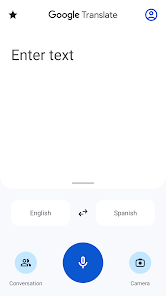
Google Translate is a translation app developed by Google LLC, and it's basically a tool you keep on your phone for those moments when words just don't work. It's a utility app, plain and simple, meant for travelers, students, or anyone who stumbles across a language they don't understand. You download it for free from Google Play or the App Store, and after a quick install, it launches right into the main screen with no fluff. The first impression is that it's surprisingly straightforward. There's a clean, white interface with two language drop-downs and a text box. No tutorials, no sign-up wall. You just start typing or pasting text, and the translation shows instantly, which feels nice. Google says the app has over a billion installs, and that trust factor kicks in right away. There are in-app purchases for some advanced features, but the core stuff is completely free, no ads hitting you in the face.
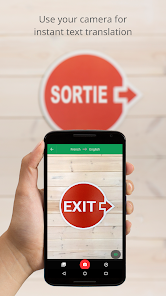
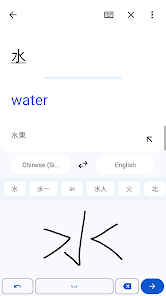
Using Google Translate for real feels like carrying a secret decoder ring. The main screen is simple: you pick your languages, type or paste text, and hit translate. Past that, there's a camera icon for translating text from images, a conversation mode for live chatting, and a handwriting option for drawn characters. I played with it on a restaurant menu in Korean. I just tapped the camera, pointed it at the text, and the app live-overlaid English words directly onto the photo. It wasn't perfect, but it was almost creepy how well it worked. There's a handy history feature that saves past translations, which I use to bookmark phrases for trips. The interface is mostly smooth, though switching between modes-like text to voice-can lag for a second on older phones. A tip I picked up: you can download offline language packs before a flight, and then it works without cell service. That's a lifesaver for subway rides where there's no data.
After a few weeks, I kept Google Translate installed because it's genuinely useful and free. It's got some quirks. The voice translation often messes up when you're in a noisy room, and it can't handle idioms very well. For quick, literal translations, it's amazing, but I'd never use it for important documents or sensitive conversations. Who would love this? Frequent travelers, international students, or people learning a new language casually. Who might skip it? Professionals who need legally accurate translations would want a human service or something like DeepL, which handles formal texts better. What sets it apart from apps like Microsoft Translator or iTranslate is the integration with Google's ecosystem. It works directly inside Chrome on my phone and on Android's pop-up bubbles. You don't feel tricked into keeping it. You just realize you've used it five times in a week, and it's tough to think of uninstalling it unless you strictly speak one language at home.
features
- 🌍 Real-time camera translation: You point your phone at any street sign or menu, and Google Translate instantly overlays the translation on the image without needing to take a photo. Compared to Microsoft Translator, which also has a camera feature, Google's version feels snappier and handles more scripts, like Thai or Hindi. This is the killer feature for travelers. Without it, you'd be manually typing each character, which is tedious and slow.
- 🗣️ Conversation mode: You tap the mic and speak in your language, then the app speaks the translation aloud and vice versa. It handles two-way dialogue surprisingly well, which apps like iTranslate try to do but often fail due to accuracy issues. With Google, you can have a slow, deliberate chat with a taxi driver. The outstanding part is the real-time processing, where it detects when each speaker stops talking without you pressing buttons.
- 📱 Offline downloads: You select a language pack, download it over Wi-Fi, and everything works without data. DeepL doesn't even offer free offline use, and Microsoft Translator requires you to save specific phrases offline rather than the full language. Google's approach means you literally never worry about roaming charges, and the translations are decent, not just simple word swaps.
pros
- 🔍 Vast language support: Google Translate covers over 100 languages, including obscure ones like Maori or Yiddish. Microsoft Translator and Apple's built-in translator both cover far fewer options. For a backpacker going off the beaten path, this is a deal-breaker.
- 🔍 Zero learning curve: You open the app, and it works immediately. There's no weird onboarding or premium upsell attempts during the first use, unlike some apps like iTranslate that push subscriptions before you even translate a word.
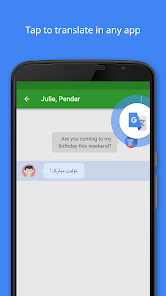
- 🔍 Cross-platform integration: You can copy text from any app on Android, and a floating bubble appears with the translation in one tap. Translate doesn't do this on iOS as well, making Android a smoother experience for multitaskers. Microsoft Translator has a browser extension, but the phone integration feels more native with Google.
cons
- ❌ Inconsistent accuracy with idioms: It absolutely flops on slang or cultural phrases. "Break a leg" becomes literal leg-breaking advice in many languages. DeepL handles contextually complex sentences much better, making it inferior for professional use.
- ❌ No speech-to-text in all languages: You can't use voice input for many less common languages, even though text translation is available. This limits practicality in field situations. Microsoft Translator supports voice input for some of the same languages Google doesn't, hitting a blind spot.
- ❌ Camera translation struggles on cluttered backgrounds: If the image has many fonts or angled text, Google misreads words. Apps like Waygo specialize in simpler camera interfaces for Asian languages and are more reliable in those specific scenarios.
- ❌ Data privacy concerns: Since everything goes through Google's cloud, there's no end-to-end encryption for your translations. For sensitive work material, you'd be better off with open-source alternatives like Libretranslate running locally on your own server.
Articles
![]()
Guide
How to Update Google Play Store on Android 2026
![]()
Guide
How to Download Older Versions of Android Apps
![]()
Guide
How to Download Apps Without Google Play Store
![]()
Guide
What Is an APK File for Android?
If you use an Android phone, you may have seen the term APK while searching for apps or games online. Some websites offer an APK download instead of a Google Play install button. Some users also mention APK files when talking about apps that are not available in their region, older app versions, or Android games downloaded outside the Play Store.
![]()
Guide
How to Install Games from Google Play for Beginners
Installing games on an Android phone is usually simple, but for beginners, the process can still feel confusing at first. You may not know where to search, which button to tap, whether the game is safe, or why Google Play sometimes asks for account settings, storage access, or payment information. If you are using an Android phone for the first time, learning how to install games from Google Play is one of the easiest ways to get started.
![]()
Guide
How Useful Gemini Is for Everyday Questions and Quick Tasks
emini feels different from many AI apps because it is not only trying to be a chatbot. After using it for everyday questions, quick writing, image understanding, and planning, I think its biggest strength is convenience.
![]()
Guide
What to Know Before Downloading APKs
For many Android users, downloading an APK is a common way to install apps and games. Sometimes an app is not available in a certain country.
![]()
Guide
ChatGPT Review: Is It Still the Best AI App in 2026?
![]()
Guide
Seedance 2.0 vs Sora: The Future of AI Video Generation
The AI video race has intensified dramatically over the past two years. Platforms like Sora from OpenAI and Luma Dream Machine pushed the boundaries of text-to-video realism. Yet, despite their impressive outputs, most tools still operate as probabilistic generators—you describe a scene, and the model interprets it. Control remains limited. With the February 2026 release of Seedance 2.0, developed by ByteDance, the paradigm shifted. Internally known as Jimeng 2.0, Seedance does not position itself as just another video model. It positions itself as an AI Director. Rather than guessing what you want, Seedance 2.0 allows you to direct what happens. This distinction defines everything that follows.









Recommended Apps
![]()
Home Design 3D
Anuman4.2
![]()
Truth or Dare Game - Party App
Chouic4.8
![]()
Photo Collage Maker
Scoompa4.7![]()
Learn to Draw Flower
Creative APPS4.2![]()
FIFA World Cup 2026™
FIFA2.8![]()
Mirror Plus: Mirror with Light
Digitalchemy, LLC4.4![]()
Meitu- Photo Editor & AI Art
Meitu (China) Limited4.5![]()
Perplexity - Ask Anything
PerplexityAI4.7![]()
GhostTube SLS Camera Alternate
GhostTube4![]()
Boom Chip Blast: 2-Player
Black Pyramid 3D Games Studio0![]()
Healthy Benefits+
Solutran, Inc.4.5![]()
Deepcheck AI Search Assistant
rohe.ai4![]()
Idol Prank Video Call & Chat
LightCode Solutions4![]()
Face Shape - Pretty Scale
GlintTec Apps3.9![]()
Plant App - Plant Identifier
ScaleUp4.6












































