
PREQUEL AI Filter Photo Editor

10M+
Installs
Prequel Inc.
Developer
-
Video Players & Editors
Category
-
Rated for 3+
Content Rating
-
support@prequelapp.com
Developer Email
-
https://prequel.app/privacy-policy/
Privacy Policy
Screenshots
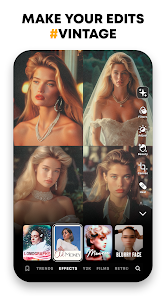
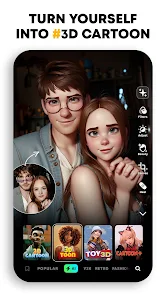
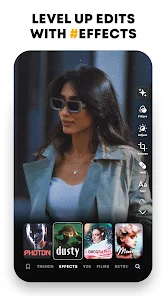
editor reviews
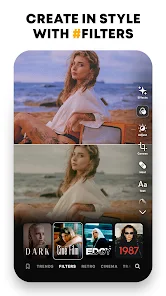
Prequel is a photo and video editing app that leans heavily into the AI-powered aesthetic filter space, sitting somewhere between a full-featured editor like VSCO and a one-trick novelty app. You mostly use it to slap trendy, often dramatic, filters onto your pictures—think anime-inspired looks, retro Y2K vibes, or moody cinematic tones. I downloaded it from Google Play after seeing a friend's story that looked suspiciously like a high-budget movie still, and the install count is pretty huge, so it's definitely not obscure. The app is free to download, and you can mess around with a decent chunk of filters without paying, though the really good ones (and the 4K export) are locked behind a subscription. First impression after launching it was a bit overwhelming—there's a ton of presets staring at you, and the interface is flashy, almost like the app is screaming "try me!"
Once you actually start using it, the workflow is straightforward but not always intuitive. You pick a photo from your gallery or shoot one in-app, and then you swipe through endless filter thumbnails at the bottom. Tapping one applies it instantly, and you can tweak the intensity with a slider, which is nice because some of these filters are way too strong out of the box. The onboarding tries to guide you to the paid stuff right away, which is a bit annoying, but if you ignore that and just scroll past the "premium" tags, you'll find a solid selection of free looks. I spent a good 10 minutes just swapping between "Anime" and "Film Noir" presets on a boring selfie, and the results were genuinely fun—it turned a dull photo into something that looked like a sketch. A small tip: if you're editing a video, the process is the same, but shorter clips process way faster, and you can preview before rendering, which saves you from waiting on a 30-second export that looks weird.
After a few weeks of playing with it, I'd say this app is perfect if you're into that hyper-stylized, Instagram-ready look without wanting to learn layers and masks in Lightroom. I keep it installed because it's great for lazy edits—tap once, and you're done. But honestly, if you prefer natural-looking adjustments or you already have something like Snapseed, you probably won't need Prequel long-term. The subscription price is a bit steep for what's essentially a filter pack, and there are ads between steps if you're on the free tier, which gets old. It's a fun tool for casual users who want to stand out fast, but serious editors will find it limiting. I'd compare it to Remini in spirit—both are niche magic-makers—but Prequel feels more about style than fixing flaws.
features
- ✨ The standout feature is definitely the AI-generated filters that go beyond usual adjustments. Unlike VSCO, which gives you subtle film looks, Prequel has presets like "Cyberpunk" or "Comic" that completely transform the photo's vibe—it'll turn a cloudy sky into neon lights or your face into a cartoon. The results are consistent too, not hit-or-miss like some other AI apps.
- ✨ Another big plus is the real-time preview for video. Most editors, like InShot or CapCut, require you to apply a filter and then render to see the full effect. But in Prequel, you can swipe through presets and watch the video change on the fly, which saves a ton of time when you're experimenting.
- ✨ The "Portrait" mode is surprisingly solid. While apps like FaceApp are known for facial tweaks, Prequel's portrait filters keep your features intact while changing the lighting and background tone. For example, a selfie taken in bad indoor light can look like it was shot in a studio with just one tap, no manual sliders needed.
pros
- 📸 The filter variety is a major strength. Prequel offers over 300 presets, covering everything from vintage grain to futuristic glitch effects. In comparison, Adobe Lightroom has powerful tools but lacks these ready-to-use, creative styles without installing extra packs.
- 📸 The UI is designed for speed. You can go from picking a photo to saving an edited version in under 30 seconds, which beats the more cluttered interfaces of apps like PicsArt. There's no confusion about where the filters are—they're all upfront.
- 📸 It handles video well. Many photo-focused filter apps, like A Color Story, can't edit video at all, but Prequel does both smoothly. This makes it a one-stop shop for someone posting mixed media content on social platforms.
cons
- ⚠️ The subscription model is annoying. While some filters are free, the best ones and the 4K export require a monthly or yearly payment. Apps like Snapseed or VSCO offer more free features, or a one-time purchase, so Prequel feels greedy in comparison.
- ⚠️ Performance can lag on older phones. I tried it on a mid-range device, and applying a filter to a high-res photo took a noticeable couple of seconds to render. Similar apps like Remini are more optimized for slower hardware, so this could frustrate budget users.
- ⚠️ There's no manual editing layer. You can't adjust exposure, contrast, or shadows independently—only the filter's intensity. If you prefer granular control like in Lightroom Mobile, you'll feel boxed in here.
Articles
![]()
Guide
How to Update Google Play Store on Android 2026
![]()
Guide
How to Download Older Versions of Android Apps
![]()
Guide
How to Download Apps Without Google Play Store
![]()
Guide
What Is an APK File for Android?
If you use an Android phone, you may have seen the term APK while searching for apps or games online. Some websites offer an APK download instead of a Google Play install button. Some users also mention APK files when talking about apps that are not available in their region, older app versions, or Android games downloaded outside the Play Store.
![]()
Guide
How to Install Games from Google Play for Beginners
Installing games on an Android phone is usually simple, but for beginners, the process can still feel confusing at first. You may not know where to search, which button to tap, whether the game is safe, or why Google Play sometimes asks for account settings, storage access, or payment information. If you are using an Android phone for the first time, learning how to install games from Google Play is one of the easiest ways to get started.
![]()
Guide
How Useful Gemini Is for Everyday Questions and Quick Tasks
emini feels different from many AI apps because it is not only trying to be a chatbot. After using it for everyday questions, quick writing, image understanding, and planning, I think its biggest strength is convenience.
![]()
Guide
What to Know Before Downloading APKs
For many Android users, downloading an APK is a common way to install apps and games. Sometimes an app is not available in a certain country.
![]()
Guide
ChatGPT Review: Is It Still the Best AI App in 2026?
![]()
Guide
Seedance 2.0 vs Sora: The Future of AI Video Generation
The AI video race has intensified dramatically over the past two years. Platforms like Sora from OpenAI and Luma Dream Machine pushed the boundaries of text-to-video realism. Yet, despite their impressive outputs, most tools still operate as probabilistic generators—you describe a scene, and the model interprets it. Control remains limited. With the February 2026 release of Seedance 2.0, developed by ByteDance, the paradigm shifted. Internally known as Jimeng 2.0, Seedance does not position itself as just another video model. It positions itself as an AI Director. Rather than guessing what you want, Seedance 2.0 allows you to direct what happens. This distinction defines everything that follows.









Recommended Apps
![]()
Home Design 3D
Anuman4.2
![]()
Truth or Dare Game - Party App
Chouic4.8
![]()
Photo Collage Maker
Scoompa4.7![]()
Learn to Draw Flower
Creative APPS4.2![]()
FIFA World Cup 2026™
FIFA2.8![]()
Mirror Plus: Mirror with Light
Digitalchemy, LLC4.4![]()
Meitu- Photo Editor & AI Art
Meitu (China) Limited4.5![]()
Perplexity - Ask Anything
PerplexityAI4.7![]()
GhostTube SLS Camera Alternate
GhostTube4![]()
Boom Chip Blast: 2-Player
Black Pyramid 3D Games Studio0![]()
Healthy Benefits+
Solutran, Inc.4.5![]()
Deepcheck AI Search Assistant
rohe.ai4![]()
Idol Prank Video Call & Chat
LightCode Solutions4![]()
Face Shape - Pretty Scale
GlintTec Apps3.9![]()
Plant App - Plant Identifier
ScaleUp4.6












































