

To Do List

10M+
Installs
Splend Apps
Developer
-
Productivity
Category
-
Everyone
Content Rating
-
support@splendapps.com
Developer Email
-
https://splendapps.com/privacy
Privacy Policy
Screenshots
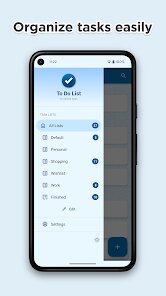
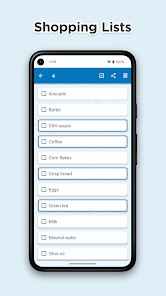
editor reviews
To Do List, created by Splend Apps, is a task management tool designed to help users organize daily responsibilities and long-term goals. Available for download on Google Play, this application focuses on simplicity and ease of use rather than overwhelming users with complex project management features. The app is free to install and contains ads, though a paid version removes those interruptions for those who prefer an uninterrupted workflow.
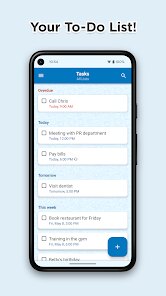
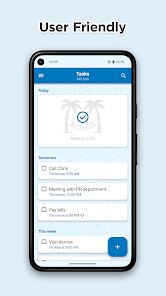
The interface places a straightforward input field at the top where tasks can be typed in and added with a single tap. Each item appears in a clean list that can be checked off when completed or swiped to delete entirely. Organizing tasks into different lists or setting priorities is handled through a simple menu, making the basic functions accessible without requiring much exploration. I found the responsiveness to be good, with no noticeable lag when adding or removing items, which keeps the process feeling smooth.
Compared to more feature-rich options like Todoist or Microsoft To Do, this app takes a noticeably minimal approach. Those other platforms offer collaboration tools, intricate labeling systems, and integration with calendars, while Splend Apps' version focuses purely on the act of listing and checking off. For someone who just wants a straightforward digital notepad for tasks rather than a full productivity suite, this stripped-down design actually feels like a strength rather than a limitation, though power users may find it lacking.
features
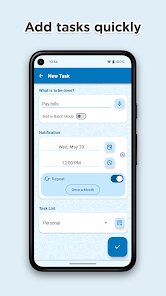
- The reminder system works reliably. Setting a time and date for a task triggers a notification that actually appears when expected, which is something some larger apps occasionally fail to deliver. I missed fewer deadlines after setting recurring reminders for weekly chores compared to my previous app.
- Color coding options add a visual layer that helps distinguish between work, personal, and urgent tasks at a glance. Unlike similar lightweight apps that use only text-based lists, this feature makes the daily view more scannable without adding unnecessary complexity.
- The widget displays upcoming tasks directly on the home screen without needing to open the app. While not as customizable as the widgets in TickTick, it provides enough information for quick reference and updates in real time.
- Data backup to Google Drive is handled automatically, which saved me after switching phones. Many free task managers lack this feature or require manual exports, so having it built in without extra setup costs is a practical advantage.
pros
- Getting started takes less than a minute after installation, with no account creation required for basic use.
- Battery and memory usage remain low even with dozens of active tasks, so it runs well on older devices.
- Recurring tasks like monthly bills are easy to set up and never dropped from the list after completion.
- Search function works across all lists and finds items quickly, which becomes useful when the task count grows.
cons
- The free version includes ads that occasionally appear between screens, which can interrupt focus during quick task entries.
- No option to attach files or images to tasks limits its usefulness for project-based tracking.
- Collaboration features are absent, so sharing a list with family or coworkers is not possible within the app itself.
- Sorting options are basic, with no way to manually reorder tasks after adding them without deleting and recreating entries.
Articles
![]()
Guide
How to Update Google Play Store on Android 2026
![]()
Guide
How to Download Older Versions of Android Apps
![]()
Guide
How to Download Apps Without Google Play Store
![]()
Guide
What Is an APK File for Android?
If you use an Android phone, you may have seen the term APK while searching for apps or games online. Some websites offer an APK download instead of a Google Play install button. Some users also mention APK files when talking about apps that are not available in their region, older app versions, or Android games downloaded outside the Play Store.
![]()
Guide
How to Install Games from Google Play for Beginners
Installing games on an Android phone is usually simple, but for beginners, the process can still feel confusing at first. You may not know where to search, which button to tap, whether the game is safe, or why Google Play sometimes asks for account settings, storage access, or payment information. If you are using an Android phone for the first time, learning how to install games from Google Play is one of the easiest ways to get started.
![]()
Guide
How Useful Gemini Is for Everyday Questions and Quick Tasks
emini feels different from many AI apps because it is not only trying to be a chatbot. After using it for everyday questions, quick writing, image understanding, and planning, I think its biggest strength is convenience.
![]()
Guide
What to Know Before Downloading APKs
For many Android users, downloading an APK is a common way to install apps and games. Sometimes an app is not available in a certain country.
![]()
Guide
ChatGPT Review: Is It Still the Best AI App in 2026?
![]()
Guide
Seedance 2.0 vs Sora: The Future of AI Video Generation
The AI video race has intensified dramatically over the past two years. Platforms like Sora from OpenAI and Luma Dream Machine pushed the boundaries of text-to-video realism. Yet, despite their impressive outputs, most tools still operate as probabilistic generators—you describe a scene, and the model interprets it. Control remains limited. With the February 2026 release of Seedance 2.0, developed by ByteDance, the paradigm shifted. Internally known as Jimeng 2.0, Seedance does not position itself as just another video model. It positions itself as an AI Director. Rather than guessing what you want, Seedance 2.0 allows you to direct what happens. This distinction defines everything that follows.









Recommended Apps
![]()
Home Design 3D
Anuman4.2
![]()
Truth or Dare Game - Party App
Chouic4.8
![]()
Photo Collage Maker
Scoompa4.7![]()
Learn to Draw Flower
Creative APPS4.2![]()
FIFA World Cup 2026™
FIFA2.8![]()
Mirror Plus: Mirror with Light
Digitalchemy, LLC4.4![]()
Meitu- Photo Editor & AI Art
Meitu (China) Limited4.5![]()
Perplexity - Ask Anything
PerplexityAI4.7![]()
GhostTube SLS Camera Alternate
GhostTube4![]()
Boom Chip Blast: 2-Player
Black Pyramid 3D Games Studio0![]()
Healthy Benefits+
Solutran, Inc.4.5![]()
Deepcheck AI Search Assistant
rohe.ai4![]()
Idol Prank Video Call & Chat
LightCode Solutions4![]()
Face Shape - Pretty Scale
GlintTec Apps3.9![]()
Plant App - Plant Identifier
ScaleUp4.6











































