
Photoleap: AI Photo Generator

10M+
Installs
Lightricks Ltd.
Developer
-
Generative AI
Category
-
Everyone
Content Rating
-
Photoleap.Android.support@lightricks.com
Developer Email
-
https://static.lightricks.com/legal/privacy-policy.html
Privacy Policy
Screenshots
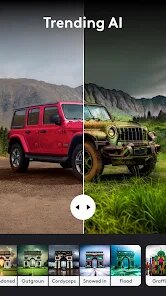

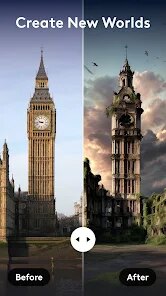
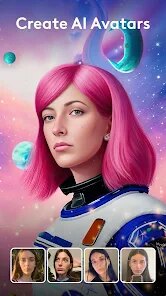
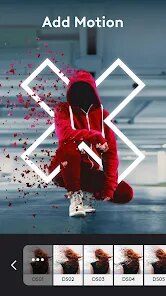
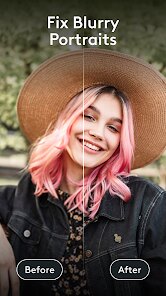
editor reviews
Photoleap is an AI-powered photo editing app developed by Lightricks Ltd., the same team behind popular tools like Facetune. It lets you transform ordinary pictures into stylized artwork, generate images from text prompts, and remove backgrounds with a single tap. I first came across it while browsing the App Store and decided to give it a shot since it was free to download with optional in-app purchases. Once I launched it, the interface immediately felt polished and modern, with a clean layout that didn't bombard me with ads. The first impression was that it's built for anyone who wants quick, creative edits without learning complex software.
After using it for a while, I found the hands-on experience pretty smooth. The onboarding walks you through the main tools like AI enhancement, text-to-image generation, and the remove background feature. I started by uploading a photo of my dog and tried the “Magic Edit” option, which lets you highlight parts of an image and describe what you want instead. It worked surprisingly well, though it took about 10-15 seconds to process. The interface has a bottom toolbar that groups similar actions, so switching between filters, backgrounds, and text overlays feels logical. One small tip I picked up is to use the “AI Expand” tool when you need to extend a landscape shot without cropping the original subject. It's not perfect, but it saves time compared to doing it manually in other editors.
After testing Photoleap for a couple of weeks, I think it's ideal for casual users who want creative results without learning traditional software. Someone who enjoys social media content, digital art experiments, or quick product mockups would get a lot out of it. But if you're a professional photographer or someone who needs pixel-level control, you may find it limiting—there's no direct clone stamp or advanced masking tool. Compared to similar apps like Picsart or Snapseed, Photoleap feels more focused on AI-driven one-tap solutions rather than manual tweaking. I'm keeping it installed because it's fun for creating quick story posts and wallpapers, though I could see myself uninstalling it if the free tier becomes too restrictive with daily usage caps. It's a solid tool, but not a replacement for heavier editing suites.
features
- 🖌️ AI Text-to-Image Generation – You type a description, and Photoleap creates an image from scratch. This sets it apart from basic editors like Picsart, which mainly rely on pre-made stickers and templates. The results are often more stylized and creative, though they can sometimes look a bit cartoonish.
- 🖌️ Magic Edit & AI Expand – Highlight a part of your photo, type what you want there (like “a red balloon”), and the app fills it in. Similarly, AI Expand extends the canvas and fills in plausible surroundings. Photoshop's generative fill does this faster, but Photoleap makes it accessible on mobile without a subscription.
- 🖌️ Background Removal & Cutouts – One tap removes backgrounds fairly accurately even with complex edges like hair. I've used this to swap out winter backgrounds for beach scenes. It rivals the precision of Remove.bg but is integrated right into the editing flow, saving steps.
- 🖌️ Diverse Art Styles & Filters – You can apply effects like comic book, oil painting, or neon glitch. Unlike Snapseed, which focuses on realistic photo correction, Photoleap leans into expressive, sometimes whimsical transformations. It's great for making your photos stand out on social media.
pros
- 👍 Ease of Use – The interface is intuitive even for beginners. Unlike Lightroom, which has a steep learning curve, Photoleap's tools are clearly labeled and backed by previews. I didn't need a tutorial to start editing.
- 👍 Speed on Mobile – Processing is quick for most tasks. While Photoshop on desktop takes several seconds for generative fill, Photoleap completes similar operations in under 20 seconds on my iPhone 14. That's impressive for a mobile app.
- 👍 Creative Templates – The app includes trendy templates for collages and social posts. Picsart has a bigger library, but Photoleap's templates feel more curated and less cluttered with ads, which makes the editing experience smoother.
- 👍 Regular Updates – Lightricks pushes new styles and features frequently. Since I downloaded it, they've added seasonal filters and improved the text-to-image model. It feels like the app is actively evolving rather than being abandoned.
cons
- 👎 Frequent Paywalls – Many of the best features like high-resolution export and unlimited AI generations require a subscription. The free version limits you to a few daily uses, which can be frustrating. In contrast, Snapseed is completely free with no restrictions.
- 👎 Occasional Processing Errors – Sometimes the AI generates weird artifacts, like hands with six fingers or strange textures in background fills. Adobe Photoshop's generative fill is more reliable, but Photoleap's errors feel more noticeable because they stand out against polished photos.
- 👎 Limited Manual Control – You can't fine-tune curves, masks, or layers like in Photoshop Express. If you need precise adjustments, you'll still need a more traditional editor. Photoleap is powerful, but it's not a replacement for a full editing suite.
- 👎 No Desktop Version – The app is mobile-only. If you prefer editing on a laptop or tablet with a larger screen, you're out of luck. Canva offers a web version with similar AI tools, which gives it an edge for cross-platform users.
Articles
![]()
Guide
How to Update Google Play Store on Android 2026
![]()
Guide
How to Download Older Versions of Android Apps
![]()
Guide
How to Download Apps Without Google Play Store
![]()
Guide
What Is an APK File for Android?
If you use an Android phone, you may have seen the term APK while searching for apps or games online. Some websites offer an APK download instead of a Google Play install button. Some users also mention APK files when talking about apps that are not available in their region, older app versions, or Android games downloaded outside the Play Store.
![]()
Guide
How to Install Games from Google Play for Beginners
Installing games on an Android phone is usually simple, but for beginners, the process can still feel confusing at first. You may not know where to search, which button to tap, whether the game is safe, or why Google Play sometimes asks for account settings, storage access, or payment information. If you are using an Android phone for the first time, learning how to install games from Google Play is one of the easiest ways to get started.
![]()
Guide
How Useful Gemini Is for Everyday Questions and Quick Tasks
emini feels different from many AI apps because it is not only trying to be a chatbot. After using it for everyday questions, quick writing, image understanding, and planning, I think its biggest strength is convenience.
![]()
Guide
What to Know Before Downloading APKs
For many Android users, downloading an APK is a common way to install apps and games. Sometimes an app is not available in a certain country.
![]()
Guide
ChatGPT Review: Is It Still the Best AI App in 2026?
![]()
Guide
Seedance 2.0 vs Sora: The Future of AI Video Generation
The AI video race has intensified dramatically over the past two years. Platforms like Sora from OpenAI and Luma Dream Machine pushed the boundaries of text-to-video realism. Yet, despite their impressive outputs, most tools still operate as probabilistic generators—you describe a scene, and the model interprets it. Control remains limited. With the February 2026 release of Seedance 2.0, developed by ByteDance, the paradigm shifted. Internally known as Jimeng 2.0, Seedance does not position itself as just another video model. It positions itself as an AI Director. Rather than guessing what you want, Seedance 2.0 allows you to direct what happens. This distinction defines everything that follows.









Recommended Apps
![]()
Home Design 3D
Anuman4.2
![]()
Truth or Dare Game - Party App
Chouic4.8
![]()
Photo Collage Maker
Scoompa4.7![]()
Learn to Draw Flower
Creative APPS4.2![]()
FIFA World Cup 2026™
FIFA2.8![]()
Mirror Plus: Mirror with Light
Digitalchemy, LLC4.4![]()
Meitu- Photo Editor & AI Art
Meitu (China) Limited4.5![]()
Perplexity - Ask Anything
PerplexityAI4.7![]()
GhostTube SLS Camera Alternate
GhostTube4![]()
Boom Chip Blast: 2-Player
Black Pyramid 3D Games Studio0![]()
Healthy Benefits+
Solutran, Inc.4.5![]()
Deepcheck AI Search Assistant
rohe.ai4![]()
Idol Prank Video Call & Chat
LightCode Solutions4![]()
Face Shape - Pretty Scale
GlintTec Apps3.9![]()
Plant App - Plant Identifier
ScaleUp4.6












































