
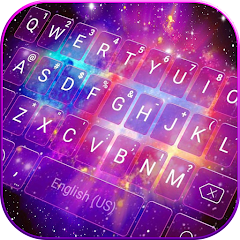
Galaxy Starry Keyboard Backgro

1M+
Installs
Fun Keyboard Theme for Android
Developer
-
Productivity
Category
-
Rated for 3+
Content Rating
-
baojieminn@gmail.com
Developer Email
-
http://www.kikatech.com/privacy_en_kika_keyboard_theme.html
Privacy Policy
Screenshots

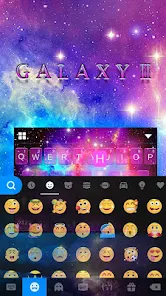
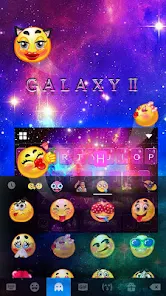

editor reviews
Galaxy Starry Keyboard Background is a customization app designed to change the look of your phone's keyboard. It falls squarely in the personalization category, letting you swap out the standard boring keys for cosmic, starry backgrounds. Most people download it to give their typing screen a fresh, unique vibe, especially if they're into space or night-sky aesthetics. When you launch the app after installing it from Google Play, the first impression is a bit hit-or-miss. The interface is straightforward, but the ads pop up pretty quickly, which can feel a little intrusive. Still, the promise of cool galaxy themes keeps you tapping around.
After you get past the initial setup, using the app is fairly simple. You pick a theme from the gallery, hit apply, and the app usually guides you through enabling it in your system settings. The actual experience varies a lot. Some themes look fantastic, with deep blues and purples that blend nicely. But others feel more like cheap wallpapers stretched across the keys. The keyboard itself is functional but not special; the predictive text is average, and sometimes it lags a bit when switching themes. A small tip is to favorite a few designs first, because browsing through dozens of similar starry wallpapers gets tiring. There are also annoying moments where you click a free theme, but it tries to push a paid pack instead.
Honestly, this app is great if you just want a quick visual change and you're not too picky about performance. Someone who loves space photos and changes their phone theme every week will enjoy it. But if you're looking for a smooth, reliable typing experience, you might get frustrated. Compared to something like Gboard or SwiftKey, this feels like a skin on top of a basic keyboard, not a full replacement. It also bombards you with ads unless you buy the premium version. I can see people keeping it for a few days, then uninstalling it once they realize the novelty wears off and there's not much depth. If you're just bored and want a pretty keyboard for a bit, go for it.
features
- 🪐 Vast library of space wallpapers - This is the main draw. You get dozens of galaxy, nebula, and starfield backgrounds that actually look high-resolution on the keyboard. Unlike Google Keyboard, which only offers a few color themes, this app lets you change the entire backdrop to something cosmic.
- 🪐 Easy one-tap apply process - Once you find a design you like, applying it takes just a couple of steps through the system settings. It's faster than manually setting a custom wallpaper for each keyboard app, unlike older customization tools that required complex configuration.
- 🪐 Regular content updates - The developers add new starry packs every few weeks. This keeps the app from getting stale, especially since many rivals in the same category just recycle the same 10 backgrounds forever.
- 🪐 Low battery impact - Because it's just an overlay on your keyboard, the app doesn't drain your phone's battery like live wallpaper apps do. You can run it all day without worrying about extra power use.
pros
- 🌟 Unlimited free themes compared to SwiftKey's limited free options - SwiftKey gives you a handful of basic themes for free, then pushes paid ones. Here, you get access to most of the starry backgrounds without spending a cent.
- 🌟 Lighter on storage than FancyKey - FancyKey's keyboard packs can take up over 100MB each. This app keeps each theme small, so your phone won't run out of space quickly.
- 🌟 Simple design without bloatware - Unlike some keyboard apps that add extra emoji tools or stickers, this one stays focused on the background. It's just a wallpaper changer, which some users prefer.
- 🌟 Works with your existing keyboard app - You don't have to switch to a new keyboard. The app applies the background to whatever keyboard you're already using, which is much more convenient than forcing a complete change.
cons
- 🌑 Heavy ad interruptions compared to Gboard's completely ad-free experience - Gboard has no ads at all. This app shows a full-screen ad after every three or four keyboard openings, which gets really annoying during fast typing.
- 🌑 No customization for key sounds or vibrations - Unlike SwiftKey, where you can tweak sound effects and haptic feedback, this app only changes the wallpaper. There's no way to adjust the typing feel.
- 🌑 Inconsistent theme quality - Some starry backgrounds look crisp and professional, while others appear stretched or pixelated on certain screen sizes. There's no preview adjuster to fix this, which is frustrating.
- 🌑 Does not support third-party keyboards well - If you use a special keyboard like Grammarly or Fleksy, the app might not apply the wallpaper correctly. Users of popular phone brands like Samsung or Xiaomi also report issues with compatibility.
Articles
![]()
Guide
How to Update Google Play Store on Android 2026
![]()
Guide
How to Download Older Versions of Android Apps
![]()
Guide
How to Download Apps Without Google Play Store
![]()
Guide
What Is an APK File for Android?
If you use an Android phone, you may have seen the term APK while searching for apps or games online. Some websites offer an APK download instead of a Google Play install button. Some users also mention APK files when talking about apps that are not available in their region, older app versions, or Android games downloaded outside the Play Store.
![]()
Guide
How to Install Games from Google Play for Beginners
Installing games on an Android phone is usually simple, but for beginners, the process can still feel confusing at first. You may not know where to search, which button to tap, whether the game is safe, or why Google Play sometimes asks for account settings, storage access, or payment information. If you are using an Android phone for the first time, learning how to install games from Google Play is one of the easiest ways to get started.
![]()
Guide
How Useful Gemini Is for Everyday Questions and Quick Tasks
emini feels different from many AI apps because it is not only trying to be a chatbot. After using it for everyday questions, quick writing, image understanding, and planning, I think its biggest strength is convenience.
![]()
Guide
What to Know Before Downloading APKs
For many Android users, downloading an APK is a common way to install apps and games. Sometimes an app is not available in a certain country.
![]()
Guide
ChatGPT Review: Is It Still the Best AI App in 2026?
![]()
Guide
Seedance 2.0 vs Sora: The Future of AI Video Generation
The AI video race has intensified dramatically over the past two years. Platforms like Sora from OpenAI and Luma Dream Machine pushed the boundaries of text-to-video realism. Yet, despite their impressive outputs, most tools still operate as probabilistic generators—you describe a scene, and the model interprets it. Control remains limited. With the February 2026 release of Seedance 2.0, developed by ByteDance, the paradigm shifted. Internally known as Jimeng 2.0, Seedance does not position itself as just another video model. It positions itself as an AI Director. Rather than guessing what you want, Seedance 2.0 allows you to direct what happens. This distinction defines everything that follows.









Recommended Apps
![]()
Home Design 3D
Anuman4.2
![]()
Truth or Dare Game - Party App
Chouic4.8
![]()
Photo Collage Maker
Scoompa4.7![]()
Learn to Draw Flower
Creative APPS4.2![]()
FIFA World Cup 2026™
FIFA2.8![]()
Mirror Plus: Mirror with Light
Digitalchemy, LLC4.4![]()
Meitu- Photo Editor & AI Art
Meitu (China) Limited4.5![]()
Perplexity - Ask Anything
PerplexityAI4.7![]()
GhostTube SLS Camera Alternate
GhostTube4![]()
Boom Chip Blast: 2-Player
Black Pyramid 3D Games Studio0![]()
Healthy Benefits+
Solutran, Inc.4.5![]()
Deepcheck AI Search Assistant
rohe.ai4![]()
Idol Prank Video Call & Chat
LightCode Solutions4![]()
Face Shape - Pretty Scale
GlintTec Apps3.9![]()
Plant App - Plant Identifier
ScaleUp4.6











































