

Fake Police Prank Call & Chat

1M+
Installs
Pear Soft
Developer
-
Entertainment
Category
-
Rated for 3+
Content Rating
-
support@pearsoft.app
Developer Email
-
http://pearsoft.app/privacy-policy/
Privacy Policy
Screenshots
editor reviews
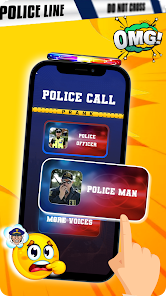
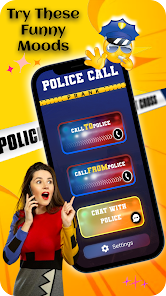
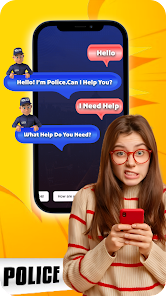
Fake Police Prank Call & Chat by Pear Soft is one of those joke apps you download when you want to mess with your friends. It falls squarely into the prank call simulation category, and basically, it lets you set up a fake incoming video call that looks like it comes from a police officer. I saw it had over a million installs on Google Play, completely free to download, and figured I might as well give it a shot for a laugh. After launching it, the first impression was honestly a bit rough - the interface looks pretty outdated, like something from several Android versions ago, with clunky icons and a confusing layout that doesn't scream "polish". No registration needed though, so that was a plus, and I jumped straight in to see what it could do. There are some banner ads right off the bat, which is expected for a free app, but they don't interrupt the fun too much once you get going.
Once I started poking around, the actual hands-on experience was a mixed bag. The main action is basically picking a contact from your phone or simulating a fake caller, and then you choose between a call or a video chat with a very fake-looking officer. The onboarding is almost non-existent, so I just tapped around until I figured it out. The simulated call screen shows a stern-looking man in uniform, and the app lets you fake the ringing and then "answer" to show your buddy. One thing that felt smooth was how fast the call screen loads - no lag there. But the video quality of the fake officer is terrible, like a low-res JPEG with some weird animation loops. A practical tip I picked up: if you want it to look more convincing, set it up in advance and then hand the phone to your friend without them seeing the prep screen. It's definitely not for serious use, but for a quick laugh at a party, it does the job.
After using it for a while, I have mixed feelings. If you're the kind of person who loves pulling dumb, harmless pranks on friends or family, this app will probably get a few chuckles out of you. But if you're looking for something that actually looks realistic or has high production value, you're going to be disappointed. Compared to something like "Prank Call - Dial Fake Call Simulator" which has a much cleaner design and more realistic fake caller options, this Pear Soft app feels half-baked. The fake police angle is unique, but the execution is so rough that it hurts its charm. I can see someone keeping it installed for a week to use at a gathering, but after the jokes get old and your friends catch on, uninstalling is pretty likely. It's fun for a moment, but not something I'd keep around long-term.
features
- 📞 The app's standout feature is the fake video call simulation from a police officer, which is something you don't see in the more generic "Fake Call - Prank Call" apps that just do audio. The visual element adds a layer of shock value that makes the prank hit harder, and it's dead simple to set up in under a minute.
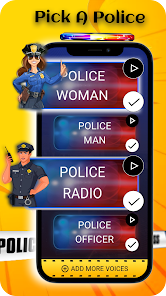
- 🎥 It offers pre-recorded video clips of a fake officer talking, so when you "answer" the call, your friend sees this stern guy speaking. Compared to "Prank Call Simulator Pro" which only shows a static image, this gives a more lively feel, even if the video quality is pixelated and the audio lines are repetitive.
- 📲 The app lets you customize the caller name and profile picture, so you can tailor it to look like your local police station or a specific officer. Apps like "Fake Call from Santa" don't offer this level of personalization, making the Pear Soft version more flexible for targeted pranks.
pros
- 🌟 It's completely free with no upfront cost, unlike "Prank Call Dialer" which locks decent features behind a paywall. You get the core prank functionality without spending a dime, which is a big win for casual users who just want a quick laugh.
- 😄 The surprise factor is genuine because seeing a police officer on a video call is something most people don't expect. Compared to apps like "Fake Call from Mom," this one triggers a real reaction due to the authority figure angle, making the prank more memorable.
- ⚡ Setup is lightning fast - no accounts, no sign-ups, just pick a contact and go. "Fake Call & Chat Prank" requires you to watch ads before every setup, while this Pear Soft version lets you skip that hassle, so you can prank someone in seconds.
cons
- 🔇 The app is riddled with intrusive banner ads and occasional full-screen video ads that pop up right when you're about to execute the prank, ruining the timing. "Prank Call Simulator Pro" has ads too, but they're much less aggressive and don't interrupt the flow like this.
- 😕 The fake video quality is embarrassingly low-res, with the officer's face looking blocky and the animation stuttering. Compared to "Fake Call Video Prank," which uses higher resolution clips, this one feels like a budget knockoff from 2015.
- 📉 The user interface is cluttered and confusing, with tiny buttons and unclear labels. "Prank Call Dialer" has a much cleaner layout that even a first-timer can navigate without guesswork, whereas here I had to tap around blindly to find the right menu.
- 🔄 It lacks any realistic background sounds or environment effects, so the fake call feels dead silent except for a low-quality ringing. "Real Call Prank" adds subtle ambient noise like traffic or office chatter, making the whole simulation way more convincing than this app's bare-bones offering.
Articles
![]()
Guide
How to Update Google Play Store on Android 2026
![]()
Guide
How to Download Older Versions of Android Apps
![]()
Guide
How to Download Apps Without Google Play Store
![]()
Guide
What Is an APK File for Android?
If you use an Android phone, you may have seen the term APK while searching for apps or games online. Some websites offer an APK download instead of a Google Play install button. Some users also mention APK files when talking about apps that are not available in their region, older app versions, or Android games downloaded outside the Play Store.
![]()
Guide
How to Install Games from Google Play for Beginners
Installing games on an Android phone is usually simple, but for beginners, the process can still feel confusing at first. You may not know where to search, which button to tap, whether the game is safe, or why Google Play sometimes asks for account settings, storage access, or payment information. If you are using an Android phone for the first time, learning how to install games from Google Play is one of the easiest ways to get started.
![]()
Guide
How Useful Gemini Is for Everyday Questions and Quick Tasks
emini feels different from many AI apps because it is not only trying to be a chatbot. After using it for everyday questions, quick writing, image understanding, and planning, I think its biggest strength is convenience.
![]()
Guide
What to Know Before Downloading APKs
For many Android users, downloading an APK is a common way to install apps and games. Sometimes an app is not available in a certain country.
![]()
Guide
ChatGPT Review: Is It Still the Best AI App in 2026?
![]()
Guide
Seedance 2.0 vs Sora: The Future of AI Video Generation
The AI video race has intensified dramatically over the past two years. Platforms like Sora from OpenAI and Luma Dream Machine pushed the boundaries of text-to-video realism. Yet, despite their impressive outputs, most tools still operate as probabilistic generators—you describe a scene, and the model interprets it. Control remains limited. With the February 2026 release of Seedance 2.0, developed by ByteDance, the paradigm shifted. Internally known as Jimeng 2.0, Seedance does not position itself as just another video model. It positions itself as an AI Director. Rather than guessing what you want, Seedance 2.0 allows you to direct what happens. This distinction defines everything that follows.









Recommended Apps
![]()
Home Design 3D
Anuman4.2
![]()
Truth or Dare Game - Party App
Chouic4.8
![]()
Photo Collage Maker
Scoompa4.7![]()
Learn to Draw Flower
Creative APPS4.2![]()
FIFA World Cup 2026™
FIFA2.8![]()
Mirror Plus: Mirror with Light
Digitalchemy, LLC4.4![]()
Meitu- Photo Editor & AI Art
Meitu (China) Limited4.5![]()
Perplexity - Ask Anything
PerplexityAI4.7![]()
GhostTube SLS Camera Alternate
GhostTube4![]()
Boom Chip Blast: 2-Player
Black Pyramid 3D Games Studio0![]()
Healthy Benefits+
Solutran, Inc.4.5![]()
Deepcheck AI Search Assistant
rohe.ai4![]()
Idol Prank Video Call & Chat
LightCode Solutions4![]()
Face Shape - Pretty Scale
GlintTec Apps3.9![]()
Plant App - Plant Identifier
ScaleUp4.6












































