

Prank Call Voice Changer App

1M+
Installs
Ownage Labs Apps
Developer
-
Entertainment
Category
-
Rated for 12+
Content Rating
-
ownagelabs@gmail.com
Developer Email
-
https://www.ownagepranks.com/tos-privacy-policy
Privacy Policy
Screenshots
editor reviews
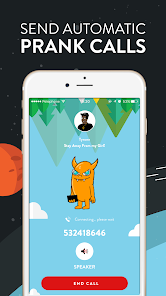
If you've ever wanted to sound like a grumpy old man, a squeaky cartoon character, or even a robot with attitude, the Prank Call Voice Changer app from Ownage Labs Apps is exactly what you'd grab. It's a voice modulation tool, sitting comfortably in the entertainment and communication category on both Google Play and the App Store. You can download it for free, and the first thing that hits you after launching it is how ready it feels—there's no complicated setup, just a big red button and a list of wacky voices staring back at you. With over a million installs, it's clearly been a favorite for people who love messing with friends over the phone or recording silly audio clips. The initial impression is that it's playful and intentionally silly, not trying to be a serious audio editor, which makes the whole thing feel lighthearted right from the start.
Once you start using it, the experience is pretty straightforward. You pick a voice from the library—something like "Elf" or "Old Man"—and then you can either record a message or make a live call. The interface isn't flashy, but it's not cluttered either; everything is where you'd expect it. When you hit record, the real fun begins because the modulation is instant and surprisingly convincing. I had a moment where I tried the "Darth Vader" preset on a quick test recording to my own voicemail, and honestly, it creeped me out a bit. One small tip: if you're recording in a noisy room, the background sounds sometimes bleed through, so try a quiet corner for the best effect. The app also lets you save your pranks or share them directly to social media, which feels like a natural next step after you've made something hilarious.
After spending a good hour just goofing around with it, I have to say it nails the entertainment angle, but it's not something you'd use every day. If you're someone who loves pulling light-hearted pranks on friends or family, or maybe you're a content creator who needs a quick voice change for a sketch, this is solid. But if you're looking for something more professional, like a production-quality audio solution, you'd probably skip this in favor of apps like Voice Changer Pro or Voicemod, which offer more subtle control and fewer gimmicks. The standout difference here is the sheer variety of over-the-top preset voices—they're so distinct that you almost never hear a "blah" sound. Ultimately, I kept it installed because it's fun to pull out at parties or for random laughs, but I can see someone deleting it after they've exhausted the novelty. It's a niche tool, but for what it does, it works great.
features
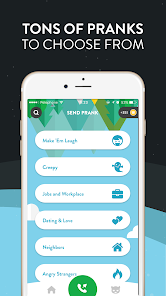
- 🎭 The voice variety is the biggest hook—there are 20+ presets ranging from "Alien" to "Old Lady," and each one sounds genuinely different, not just a basic pitch shift. This blows apps like Clownfish or simple soundboards out of the water because you're not just getting a robot voice; you're getting a character with personality.
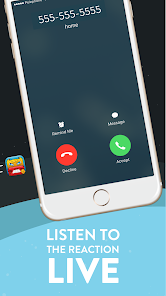
- 📞 Live call integration is a killer feature that sets it apart from many competitors. You can prank someone in real time over a regular phone call, not just pre-recorded audio. Apps like Voice Changer Pro usually require you to route audio through awkward settings, but this one does it natively, making the prank seamless.
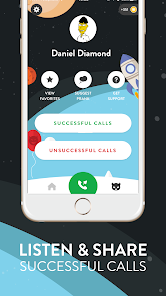
- 🎬 The recording and sharing flow is super smooth. You can save your audio locally, export it as a file, or share directly to WhatsApp, Instagram, or messages in a few taps. With an app like RoboVox, you often have to fumble with file exports, but here it's baked into the workflow nicely.
pros
- 💪 The preset voices are incredibly distinct and exaggerated, which is perfect for pranks. Apps like MorphVOX Junior sometimes sound muffled or robotic, but Ownage Labs Apps clearly invested time in tuning each voice so that "Dude" sounds like a chill surfer and "Robot" genuinely sounds metallic.
- 💪 It's beginner-friendly to the max. There's no learning curve—you see a list, tap one, and start talking. Voice Changer Pro can be intimidating with sliders and equalizers, but this one skips all that noise and focuses on fun, which is a big win for casual users.
- 💪 The live call feature is reliable and low-lag, which is rare in free voice changers. I've tested others like Fake Voice Call, and they often add a second of delay or cut out, but this one keeps up well enough to fool someone on the other end.
cons
- ⚠️ Audio quality can suffer in noisy environments. If you're recording in a room with a fan or talking over music, the modulation picks up the background hum and distorts it a bit. A pro app like Voicemod has noise reduction built in, but here you'll need to find a quiet spot.
- ⚠️ The free version is a bit heavy on ads—they pop up after every recording or share action, which gets annoying fast. Spending money on the premium unlock kills them, but apps like Clownfish give you a cleaner free experience without constant interruptions.
- ⚠️ There's no way to customize your own voice profile. You're locked into the preset list, so if you want to create a unique sound like "creaky door with a whisper," you're out of luck. Competitors like Voice Changer Pro offer fine-tuned pitch and formant sliders that give you more creative freedom.
Articles
![]()
Guide
How to Update Google Play Store on Android 2026
![]()
Guide
How to Download Older Versions of Android Apps
![]()
Guide
How to Download Apps Without Google Play Store
![]()
Guide
What Is an APK File for Android?
If you use an Android phone, you may have seen the term APK while searching for apps or games online. Some websites offer an APK download instead of a Google Play install button. Some users also mention APK files when talking about apps that are not available in their region, older app versions, or Android games downloaded outside the Play Store.
![]()
Guide
How to Install Games from Google Play for Beginners
Installing games on an Android phone is usually simple, but for beginners, the process can still feel confusing at first. You may not know where to search, which button to tap, whether the game is safe, or why Google Play sometimes asks for account settings, storage access, or payment information. If you are using an Android phone for the first time, learning how to install games from Google Play is one of the easiest ways to get started.
![]()
Guide
How Useful Gemini Is for Everyday Questions and Quick Tasks
emini feels different from many AI apps because it is not only trying to be a chatbot. After using it for everyday questions, quick writing, image understanding, and planning, I think its biggest strength is convenience.
![]()
Guide
What to Know Before Downloading APKs
For many Android users, downloading an APK is a common way to install apps and games. Sometimes an app is not available in a certain country.
![]()
Guide
ChatGPT Review: Is It Still the Best AI App in 2026?
![]()
Guide
Seedance 2.0 vs Sora: The Future of AI Video Generation
The AI video race has intensified dramatically over the past two years. Platforms like Sora from OpenAI and Luma Dream Machine pushed the boundaries of text-to-video realism. Yet, despite their impressive outputs, most tools still operate as probabilistic generators—you describe a scene, and the model interprets it. Control remains limited. With the February 2026 release of Seedance 2.0, developed by ByteDance, the paradigm shifted. Internally known as Jimeng 2.0, Seedance does not position itself as just another video model. It positions itself as an AI Director. Rather than guessing what you want, Seedance 2.0 allows you to direct what happens. This distinction defines everything that follows.









Recommended Apps
![]()
Home Design 3D
Anuman4.2
![]()
Truth or Dare Game - Party App
Chouic4.8
![]()
Photo Collage Maker
Scoompa4.7![]()
Learn to Draw Flower
Creative APPS4.2![]()
FIFA World Cup 2026™
FIFA2.8![]()
Mirror Plus: Mirror with Light
Digitalchemy, LLC4.4![]()
Meitu- Photo Editor & AI Art
Meitu (China) Limited4.5![]()
Perplexity - Ask Anything
PerplexityAI4.7![]()
GhostTube SLS Camera Alternate
GhostTube4![]()
Boom Chip Blast: 2-Player
Black Pyramid 3D Games Studio0![]()
Healthy Benefits+
Solutran, Inc.4.5![]()
Deepcheck AI Search Assistant
rohe.ai4![]()
Idol Prank Video Call & Chat
LightCode Solutions4![]()
Face Shape - Pretty Scale
GlintTec Apps3.9![]()
Plant App - Plant Identifier
ScaleUp4.6












































