

Christmas Photo Frames

1M+
Installs
PhotoFramesApps
Developer
-
Video Players & Editors
Category
-
Rated for 12+
Content Rating
-
z.awesome.995@gmail.com
Developer Email
-
https://docs.google.com/document/d/1tcQYc-r-IdjV_15L2ilYLybN-hbUPzAVlrf8bcZmBKg/edit?usp=sharing
Privacy Policy
Screenshots
editor reviews
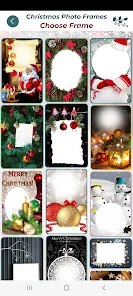
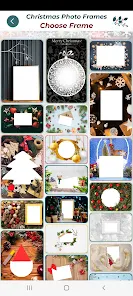
Christmas Photo Frames is a mobile app that lets you take or pick photos and decorate them with holiday-themed borders, stickers, and text. I first came across it on Google Play, where it had a decent number of installs and was free to download. After installation, the app launched with a bright, festive interface that immediately felt cheery. There was no forced registration or credit card request, just a quick permissions check for camera and storage access. The first impression was pretty straightforward: the app is built for casual seasonal fun, especially if you want to customize photos before sending them to friends or posting on social media.
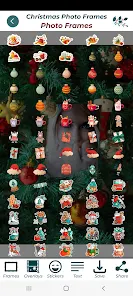
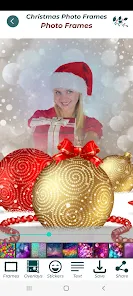
After opening it, I tapped the big “Select Photo” button to grab a picture from my gallery. The editing screen showed up quickly, with a row of frame options at the bottom and a handful of stickers and text tools at the top. I tried out a few border styles, and the app applied them instantly without lag. Adjusting the size and position of stickers required some tapping and dragging, which worked fine, but the touch targets felt a bit small on my phone. The text tool lets you type and change font colors, but I noticed the font selection was limited. Overall, the steps were simple: choose a photo, pick a frame, add stickers or text, then save or share. There were also some ad banners at the bottom, but they didn't interrupt the actual editing process.
After using it for a few days around the holidays, I think this app works best for people who want quick, ready-made decorations without learning any design software. It's not for someone looking for serious photo editing because the control over each element is quite basic. Compared to apps like Canva or PicsArt, Christmas Photo Frames feels more limited – those alternatives offer way more flexibility, templates, and export options. However, if you just want to slap a Santa hat or a snowflake frame onto a picture in a minute, this does the job. I ended up keeping it for last-minute card making, but after the season passed, I uninstalled it without hesitation.
features
- 🎄 Festive Frames and Stickers – The app comes packed with Christmas-specific borders, like reindeers, snowmen, and ornament shapes. You can layer multiple stickers on a single photo, which is handy for making a collage-like card. In comparison, Photo Grid offers similar sticker packs but charges extra for most of them, while Christmas Photo Frames includes a solid selection for free right after download.
- 🎄 Simple One-Tap Application – Applying a frame or sticker only requires a single tap on the element you want. There is no need to adjust layers manually or mess with opacity settings. This makes it far more beginner-friendly than something like Adobe Express, where you often have to navigate multiple menus just to apply a basic effect.
- 🎄 Built-In Save and Share Buttons – After finishing your edit, the app provides direct buttons to save the image to your gallery or share it via messaging and social platforms. It supports common image formats and preserves decent resolution. Other apps like Photo Editor Pro often require a separate export step, but this one streamlines the whole process into two taps.
pros
- 🎁 Completely Free to Use – There are no subscription fees or hidden costs. You can access all frames and stickers without making any payment. Many holiday-themed apps, such as Christmas Photo Editor, lock the best designs behind a paywall, but this one keeps everything open from the start.
- 🎁 No Account Required – You do not have to create a profile or sign in with social media accounts. Apps like Canva prompt you to register before you can save your work, which can feel intrusive. This one lets you jump straight into editing, which is a big plus for privacy-conscious users.
- 🎁 Lightweight and Fast – The app size is minimal, so it downloads quickly and takes up little storage space. It also runs smoothly on older phones without freezing. In contrast, PicsArt tends to be heavier and may lag on low-end devices.
cons
- 🎅 Limited Font and Text Options – You can only choose from a handful of font styles, and you cannot adjust letter spacing or alignment. If you need more typography control, apps like Canva or PicMonkey offer hundreds of fonts, but here the text tool feels basic.
- 🎅 Ads Are Present and Visible – While the ads do not block the main editing functions, there is a persistent banner at the bottom and occasional pop-ups after saving. Some users might find this distracting. Photo Grid handles ads more discreetly by placing them only in the menu sections.
- 🎅 No Undo or History Feature – If you accidentally move a sticker or select the wrong frame, there is no way to undo that step. You have to restart the edit from scratch. Most other apps, including Snapseed, have a proper undo button that makes trial-and-error much easier.
Articles
![]()
Guide
How to Update Google Play Store on Android 2026
![]()
Guide
How to Download Older Versions of Android Apps
![]()
Guide
How to Download Apps Without Google Play Store
![]()
Guide
What Is an APK File for Android?
If you use an Android phone, you may have seen the term APK while searching for apps or games online. Some websites offer an APK download instead of a Google Play install button. Some users also mention APK files when talking about apps that are not available in their region, older app versions, or Android games downloaded outside the Play Store.
![]()
Guide
How to Install Games from Google Play for Beginners
Installing games on an Android phone is usually simple, but for beginners, the process can still feel confusing at first. You may not know where to search, which button to tap, whether the game is safe, or why Google Play sometimes asks for account settings, storage access, or payment information. If you are using an Android phone for the first time, learning how to install games from Google Play is one of the easiest ways to get started.
![]()
Guide
How Useful Gemini Is for Everyday Questions and Quick Tasks
emini feels different from many AI apps because it is not only trying to be a chatbot. After using it for everyday questions, quick writing, image understanding, and planning, I think its biggest strength is convenience.
![]()
Guide
What to Know Before Downloading APKs
For many Android users, downloading an APK is a common way to install apps and games. Sometimes an app is not available in a certain country.
![]()
Guide
ChatGPT Review: Is It Still the Best AI App in 2026?
![]()
Guide
Seedance 2.0 vs Sora: The Future of AI Video Generation
The AI video race has intensified dramatically over the past two years. Platforms like Sora from OpenAI and Luma Dream Machine pushed the boundaries of text-to-video realism. Yet, despite their impressive outputs, most tools still operate as probabilistic generators—you describe a scene, and the model interprets it. Control remains limited. With the February 2026 release of Seedance 2.0, developed by ByteDance, the paradigm shifted. Internally known as Jimeng 2.0, Seedance does not position itself as just another video model. It positions itself as an AI Director. Rather than guessing what you want, Seedance 2.0 allows you to direct what happens. This distinction defines everything that follows.









Recommended Apps
![]()
Home Design 3D
Anuman4.2
![]()
Truth or Dare Game - Party App
Chouic4.8
![]()
Photo Collage Maker
Scoompa4.7![]()
Learn to Draw Flower
Creative APPS4.2![]()
FIFA World Cup 2026™
FIFA2.8![]()
Mirror Plus: Mirror with Light
Digitalchemy, LLC4.4![]()
Meitu- Photo Editor & AI Art
Meitu (China) Limited4.5![]()
Perplexity - Ask Anything
PerplexityAI4.7![]()
GhostTube SLS Camera Alternate
GhostTube4![]()
Boom Chip Blast: 2-Player
Black Pyramid 3D Games Studio0![]()
Healthy Benefits+
Solutran, Inc.4.5![]()
Deepcheck AI Search Assistant
rohe.ai4![]()
Idol Prank Video Call & Chat
LightCode Solutions4![]()
Face Shape - Pretty Scale
GlintTec Apps3.9![]()
Plant App - Plant Identifier
ScaleUp4.6











































