
Prisma3D - Animation, Modeling

10M+
Installs
Prisma3D
Developer
-
Art & Design
Category
-
Everyone
Content Rating
-
info@prisma3d.net
Developer Email
-
https://prisma3d.net/privacy-policy/
Privacy Policy
Screenshots
editor reviews
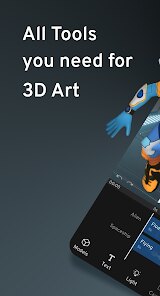
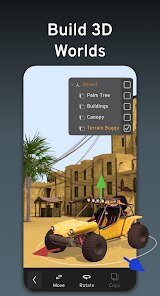
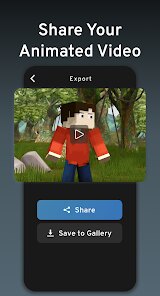
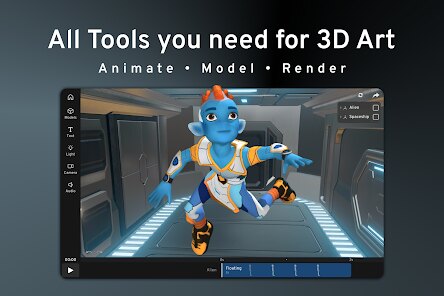
Prisma3D is a mobile-first 3D modeling and animation app designed for users who want to create without the steep learning curve of desktop software. It's essentially a scaled-down but surprisingly capable 3D suite that fits on a phone. Most people download it because they want to try 3D art but don't have access to a powerful computer or they just prefer working on a tablet. The first time you launch it, you're greeted with a clean, dark interface that feels more like a stripped-down pro tool than a toy. There's no forced sign-up or tutorial wall, which makes the initial impression feel welcoming. You just see an empty scene and a set of icons that hint at deep functionality, which is a bit intimidating but also exciting for someone eager to start sculpting.
Getting your hands dirty with Prisma3D is a mixed bag of intuitive gestures and menu diving. The core workflow revolves around adding basic shapes like cubes and spheres, then moving, scaling, and rotating them with touch controls. Pinch to zoom and two-finger rotate feel very natural on a screen. You build your model by combining these primitives, and the animation side lets you set keyframes to move things around. A common user path might be: add a sphere, stretch it into an oval, duplicate it, then position the copy to form a simple character. The app does a good job with real-time preview, so you see the result of your actions instantly. However, finding the tool to merge shapes or adjust a vertex can be confusing because the menus are hidden behind long-press gestures. A practical tip is to get comfortable with the transform gizmo early on—it saves a lot of accidental misalignment.
After spending a few weeks with Prisma3D, I'd say it nails its niche for quick, low-poly work and learning the fundamentals of 3D. It's perfect for a digital artist who wants to prototype an idea on the bus or for a student just starting to understand modeling. It's definitely not for someone needing high-detail sculpting or complex rigging—you'd miss Blender or Nomad Sculpt for that. What sets it apart is how it compresses a core 3D pipeline into a mobile app without making it feel like a gimmick. I could see a hobbyist keeping it installed for spontaneous sketches, but a serious 3D artist might uninstall it once they feel held back by the polygon limits and lack of texture painting. The key is that it respects your time by letting you jump straight into making, even if the final result feels rough.
features
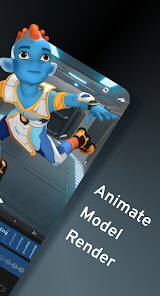
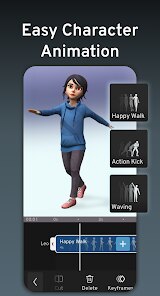
- 🔧 The standout feature is the fully functional keyframe animation system. Unlike apps like uMake that focus solely on modeling, Prisma3D lets you set position, rotation, and scale keyframes over time, then play back a smooth animation. This makes it feel like a real 3D app, not just a model viewer.
- 🔧 The real-time shadow and lighting preview is impressive for a mobile app. While Nomad Sculpt offers better rendering, Prisma3D gives you dynamic shadows that update as you move your light source, helping you check the form of your model without needing to switch to a separate render engine.
- 🔧 The simple Boolean operations (merge, subtract) let you create complex shapes from primitives. In apps like Forger, you'd need to sculpt those details manually, but here you can combine a cylinder and a cube to make a robotic joint in seconds.
- 🔧 The low-poly aesthetic is baked into the tool. It doesn't push high-resolution details, which might seem limiting, but it actually encourages you to focus on silhouette and clear design, reminiscent of early PlayStation art style.
pros
- ✅ Super portable and battery-friendly. Compared to a full desktop suite like Blender, Prisma3D runs on a phone without draining your laptop battery. You can model on a couch or during a commute without firing up a heavy machine.
- ✅ The gesture-based controls for camera and object manipulation are more natural than clunky sliders. In Sketchfab's mobile app, you can't edit models, but here you get true 3D interaction that feels like you're holding the object in your hand.
- ✅ It has a built-in export to glTF and OBJ, which means your work isn't trapped in the app. While some mobile tools lock you into their ecosystem, Prisma3D lets you easily transfer creations to Unity or Blender for further polish.
- ✅ Zero ads or subscription pressure during use. Many free apps throw pop-ups for in-app purchases, but Prisma3D stays out of your way once you're working, which is rare in mobile creative tools.
cons
- ❌ The polygon count limit is quite restrictive. If you try to build a detailed character or a complex scene, the app becomes sluggish and eventually crashes, something you don't face in desktop alternatives like SketchUp or Blender.
- ❌ There is no texture painting or UV mapping tool. Unlike Nomad Sculpt, which lets you paint directly onto the model, Prisma3D only supports flat colors. This makes it hard to create realistic or textured game assets without using another app.
- ❌ The undo system is unreliable. In C4D or Maya, you can undo dozens of steps, but here one accidental wrong gesture often cannot be reverted, forcing you to restart a part of your model. This is frustrating for beginners who make many mistakes.
- ❌ The selection and snapping tools are finicky. Trying to snap one edge to another feels imprecise compared to desktop apps like Fusion 360, leading to messy joins that require manual tweaking.
Articles
![]()
Guide
How to Update Google Play Store on Android 2026
![]()
Guide
How to Download Older Versions of Android Apps
![]()
Guide
How to Download Apps Without Google Play Store
![]()
Guide
What Is an APK File for Android?
If you use an Android phone, you may have seen the term APK while searching for apps or games online. Some websites offer an APK download instead of a Google Play install button. Some users also mention APK files when talking about apps that are not available in their region, older app versions, or Android games downloaded outside the Play Store.
![]()
Guide
How to Install Games from Google Play for Beginners
Installing games on an Android phone is usually simple, but for beginners, the process can still feel confusing at first. You may not know where to search, which button to tap, whether the game is safe, or why Google Play sometimes asks for account settings, storage access, or payment information. If you are using an Android phone for the first time, learning how to install games from Google Play is one of the easiest ways to get started.
![]()
Guide
How Useful Gemini Is for Everyday Questions and Quick Tasks
emini feels different from many AI apps because it is not only trying to be a chatbot. After using it for everyday questions, quick writing, image understanding, and planning, I think its biggest strength is convenience.
![]()
Guide
What to Know Before Downloading APKs
For many Android users, downloading an APK is a common way to install apps and games. Sometimes an app is not available in a certain country.
![]()
Guide
ChatGPT Review: Is It Still the Best AI App in 2026?
![]()
Guide
Seedance 2.0 vs Sora: The Future of AI Video Generation
The AI video race has intensified dramatically over the past two years. Platforms like Sora from OpenAI and Luma Dream Machine pushed the boundaries of text-to-video realism. Yet, despite their impressive outputs, most tools still operate as probabilistic generators—you describe a scene, and the model interprets it. Control remains limited. With the February 2026 release of Seedance 2.0, developed by ByteDance, the paradigm shifted. Internally known as Jimeng 2.0, Seedance does not position itself as just another video model. It positions itself as an AI Director. Rather than guessing what you want, Seedance 2.0 allows you to direct what happens. This distinction defines everything that follows.









Recommended Apps
![]()
Home Design 3D
Anuman4.2
![]()
Truth or Dare Game - Party App
Chouic4.8
![]()
Photo Collage Maker
Scoompa4.7![]()
Learn to Draw Flower
Creative APPS4.2![]()
FIFA World Cup 2026™
FIFA2.8![]()
Mirror Plus: Mirror with Light
Digitalchemy, LLC4.4![]()
Meitu- Photo Editor & AI Art
Meitu (China) Limited4.5![]()
Perplexity - Ask Anything
PerplexityAI4.7![]()
GhostTube SLS Camera Alternate
GhostTube4![]()
Boom Chip Blast: 2-Player
Black Pyramid 3D Games Studio0![]()
Healthy Benefits+
Solutran, Inc.4.5![]()
Deepcheck AI Search Assistant
rohe.ai4![]()
Idol Prank Video Call & Chat
LightCode Solutions4![]()
Face Shape - Pretty Scale
GlintTec Apps3.9![]()
Plant App - Plant Identifier
ScaleUp4.6











































