
Notes - Notepad, Secure Notes

100K+
Installs
PANCHHI SOLUTION
Developer
-
Productivity
Category
-
Everyone
Content Rating
-
support@panchhisolution.com
Developer Email
-
https://sites.google.com/view/panchhisolution-notes
Privacy Policy
Screenshots
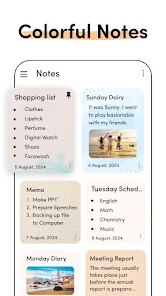
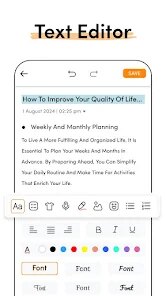
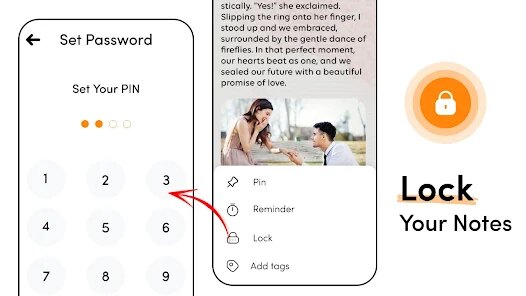
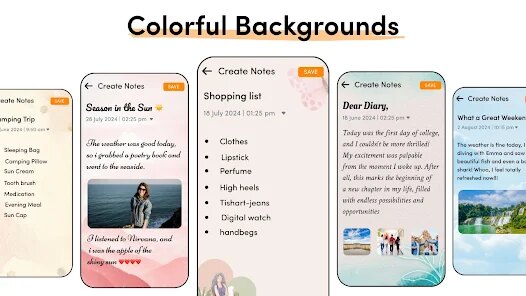
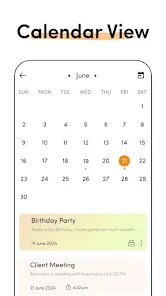
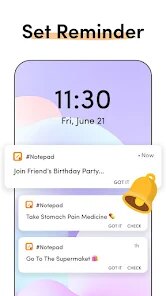
editor reviews
Notes - Notepad, Secure Notes is a straightforward note-taking tool available on the Google Play Store. It falls into the productivity category, designed mostly for quick jots, to-do lists, and simple text storage. A normal user might download it looking for a no-fuss replacement for their phone's default memo app, especially if they want something with a bit more organization. Upon launching it, the first impression is that it looks clean but a little basic. The app is free to download and installs quickly, though it does include ads. Registration isn't required to start typing, which feels like a relief. You're dropped right into a list view of your notes, which feels immediate and direct for a casual user.
After using it for a bit, the experience is mostly straightforward. The interface shows a list of your saved notes, and tapping the plus button creates a new one. The screen for editing is just a plain text box. There is no bold, italic, or image support, so you are just typing words. The onboarding is practically non-existent, which might leave some users guessing about the "secure" part. To password-protect a note, you have to dig into each note's menu instead of finding a global lock option. Functionally, the app gets the job done for basic needs. A useful tip is that the app trims extra spaces automatically, which is neat for clean notes. Navigation feels fast until you try to search for a note among dozens, where the absence of a search bar becomes frustrating. The flow works fine for 5 or 6 notes but feels clunky with more.
After using it for a few days, this app feels decent for someone who just wants to jot down quick reminders without extra fluff. It might be perfect for a student who needs a simple grocery list or a quick thought logged, but it's not for a power user managing projects or research. Compared to something like Google Keep, it lacks labels, color-coding, and checkboxes. Compared to Notion or Evernote, it is almost laughably minimal. Yet, that simplicity is its charm. The lack of sync across devices means it stays on one phone. Users looking to save sensitive text might keep it installed for that specific use, but anyone needing deep organization will likely uninstall it fast. The app does what it says, but no more.
features
- 🔒 Basic note locking sets this apart from simpler apps like Google Keep. Each note can be secured with a password or pattern, which is handy for a local diary entry or a private password list without needing a separate lock app. However, it only works per note, so locking all at once is not an option.
- 📝 Plain text editing keeps things incredibly fast. There is no formatting toolbar or rich text to slow you down. It feels snappier than Microsoft OneNote for quick captures, but you lose bullet points and checklists entirely if that matters to you.
- 🎨 Dark mode is supported out of the box, following the system theme. It is a simple toggle but appreciated in low light. Unlike ColorNote, which also has dark mode, this app's implementation feels a bit more integrated without weird color clashes.
- 📂 Folder organization allows grouping notes, which is more than what Apple Notes offers in its basic form on Android. It is not smart tagging, but for a tiny app, having folders feels like a solid middle ground between chaos and total order.
pros
- 👍 No registration required. Unlike Google Keep or Evernote, you do not need an account to start or use any feature. You download it and write instantly. It respects privacy by not forcing sync, which is a big plus for local-only users.
- 👍 Low file size and minimal permissions. The app is under 5MB, unlike bloated alternatives like Notion that can take 100MB+. It also does not ask for contacts, location, or camera access unless you specifically use attach features.
- 👍 Quick launch and resume. It cold-starts faster than most similar apps. While Microsoft OneNote takes a second to sync and load, this app is ready to type in less than a second even on older phones.
- 👍 No nagging for premium upgrade. Unlike Standard Notes, which constantly pokes you for a paid plan, this app's ads are non-intrusive and there is no persistent sales pitch in your face.
cons
- 👎 No sync mechanism. While some see this as a privacy bonus, it is a major limitation compared to Google Keep or Evernote. You cannot access your notes on another device or backup them automatically. Losing your phone means losing everything.
- 👎 Basic search is missing. With more than twenty notes, you have to scroll through the list manually. Apps like ColorNote and Simple Notes allow search, but this app does not, making it tedious as your collection grows.
- 👎 No rich text, no attachments. You cannot add images, voice memos, or even checklists. Compared to Google Keep's flexible notes or Notion's database approach, this feels stripped down. It is fine for text, but limited for complex ideas.
- 👎 The ad placement is slightly awkward. While ads are not aggressive, an occasional banner appears right where you tap to create a new note. It can cause accidental clicks, which is not an issue in ad-free apps like Apple Notes or premium options.
Articles
![]()
Guide
How to Update Google Play Store on Android 2026
![]()
Guide
How to Download Older Versions of Android Apps
![]()
Guide
How to Download Apps Without Google Play Store
![]()
Guide
What Is an APK File for Android?
If you use an Android phone, you may have seen the term APK while searching for apps or games online. Some websites offer an APK download instead of a Google Play install button. Some users also mention APK files when talking about apps that are not available in their region, older app versions, or Android games downloaded outside the Play Store.
![]()
Guide
How to Install Games from Google Play for Beginners
Installing games on an Android phone is usually simple, but for beginners, the process can still feel confusing at first. You may not know where to search, which button to tap, whether the game is safe, or why Google Play sometimes asks for account settings, storage access, or payment information. If you are using an Android phone for the first time, learning how to install games from Google Play is one of the easiest ways to get started.
![]()
Guide
How Useful Gemini Is for Everyday Questions and Quick Tasks
emini feels different from many AI apps because it is not only trying to be a chatbot. After using it for everyday questions, quick writing, image understanding, and planning, I think its biggest strength is convenience.
![]()
Guide
What to Know Before Downloading APKs
For many Android users, downloading an APK is a common way to install apps and games. Sometimes an app is not available in a certain country.
![]()
Guide
ChatGPT Review: Is It Still the Best AI App in 2026?
![]()
Guide
Seedance 2.0 vs Sora: The Future of AI Video Generation
The AI video race has intensified dramatically over the past two years. Platforms like Sora from OpenAI and Luma Dream Machine pushed the boundaries of text-to-video realism. Yet, despite their impressive outputs, most tools still operate as probabilistic generators—you describe a scene, and the model interprets it. Control remains limited. With the February 2026 release of Seedance 2.0, developed by ByteDance, the paradigm shifted. Internally known as Jimeng 2.0, Seedance does not position itself as just another video model. It positions itself as an AI Director. Rather than guessing what you want, Seedance 2.0 allows you to direct what happens. This distinction defines everything that follows.









Recommended Apps
![]()
Home Design 3D
Anuman4.2
![]()
Truth or Dare Game - Party App
Chouic4.8
![]()
Photo Collage Maker
Scoompa4.7![]()
Learn to Draw Flower
Creative APPS4.2![]()
FIFA World Cup 2026™
FIFA2.8![]()
Mirror Plus: Mirror with Light
Digitalchemy, LLC4.4![]()
Meitu- Photo Editor & AI Art
Meitu (China) Limited4.5![]()
Perplexity - Ask Anything
PerplexityAI4.7![]()
GhostTube SLS Camera Alternate
GhostTube4![]()
Boom Chip Blast: 2-Player
Black Pyramid 3D Games Studio0![]()
Healthy Benefits+
Solutran, Inc.4.5![]()
Deepcheck AI Search Assistant
rohe.ai4![]()
Idol Prank Video Call & Chat
LightCode Solutions4![]()
Face Shape - Pretty Scale
GlintTec Apps3.9![]()
Plant App - Plant Identifier
ScaleUp4.6











































