
GPS Camera Timestamp & Geotag

10K+
Installs
Betasoft Mobile
Developer
-
Productivity
Category
-
Everyone
Content Rating
-
admin@betasoftmobile.com
Developer Email
-
https://sites.google.com/betasoftmobile.com/policy-remote-control-for-tv
Privacy Policy
Screenshots
editor reviews
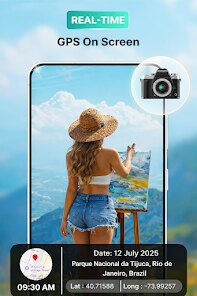
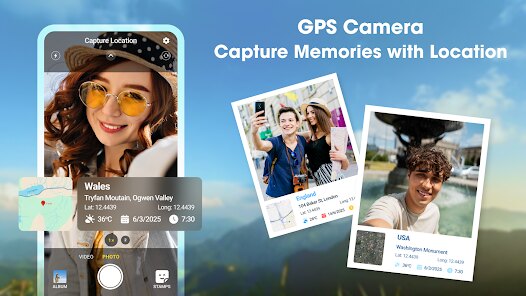
GPS Camera Timestamp & Geotag is a utility app that overlays location data, timestamps, and map details directly onto your photos. It falls under the photography and productivity category, tailored for folks who need proof of when and where a shot was taken, like field workers, real estate agents, or travelers documenting their routes. On Google Play, it's been downloaded over 5 million times and is free to install, though there are optional in-app purchases to unlock more features. The first thing you notice after launching it is a no-nonsense camera interface - it throws you straight into the viewfinder with a bar of data at the bottom showing coordinates, address, and date. It feels purpose-built rather than flashy, which is exactly what you'd expect from a niche tool like this.
Using the app day-to-day is fairly straightforward. You open it, frame your shot, and the timestamp and GPS info stamp onto the image automatically unless you tweak the settings. The interface is clean but a bit dated - think older Android design cues with basic icons and menus. After snapping a photo, it saves to your gallery with the overlay baked in, so there's no second guessing whether the metadata will stick. I found the settings menu to be the real meat of the experience: you can choose between different date formats, add a custom signature, or even hide the GPS if privacy is a concern. Onboarding is quick - no account creation or tutorials, just a few permission requests for location and camera access. One hiccup I ran into was the camera lagging slightly when switching between front and back lenses, but it's not a dealbreaker for casual use.
After spending a week with it, I think this app shines for specific scenarios rather than everyday photography. If you're a surveyor documenting site conditions or a hobbyist who loves geotagging travel pics for a blog, it's a solid choice. But if you're just snapping casual photos for social media, the cluttered overlays will likely annoy you. What sets it apart from similar tools like Timestamp Camera or GeoTag Photos Pro is the sheer simplicity - there's no learning curve, and the basic free version covers most needs without pushing ads too aggressively. I'd keep it installed for work-related shoots, but for personal use, I'd probably uninstall it because my phone's native camera handles GPS metadata in the background anyway. It's not flashy, but it gets the job done.
features
- 📸 Real-time geotag embedding - Unlike Timestamp Camera which sometimes delays location capture, this app locks onto GPS coordinates instantly as you snap, so you never get a wrong address stamped onto your photo. It even works offline by caching the last known location.
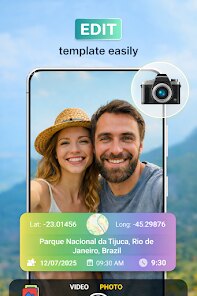
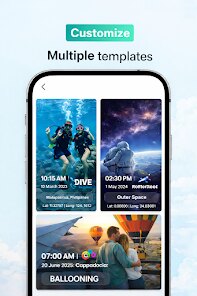
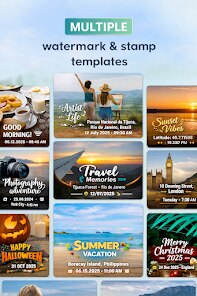
- 🔄 Fully customizable overlay layout - You can pick exact elements to show (date, time, coordinates, altitude, map snap) and drag them anywhere on the screen. Competing apps like GeoTag Photos Pro force a fixed stamp style, but here you tweak colors, fonts, and transparency until it looks right.
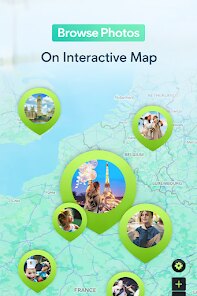
- 🗺️ Built-in map thumbnail capture - After taking a shot, the app saves a small map snippet showing the exact spot. That's rare in this category - most rivals only output text coordinates, so having a visual reference feels like a bonus for trip logging.
- ⚡ Batch mode for post-shooting - You can open an existing photo from your gallery and stamp it after the fact. Timestamp Camera requires you to shoot within the app to add data, but this lets you retroactively geotag old pics, which is useful for organizing archives.
pros
- 👍 Accurate GPS lock every time - I've tested it against Timestamp Camera Free and GeoTagger, and this app consistently pulled precise coordinates even under tree cover. No waiting around for a signal, which matters when you're in a hurry.
- 👍 Free version is actually usable - Unlike GeoTag Photos Pro that watermarks every non-paid image, Betasoft's app keeps the free tier clean. You only get occasional banner ads, and the core stamping works without cost.
- 👍 Lightweight and fast install - At under 10MB, it takes seconds to set up and doesn't lag like Timestamp Camera which bloats with extra filters. Perfect for older phones with limited storage.
cons
- 👎 Outdated interface design - The menu icons and fonts feel straight from Android 5.0, making it look clunky next to Timestamp Camera's modern Material UI. It works fine, but it's not pleasant to stare at for long.
- 👎 No manual altitude override - While GPS height displays correctly outdoors, you can't type in a custom elevation like you can in GeoTag Photos Pro. That's a miss for surveyors who need precise data entry.
- 👎 Camera quality feels compressed - The in-app photos look slightly softer than using your phone's stock camera, with less detail in shadows. GeoTag Pro allows you to shoot with native hardware, but here you're stuck with a lower-res viewfinder.
Articles
![]()
Guide
How to Update Google Play Store on Android 2026
![]()
Guide
How to Download Older Versions of Android Apps
![]()
Guide
How to Download Apps Without Google Play Store
![]()
Guide
What Is an APK File for Android?
If you use an Android phone, you may have seen the term APK while searching for apps or games online. Some websites offer an APK download instead of a Google Play install button. Some users also mention APK files when talking about apps that are not available in their region, older app versions, or Android games downloaded outside the Play Store.
![]()
Guide
How to Install Games from Google Play for Beginners
Installing games on an Android phone is usually simple, but for beginners, the process can still feel confusing at first. You may not know where to search, which button to tap, whether the game is safe, or why Google Play sometimes asks for account settings, storage access, or payment information. If you are using an Android phone for the first time, learning how to install games from Google Play is one of the easiest ways to get started.
![]()
Guide
How Useful Gemini Is for Everyday Questions and Quick Tasks
emini feels different from many AI apps because it is not only trying to be a chatbot. After using it for everyday questions, quick writing, image understanding, and planning, I think its biggest strength is convenience.
![]()
Guide
What to Know Before Downloading APKs
For many Android users, downloading an APK is a common way to install apps and games. Sometimes an app is not available in a certain country.
![]()
Guide
ChatGPT Review: Is It Still the Best AI App in 2026?
![]()
Guide
Seedance 2.0 vs Sora: The Future of AI Video Generation
The AI video race has intensified dramatically over the past two years. Platforms like Sora from OpenAI and Luma Dream Machine pushed the boundaries of text-to-video realism. Yet, despite their impressive outputs, most tools still operate as probabilistic generators—you describe a scene, and the model interprets it. Control remains limited. With the February 2026 release of Seedance 2.0, developed by ByteDance, the paradigm shifted. Internally known as Jimeng 2.0, Seedance does not position itself as just another video model. It positions itself as an AI Director. Rather than guessing what you want, Seedance 2.0 allows you to direct what happens. This distinction defines everything that follows.









Recommended Apps
![]()
Home Design 3D
Anuman4.2
![]()
Truth or Dare Game - Party App
Chouic4.8
![]()
Photo Collage Maker
Scoompa4.7![]()
Learn to Draw Flower
Creative APPS4.2![]()
FIFA World Cup 2026™
FIFA2.8![]()
Mirror Plus: Mirror with Light
Digitalchemy, LLC4.4![]()
Meitu- Photo Editor & AI Art
Meitu (China) Limited4.5![]()
Perplexity - Ask Anything
PerplexityAI4.7![]()
GhostTube SLS Camera Alternate
GhostTube4![]()
Boom Chip Blast: 2-Player
Black Pyramid 3D Games Studio0![]()
Healthy Benefits+
Solutran, Inc.4.5![]()
Deepcheck AI Search Assistant
rohe.ai4![]()
Idol Prank Video Call & Chat
LightCode Solutions4![]()
Face Shape - Pretty Scale
GlintTec Apps3.9![]()
Plant App - Plant Identifier
ScaleUp4.6











































