

AI Detector & Humanizer

100K+
Installs
Wallet Passes Alliance
Developer
-
Productivity
Category
-
Everyone
Content Rating
-
support.aidetector@walletpasses.me
Developer Email
-
https://walletpasses.me/aidetector/privacy/
Privacy Policy
Screenshots
editor reviews
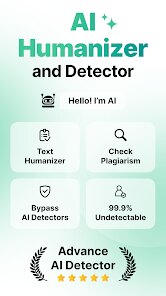
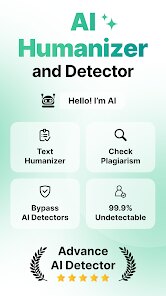
I came across AI Detector & Humanizer recently while looking for a tool to clean up some AI-generated drafts. It's a utility app, not a game or social platform, and its main purpose is pretty straightforward: you paste in text that might have been written by an AI, and the app tells you if it looks machine-made. After that, it offers to rewrite that content to sound more natural, like a real person wrote it. I spotted it on the Google Play Store with a decent number of downloads, and it's free to download and install, though it does have some in-app purchases if you want to unlock more features. Launching it for the first time, I was hit with a clean, simple interface — no flashy graphics or confusing menus. You just type or paste your text into a box and tap a button. That minimalism felt refreshing, honestly, no clutter to wade through.
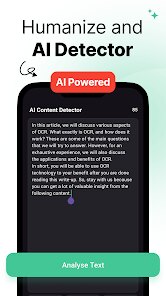
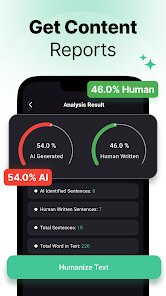
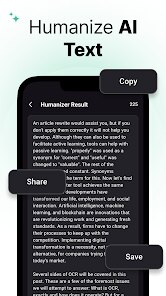
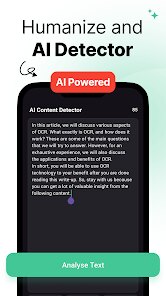
Once I started using it, the experience was fairly smooth. The main screen is just a text input area with a big button to analyze the text. I pasted a few paragraphs from an AI-generated article I had sitting around, and within a couple of seconds, it highlighted sentences it considered artificial. The color coding was helpful: green for natural, yellow for suspicious, red for clearly machine-written. After that, one tap on the humanize button took me to a rewritten version. I tried it on a few different samples — email drafts, blog posts, even some social media captions. The rewriting was pretty good for basic text, but it sometimes missed the nuance in more creative writing. A small tip I picked up: if you run the same text through the humanizer a couple of times, it tends to vary the output a bit, giving you more natural-sounding options to choose from. There were a few moments where the app froze briefly when processing longer documents, but nothing too frustrating.
After messing around with it for a couple of weeks, I've got a pretty solid impression. This app is a lifesaver for students, bloggers, or anyone who relies on AI writing tools and needs their work to pass as original. If you are a freelance writer or a marketer cranking out content, it can save you from getting caught by AI detectors. That said, if you already write everything from scratch yourself, you probably do not need this. Compared to similar tools like GPTInf or Undetectable AI, this one feels a bit simpler and less feature-packed, but it gets the job done without a complicated setup. What makes it stand out to me is how direct it is — no account creation, no endless settings, just paste and go. I can see myself keeping it installed for quick fixes, but I might uninstall it if I stop generating AI text regularly. It's not a permanent fixture, but it definitely serves its purpose when needed.
features
- 🎯 Real-time detection with color-coded feedback. Unlike Wordtune, which focuses on rewriting without checking AI origins, this app first highlights machine-written parts in red, yellow, or green. You see exactly where the problem lies before hitting the humanize button, which helps you understand what gives AI text away.
- 🎯 One-tap humanization with multiple attempts. While QuillBot offers generic paraphrasing, this app tailors the rewrite specifically to bypass AI detectors. Running the same text through twice gives varied outputs, letting you pick the most natural-sounding version. It is not perfect for poetic or highly stylized writing, but for standard academic or business content, it works reliably.
- 🎯 No account required for basic use. Many similar apps push you to sign up before even letting you try a single sentence. Here, you download, open, and start using the detector and humanizer immediately. That barrier-free access is a big plus for people who just want a quick fix without commitment.
pros
- ✨ Simpler interface than Undetectable AI. That app has a more professional look but can feel overwhelming with all its settings for readability, tone, and purpose. AI Detector & Humanizer keeps things bare-bones, so even someone unfamiliar with these tools can figure it out in seconds.
- ✨ Free basic features with no daily limits. Some competitors like GPTZero limit how much text you can check per day unless you pay. Here, you can run multiple checks and rewrites without hitting a paywall immediately, which is great for heavy users on a budget.
- ✨ Quick processing speed. Compared to tools like Originality.ai, which can take a while for longer documents, this app gives results in one to two seconds for standard paragraphs. It does not waste your time, which matters when you are editing on the go.
cons
- ⚠️ Limited precision for creative or highly technical text. While it works well for straightforward articles or emails, it sometimes flags poetic phrases as AI-generated and then rewrites them into something bland. Tools like Writer.com handle diverse writing styles better.
- ⚠️ Occasional freezing with longer documents. Past a few hundred words, the app can slow down or briefly freeze. That is annoying when you are working on a full-length essay or report. Competitors like Copyleaks manage larger texts more smoothly.
- ⚠️ No browser extension or desktop version. You have to use it on your phone, and if you are working on a laptop, switching back and forth feels clunky. Tools like Grammarly integrate directly into your workflow, which this app does not yet offer.
Articles
![]()
Guide
How to Update Google Play Store on Android 2026
![]()
Guide
How to Download Older Versions of Android Apps
![]()
Guide
How to Download Apps Without Google Play Store
![]()
Guide
What Is an APK File for Android?
If you use an Android phone, you may have seen the term APK while searching for apps or games online. Some websites offer an APK download instead of a Google Play install button. Some users also mention APK files when talking about apps that are not available in their region, older app versions, or Android games downloaded outside the Play Store.
![]()
Guide
How to Install Games from Google Play for Beginners
Installing games on an Android phone is usually simple, but for beginners, the process can still feel confusing at first. You may not know where to search, which button to tap, whether the game is safe, or why Google Play sometimes asks for account settings, storage access, or payment information. If you are using an Android phone for the first time, learning how to install games from Google Play is one of the easiest ways to get started.
![]()
Guide
How Useful Gemini Is for Everyday Questions and Quick Tasks
emini feels different from many AI apps because it is not only trying to be a chatbot. After using it for everyday questions, quick writing, image understanding, and planning, I think its biggest strength is convenience.
![]()
Guide
What to Know Before Downloading APKs
For many Android users, downloading an APK is a common way to install apps and games. Sometimes an app is not available in a certain country.
![]()
Guide
ChatGPT Review: Is It Still the Best AI App in 2026?
![]()
Guide
Seedance 2.0 vs Sora: The Future of AI Video Generation
The AI video race has intensified dramatically over the past two years. Platforms like Sora from OpenAI and Luma Dream Machine pushed the boundaries of text-to-video realism. Yet, despite their impressive outputs, most tools still operate as probabilistic generators—you describe a scene, and the model interprets it. Control remains limited. With the February 2026 release of Seedance 2.0, developed by ByteDance, the paradigm shifted. Internally known as Jimeng 2.0, Seedance does not position itself as just another video model. It positions itself as an AI Director. Rather than guessing what you want, Seedance 2.0 allows you to direct what happens. This distinction defines everything that follows.









Recommended Apps
![]()
Home Design 3D
Anuman4.2
![]()
Truth or Dare Game - Party App
Chouic4.8
![]()
Photo Collage Maker
Scoompa4.7![]()
Learn to Draw Flower
Creative APPS4.2![]()
FIFA World Cup 2026™
FIFA2.8![]()
Mirror Plus: Mirror with Light
Digitalchemy, LLC4.4![]()
Meitu- Photo Editor & AI Art
Meitu (China) Limited4.5![]()
Perplexity - Ask Anything
PerplexityAI4.7![]()
GhostTube SLS Camera Alternate
GhostTube4![]()
Boom Chip Blast: 2-Player
Black Pyramid 3D Games Studio0![]()
Healthy Benefits+
Solutran, Inc.4.5![]()
Deepcheck AI Search Assistant
rohe.ai4![]()
Idol Prank Video Call & Chat
LightCode Solutions4![]()
Face Shape - Pretty Scale
GlintTec Apps3.9![]()
Plant App - Plant Identifier
ScaleUp4.6











































