

Bugzz: Insect Prank Filters

5M+
Installs
Smart Utilities Hub
Developer
-
Entertainment
Category
-
Everyone
Content Rating
-
gofs.studio@gmail.com
Developer Email
-
https://smartutilities.mobi/policy.html
Privacy Policy
Screenshots



editor reviews
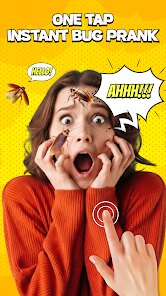
Bugzz: Insect Prank Filters is a playful photography tool for Android devices that adds realistic-looking insects to your photos and videos. You can grab it for free from Google Play, where it has been downloaded over a million times. The app is free to install and use, though it does include advertisements and offers optional in-app purchases for those who want to unlock additional bug types or remove the ads.
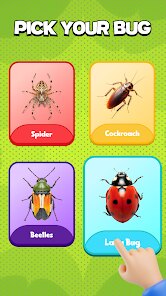
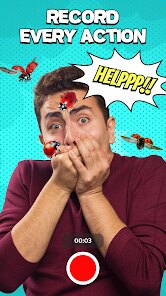
Once you download and install Bugzz, you'll find a straightforward interface centered around a live camera viewfinder. You simply point your phone at a subject and select from a row of bugs that include spiders, cockroaches, ants, and flies. The insects appear to crawl across the screen and interact with surfaces, which is where the prank element comes in. I found the tracking quite decent - the bugs follow contours and edges in the scene rather than just floating around, giving the impression they're actually crawling on the person or object in frame. You can also snap a photo or record a short video clip to share with friends.
Compared to similar apps in the prank camera genre, Bugzz stands out for its more detailed insect animations. Many competing tools rely on static overlays or simple pixelated bugs, whereas the insect models here cast shadows, react to movement, and even interact with each other. The trade-off is that the app feels more specialized than general prank apps that offer multiple categories like ghosts, explosions, or face distortions. If you want variety across different prank genres, something like Prank Camera might serve you better, but for pure bug-centric humor, Bugzz delivers a more convincing experience.
features
- The insect library includes common creepy-crawlies with varied sizes and behaviors. Spiders drop on threads while cockroaches scuttle sideways. This variety keeps the pranks from feeling predictable after repeated use.
- Recording video with the bugs active works smoothly without noticeable lag on my mid-range device. The bugs maintain position in the scene during movement, which makes the resulting clips more believable when shared.
- You can control bug placement by tapping the screen, and they always start from the edge of the frame before crawling toward your target. This deliberate approach feels more natural than having them simply appear on someone's face.
- Compared to Bug Invasion, which uses simpler graphics, Bugzz offers better shadow integration and surface tracking. The bugs actually appear to walk around objects rather than overlapping everything uniformly.
pros
- Perfect for lighthearted scares during conversations or video calls. I've gotten genuine reactions from friends who briefly believed a spider was crawling near them.
- No complex editing skills required. You open the app, add the bug, and share your creation in seconds, which works well for quick social media posts.
- Great for entertaining children who enjoy the surprise factor. The cartoonish style keeps the experience fun rather than genuinely frightening.
cons
- Ads appear between captures and occasionally overlay the viewfinder, which can interrupt the flow when you're trying to set up a prank quickly.
- The free version only includes four insect types. The more unusual ones like centipedes and beetles are locked behind the in-app purchase.
- Some insects clip through flat surfaces at certain angles, breaking the illusion for anyone looking closely at the edges of the screen.
- No option to resize or rotate individual bugs independently. The preset sizes sometimes look disproportionate depending on your distance from the subject.
Articles
![]()
Guide
How to Update Google Play Store on Android 2026
![]()
Guide
How to Download Older Versions of Android Apps
![]()
Guide
How to Download Apps Without Google Play Store
![]()
Guide
What Is an APK File for Android?
If you use an Android phone, you may have seen the term APK while searching for apps or games online. Some websites offer an APK download instead of a Google Play install button. Some users also mention APK files when talking about apps that are not available in their region, older app versions, or Android games downloaded outside the Play Store.
![]()
Guide
How to Install Games from Google Play for Beginners
Installing games on an Android phone is usually simple, but for beginners, the process can still feel confusing at first. You may not know where to search, which button to tap, whether the game is safe, or why Google Play sometimes asks for account settings, storage access, or payment information. If you are using an Android phone for the first time, learning how to install games from Google Play is one of the easiest ways to get started.
![]()
Guide
How Useful Gemini Is for Everyday Questions and Quick Tasks
emini feels different from many AI apps because it is not only trying to be a chatbot. After using it for everyday questions, quick writing, image understanding, and planning, I think its biggest strength is convenience.
![]()
Guide
What to Know Before Downloading APKs
For many Android users, downloading an APK is a common way to install apps and games. Sometimes an app is not available in a certain country.
![]()
Guide
ChatGPT Review: Is It Still the Best AI App in 2026?
![]()
Guide
Seedance 2.0 vs Sora: The Future of AI Video Generation
The AI video race has intensified dramatically over the past two years. Platforms like Sora from OpenAI and Luma Dream Machine pushed the boundaries of text-to-video realism. Yet, despite their impressive outputs, most tools still operate as probabilistic generators—you describe a scene, and the model interprets it. Control remains limited. With the February 2026 release of Seedance 2.0, developed by ByteDance, the paradigm shifted. Internally known as Jimeng 2.0, Seedance does not position itself as just another video model. It positions itself as an AI Director. Rather than guessing what you want, Seedance 2.0 allows you to direct what happens. This distinction defines everything that follows.









Recommended Apps
![]()
Home Design 3D
Anuman4.2
![]()
Truth or Dare Game - Party App
Chouic4.8
![]()
Photo Collage Maker
Scoompa4.7![]()
Learn to Draw Flower
Creative APPS4.2![]()
FIFA World Cup 2026™
FIFA2.8![]()
Mirror Plus: Mirror with Light
Digitalchemy, LLC4.4![]()
Meitu- Photo Editor & AI Art
Meitu (China) Limited4.5![]()
Perplexity - Ask Anything
PerplexityAI4.7![]()
GhostTube SLS Camera Alternate
GhostTube4![]()
Boom Chip Blast: 2-Player
Black Pyramid 3D Games Studio0![]()
Healthy Benefits+
Solutran, Inc.4.5![]()
Deepcheck AI Search Assistant
rohe.ai4![]()
Idol Prank Video Call & Chat
LightCode Solutions4![]()
Face Shape - Pretty Scale
GlintTec Apps3.9![]()
Plant App - Plant Identifier
ScaleUp4.6












































