

Fazee - Funny Face Filter

Installs
Vibe Filter Club
Developer
-
Video Players & Editors
Category
-
Everyone
Content Rating
-
mobileinovatex@gmail.com
Developer Email
-
https://sites.google.com/view/innovatex-privacy-policy/home
Privacy Policy
Screenshots
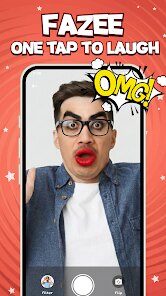


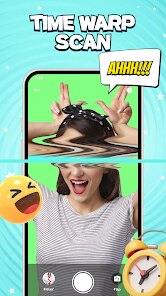

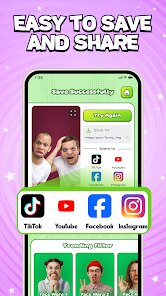
editor reviews
Fazee - Funny Face Filter, developed by Vibe Filter Club, is an entertainment-focused application that transforms ordinary selfies and photos into humorous, animated results using real-time facial recognition. The app is available for download through Google Play and can be installed at no cost. Like many free applications, it does include advertisements and offers optional in-app purchases for those who want to unlock additional filter packs or remove ads entirely.
Getting started with Fazee takes only a moment. After installation, the interface presents a live camera feed with a row of filter thumbnails along the bottom. Selecting one applies the effect immediately, and the app tracks facial movements with surprisingly good accuracy. The library contains hundreds of options, ranging from simple distortions that enlarge eyes to more elaborate animations with backgrounds and sound effects. Users can capture photos or record short video clips, then save them directly to their device or share them through messaging platforms. Some filters respond to specific expressions like raising eyebrows or opening the mouth wide, which adds a layer of interactivity beyond static overlays.
In comparison to similar applications like Snapchat or TikTok's built-in effects, Fazee focuses strictly on comedic transformation rather than social networking. There is no feed to browse or friends to add—just a straightforward tool for creating silly images. This narrower scope makes it feel more immediate and less cluttered. However, the filter quality does not quite match the polish found in larger platforms; animations occasionally lag or misalign, particularly on older phone models. Still, for its specific purpose, the app offers enough variety to keep things entertaining.
features
- The facial tracking system stands out as particularly responsive, even in moderate lighting conditions. It holds onto facial features well during slight head turns, which reduces the frustration of filters slipping out of place. Several options incorporate interactive triggers, like sticking out your tongue to activate a rainbow effect or squinting to change the background. That kind of responsiveness makes experimentation genuinely fun rather than gimmicky.
- Content variety is another strong suit. Categories organize filters into themes such as animals, cartoon characters, age progression, and exaggerated expressions. For individual use, the single-face filters work well; some applications perform poorly with multiple faces, but Fazee handles group shots by applying the chosen effect to everyone detected simultaneously, which comes in handy during gatherings.
- The editing suite, while basic, serves its purpose. Users can adjust brightness, add text with customizable fonts and colors, or overlay stickers on top of the filtered image. A collage mode lets you combine several shots into one frame. Compared with dedicated photo editors, the toolset is limited, but for casual use it covers most needs without complicating the process.
- Video recording runs at a steady thirty frames per second, producing smooth playback when shared. The length limit of fifteen seconds per clip feels brief, but it suits short social media posts. The app stores recordings in a dedicated gallery tab, making it easy to revisit previous creations or manage storage.
pros
- The quick setup means you can go from install to first funny photo in under a minute, which lowers the barrier for spontaneous use.
- Because most effects work offline once downloaded, the app remains usable without a stable internet connection—handy during commutes or travel.
- Regular updates add new filters each month, providing fresh material without requiring manual checks.
- Sharing integrates directly with common social apps, so saving a file separately is usually unnecessary.
cons
- Ads appear frequently between sessions, which can interrupt the flow when you are trying to preview multiple filters quickly.
- Certain filters only unlock after viewing promotional videos or spending coins, and the in-app currency accumulates slowly unless purchased.
- Battery consumption runs higher than expected during extended video recording sessions, so keeping a charger nearby is advisable for heavier use.
- The free version limits exports to a lower resolution, which noticeably affects quality when images are enlarged.
Articles
![]()
Guide
How to Update Google Play Store on Android 2026
![]()
Guide
How to Download Older Versions of Android Apps
![]()
Guide
How to Download Apps Without Google Play Store
![]()
Guide
What Is an APK File for Android?
If you use an Android phone, you may have seen the term APK while searching for apps or games online. Some websites offer an APK download instead of a Google Play install button. Some users also mention APK files when talking about apps that are not available in their region, older app versions, or Android games downloaded outside the Play Store.
![]()
Guide
How to Install Games from Google Play for Beginners
Installing games on an Android phone is usually simple, but for beginners, the process can still feel confusing at first. You may not know where to search, which button to tap, whether the game is safe, or why Google Play sometimes asks for account settings, storage access, or payment information. If you are using an Android phone for the first time, learning how to install games from Google Play is one of the easiest ways to get started.
![]()
Guide
How Useful Gemini Is for Everyday Questions and Quick Tasks
emini feels different from many AI apps because it is not only trying to be a chatbot. After using it for everyday questions, quick writing, image understanding, and planning, I think its biggest strength is convenience.
![]()
Guide
What to Know Before Downloading APKs
For many Android users, downloading an APK is a common way to install apps and games. Sometimes an app is not available in a certain country.
![]()
Guide
ChatGPT Review: Is It Still the Best AI App in 2026?
![]()
Guide
Seedance 2.0 vs Sora: The Future of AI Video Generation
The AI video race has intensified dramatically over the past two years. Platforms like Sora from OpenAI and Luma Dream Machine pushed the boundaries of text-to-video realism. Yet, despite their impressive outputs, most tools still operate as probabilistic generators—you describe a scene, and the model interprets it. Control remains limited. With the February 2026 release of Seedance 2.0, developed by ByteDance, the paradigm shifted. Internally known as Jimeng 2.0, Seedance does not position itself as just another video model. It positions itself as an AI Director. Rather than guessing what you want, Seedance 2.0 allows you to direct what happens. This distinction defines everything that follows.









Recommended Apps
![]()
Home Design 3D
Anuman4.2
![]()
Truth or Dare Game - Party App
Chouic4.8
![]()
Photo Collage Maker
Scoompa4.7![]()
Learn to Draw Flower
Creative APPS4.2![]()
FIFA World Cup 2026™
FIFA2.8![]()
Mirror Plus: Mirror with Light
Digitalchemy, LLC4.4![]()
Meitu- Photo Editor & AI Art
Meitu (China) Limited4.5![]()
Perplexity - Ask Anything
PerplexityAI4.7![]()
GhostTube SLS Camera Alternate
GhostTube4![]()
Boom Chip Blast: 2-Player
Black Pyramid 3D Games Studio0![]()
Healthy Benefits+
Solutran, Inc.4.5![]()
Deepcheck AI Search Assistant
rohe.ai4![]()
Idol Prank Video Call & Chat
LightCode Solutions4![]()
Face Shape - Pretty Scale
GlintTec Apps3.9![]()
Plant App - Plant Identifier
ScaleUp4.6












































