
Cat & Dog Translator Simulator

1M+
Installs
Notebook & Notepad & CV & Resume Example & Piano
Developer
-
Lifestyle
Category
-
Everyone
Content Rating
-
3xi4991@gmail.com
Developer Email
-
http://3xiapp.pro.vn/privacy-policy.html?app=Cat%20--%20Dog%20Translator%20Simulator&store=Notebook%20--%20Notepad%20--%20CV%20--%20Resume%20Example%20--%20Piano
Privacy Policy
Screenshots

editor reviews
There's a certain charm to apps that promise to decode the secret language of our furry companions, and Cat & Dog Translator Simulator, available for free on Google Play, taps directly into that curiosity. The app is essentially an entertainment utility that claims to interpret various barks, meows, and growls into human-readable phrases, and vice versa. You can download and install it directly from the Play Store without spending a cent, though you'll encounter occasional ads between sessions. In-app purchases exist for those who want to remove advertising permanently, but they're entirely optional and don't gate any core functionality.
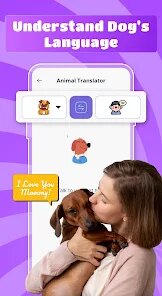
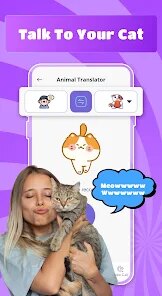
Opening the app presents a straightforward interface with two primary modes: one for cat translation and another for dogs. You simply select an animal, press and hold the microphone button, and let your pet vocalize into the device. A few seconds later, text appears on screen with the presumed meaning of that sound, often accompanied by a playful animation. The reverse function works similarly, allowing you to type a phrase that the app then converts into animal vocalizations through its speaker. During my first session, my cat stared at me with what I can only assume was deep confusion when I attempted to "speak" back to her, though the app dutifully produced a series of meows that she didn't seem particularly impressed by.
Compared to other pet communication apps like Talking Ben or Pet Translator, this one leans more heavily into the "simulator" aspect of its name rather than pretending to be scientific. The interface feels more polished than many rivals, with cleaner graphics and smoother animations, though the actual accuracy of translations is clearly meant to be taken with a grain of salt. What sets it apart is the sheer range of sounds it recognizes across both species, which gives it broader appeal than apps focusing on just one type of animal.
features
- The sound recognition library is surprisingly extensive, covering everything from happy chirps to warning growls. In practice, this means you'll rarely encounter an "unrecognized sound" error, which keeps the experience fluid. That said, I noticed that opposite to some competitors, the app doesn't provide any confidence rating for its interpretations.
- Translation history is automatically saved within a session, letting you review previous "conversations" without leaving the interface. This becomes genuinely useful when trying to correlate specific sounds with behavioral patterns, though clearing that history requires navigating through a somewhat hidden settings menu.
- The voice synthesis for the reverse translation feature offers multiple pitch options for each animal. Lower pitches seem to work better for larger dogs in practice, while higher pitches appear more appropriate for cats. This level of customization isn't something you usually see in similar free apps.
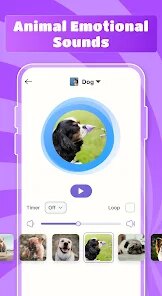
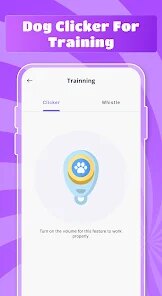
- A built-in "soundboard" lets you play pre-recorded animal noises without using your own voice, which is particularly handy for catching your pet's attention or testing their reactions. Compared to the microphone approach, this feels more consistent in terms of audio quality.
pros
- It provides harmless entertainment during quiet evenings, and watching your pet's reaction to translated sounds never quite gets old.
- The simple, gesture-based interface means even younger users can navigate it without needing a tutorial.
- Using the history feature to track which sounds trigger specific reactions from your pet can be genuinely amusing and occasionally insightful.
- Since it's free with ads, there's no financial risk in trying it out, and the offline mode still works for the reverse translation feature.
cons
- The accuracy is, at best, imaginative, and anyone expecting real communication will be disappointed.
- Ads appear fairly frequently between translation attempts, which can break the flow during extended sessions.
- Background noise interferes with recognition quite easily, meaning you need a relatively quiet room for consistent results.
Articles
![]()
Guide
How to Update Google Play Store on Android 2026
![]()
Guide
How to Download Older Versions of Android Apps
![]()
Guide
How to Download Apps Without Google Play Store
![]()
Guide
What Is an APK File for Android?
If you use an Android phone, you may have seen the term APK while searching for apps or games online. Some websites offer an APK download instead of a Google Play install button. Some users also mention APK files when talking about apps that are not available in their region, older app versions, or Android games downloaded outside the Play Store.
![]()
Guide
How to Install Games from Google Play for Beginners
Installing games on an Android phone is usually simple, but for beginners, the process can still feel confusing at first. You may not know where to search, which button to tap, whether the game is safe, or why Google Play sometimes asks for account settings, storage access, or payment information. If you are using an Android phone for the first time, learning how to install games from Google Play is one of the easiest ways to get started.
![]()
Guide
How Useful Gemini Is for Everyday Questions and Quick Tasks
emini feels different from many AI apps because it is not only trying to be a chatbot. After using it for everyday questions, quick writing, image understanding, and planning, I think its biggest strength is convenience.
![]()
Guide
What to Know Before Downloading APKs
For many Android users, downloading an APK is a common way to install apps and games. Sometimes an app is not available in a certain country.
![]()
Guide
ChatGPT Review: Is It Still the Best AI App in 2026?
![]()
Guide
Seedance 2.0 vs Sora: The Future of AI Video Generation
The AI video race has intensified dramatically over the past two years. Platforms like Sora from OpenAI and Luma Dream Machine pushed the boundaries of text-to-video realism. Yet, despite their impressive outputs, most tools still operate as probabilistic generators—you describe a scene, and the model interprets it. Control remains limited. With the February 2026 release of Seedance 2.0, developed by ByteDance, the paradigm shifted. Internally known as Jimeng 2.0, Seedance does not position itself as just another video model. It positions itself as an AI Director. Rather than guessing what you want, Seedance 2.0 allows you to direct what happens. This distinction defines everything that follows.









Recommended Apps
![]()
Home Design 3D
Anuman4.2
![]()
Truth or Dare Game - Party App
Chouic4.8
![]()
Photo Collage Maker
Scoompa4.7![]()
Learn to Draw Flower
Creative APPS4.2![]()
FIFA World Cup 2026™
FIFA2.8![]()
Mirror Plus: Mirror with Light
Digitalchemy, LLC4.4![]()
Meitu- Photo Editor & AI Art
Meitu (China) Limited4.5![]()
Perplexity - Ask Anything
PerplexityAI4.7![]()
GhostTube SLS Camera Alternate
GhostTube4![]()
Boom Chip Blast: 2-Player
Black Pyramid 3D Games Studio0![]()
Healthy Benefits+
Solutran, Inc.4.5![]()
Deepcheck AI Search Assistant
rohe.ai4![]()
Idol Prank Video Call & Chat
LightCode Solutions4![]()
Face Shape - Pretty Scale
GlintTec Apps3.9![]()
Plant App - Plant Identifier
ScaleUp4.6












































