

Pregnancy Tracker & Baby Diary

500K+
Installs
Willson Studio
Developer
-
Health & Fitness
Category
-
Everyone
Content Rating
-
GutierrezRiley83zr3y0@gmail.com
Developer Email
-
https://pregnancy-tracker-premium.netlify.app/privacy
Privacy Policy
Screenshots
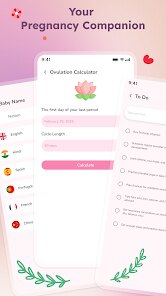
editor reviews
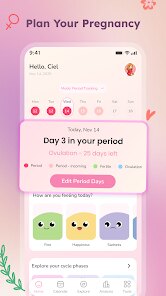
For expectant parents looking to keep a detailed record of their pregnancy journey, Pregnancy Tracker & Baby Diary from Willson Studio offers a straightforward digital companion. This Android application is readily available for download on Google Play and installs quickly, providing a central place to log weekly changes, track symptoms, and store memories as the due date approaches. The app is free to use, though it does include ads, and some optional in-app purchases unlock additional features for those who want them.
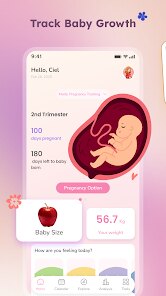
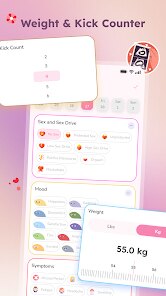
The core experience revolves around a week-by-week timeline that adjusts automatically as the pregnancy progresses. Users log in through a simple setup, enter their due date, and the app calculates the current stage with relevant information displayed on the home screen. There is a section for recording mood, physical symptoms, weight, and blood pressure, with each entry easily accessible through tabs and icons. Creating diary entries with photos is straightforward, and the app organizes these memories in a clean, chronological feed that is simple to browse. It doesn't overwhelm new users with complex navigational menus; most actions can be completed within two or three taps.
Many pregnancy apps aim to be all-encompassing, integrating social networks, extensive medical articles, or shopping recommendations. This one takes a more focused approach by concentrating on personal tracking and journaling. Compared to larger, more community-driven platforms, it feels less cluttered and more private, which I found refreshing. The visual style is softer and more minimal than some of its competitors, making the interface feel less clinical. While it may sacrifice the depth of informational content found elsewhere, its clarity and simplicity make it a solid choice for those who prioritize personal records over external content.
features
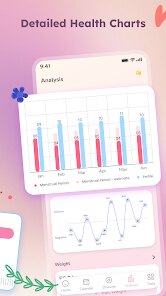
- The tracking tools for weight and blood pressure give clear trend charts, which make it easy to notice changes over time at a single glance. Entries feel quick to make, and the app never pushes unnecessary notifications during data input, keeping the process uninterrupted.
- The diary feature stands out by allowing both text and image attachments for each entry. Adding a photo takes only a moment, and the layout places emphasis on the visual memory rather than just a block of text. This makes the log feel more personal compared to a simple notes file.
- Reminders for upcoming appointments or medication times can be set individually, with flexible scheduling options. The alert tone is gentle, and the notification text is concise. Similar apps often require navigating through a settings menu for this; here, it is available directly from the calendar view, which is a neat time-saver.
- The week-by-week summary provides a brief overview of fetal development without heavy medical jargon. This is helpful but not exhaustive, which is likely a deliberate choice to keep things digestible on a small screen.
pros
- Having a single app for both health metrics and personal notes reduces the need to juggle multiple tools during a busy period.
- The simple interface means less time learning how to use it and more time actually recording information.
- Photo entries create a visual timeline that becomes a nice keepsake to look back on after delivery, something that is not always easy to put together later.
cons
- The free version displays ads after certain interactions, which occasionally interrupts the flow of browsing older diary entries.
- Some in-app purchases feel directed toward cosmetic changes, like themes, that might not matter to every user.
- Syncing across multiple devices is not seamless; the app appears to rely on manual backups rather than automatic cloud integration.
Articles
![]()
Guide
How to Update Google Play Store on Android 2026
![]()
Guide
How to Download Older Versions of Android Apps
![]()
Guide
How to Download Apps Without Google Play Store
![]()
Guide
What Is an APK File for Android?
If you use an Android phone, you may have seen the term APK while searching for apps or games online. Some websites offer an APK download instead of a Google Play install button. Some users also mention APK files when talking about apps that are not available in their region, older app versions, or Android games downloaded outside the Play Store.
![]()
Guide
How to Install Games from Google Play for Beginners
Installing games on an Android phone is usually simple, but for beginners, the process can still feel confusing at first. You may not know where to search, which button to tap, whether the game is safe, or why Google Play sometimes asks for account settings, storage access, or payment information. If you are using an Android phone for the first time, learning how to install games from Google Play is one of the easiest ways to get started.
![]()
Guide
How Useful Gemini Is for Everyday Questions and Quick Tasks
emini feels different from many AI apps because it is not only trying to be a chatbot. After using it for everyday questions, quick writing, image understanding, and planning, I think its biggest strength is convenience.
![]()
Guide
What to Know Before Downloading APKs
For many Android users, downloading an APK is a common way to install apps and games. Sometimes an app is not available in a certain country.
![]()
Guide
ChatGPT Review: Is It Still the Best AI App in 2026?
![]()
Guide
Seedance 2.0 vs Sora: The Future of AI Video Generation
The AI video race has intensified dramatically over the past two years. Platforms like Sora from OpenAI and Luma Dream Machine pushed the boundaries of text-to-video realism. Yet, despite their impressive outputs, most tools still operate as probabilistic generators—you describe a scene, and the model interprets it. Control remains limited. With the February 2026 release of Seedance 2.0, developed by ByteDance, the paradigm shifted. Internally known as Jimeng 2.0, Seedance does not position itself as just another video model. It positions itself as an AI Director. Rather than guessing what you want, Seedance 2.0 allows you to direct what happens. This distinction defines everything that follows.









Recommended Apps
![]()
Home Design 3D
Anuman4.2
![]()
Truth or Dare Game - Party App
Chouic4.8
![]()
Photo Collage Maker
Scoompa4.7![]()
Learn to Draw Flower
Creative APPS4.2![]()
FIFA World Cup 2026™
FIFA2.8![]()
Mirror Plus: Mirror with Light
Digitalchemy, LLC4.4![]()
Meitu- Photo Editor & AI Art
Meitu (China) Limited4.5![]()
Perplexity - Ask Anything
PerplexityAI4.7![]()
GhostTube SLS Camera Alternate
GhostTube4![]()
Boom Chip Blast: 2-Player
Black Pyramid 3D Games Studio0![]()
Healthy Benefits+
Solutran, Inc.4.5![]()
Deepcheck AI Search Assistant
rohe.ai4![]()
Idol Prank Video Call & Chat
LightCode Solutions4![]()
Face Shape - Pretty Scale
GlintTec Apps3.9![]()
Plant App - Plant Identifier
ScaleUp4.6











































