

Idol Prank Video Call & Chat

Installs
84devs Studio
Developer
-
Video Players & Editors
Category
-
Everyone
Content Rating
-
support@84devs.studio
Developer Email
-
https://www.84devs.studio/idol-prank/privacy-policy.html
Privacy Policy
Screenshots
editor reviews
Idol Prank Video Call & Chat, created by 84devs Studio, is an entertainment application designed to simulate video calls and chat conversations with fictional idol characters. The app is available for direct download from Google Play and has seen a steady number of installations since its release. It operates on a free-to-use model, though it does incorporate advertisements and offers optional in-app purchases for those who wish to unlock additional content features.
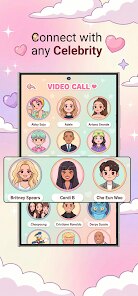
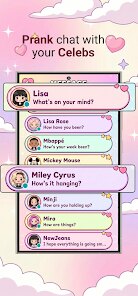
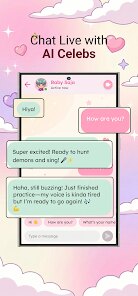
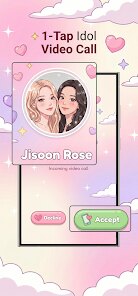
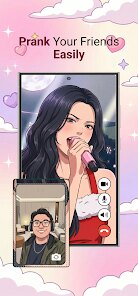
When you launch the app, you choose a character from a lineup of animated idols, each with distinct personalities and visual styles. The interaction begins with an incoming call screen that mimics a real video chat interface, complete with a shaky camera effect and occasional audio glitches to sell the illusion. You can tap to answer, and then a looping video of your chosen character plays, reacting to preset prompts you select from a list. Chat responses arrive as pre-written messages that appear with typing indicators, giving a sense of live conversation even though everything is scripted. The experience feels less like a game and more like a playful simulation tool.
While other apps in this category often focus on static images or text-only interactions, this one makes a point of blending both call and messaging mechanics into a single interface. Some similar titles emphasize deep role-playing narratives, whereas this app keeps things light and spontaneous, which I found suits its humor-oriented purpose better. The visual quality of the characters is also noticeably sharper than in comparable free apps, which use more generic anime-style avatars. It is not a complex product by any stretch, but it knows exactly what it wants to be and commits to that straightforward idea.
features
- The call simulation stands out because it layers realistic elements like connection delays and screen flickers. In use, those minor details make the prank more convincing when you show it to a friend, unlike simpler apps that just play a video outright.
- Character selection is broader than expected, with around a dozen idols available from the start. Each one has a distinct set of reactions, so switching characters actually changes the tone of the calls, which keeps the novelty alive longer than I initially thought it would.
- The chat mode feels surprisingly responsive due to the typing delay and quick reply suggestions. Compared to a similar app I tried earlier that made you wait for every line, this one flows at a better pace, making it easier to improvise a fake conversation.
- Offline functionality works well after the initial download of character data. That practicality matters when you want to show the prank without relying on a stable wifi connection, something not all rivals handle gracefully.
pros
- Setting up a prank takes under a minute, so it is handy when you need a quick distraction or a laugh at a gathering.
- The scripted conversations are well-written enough to feel naturally silly, which reduces the effort you need to put into crafting your own lines.
- Because it does not require any permissions beyond storage, it feels less invasive than many other apps on Play Store.
cons
- The ads interrupt at awkward moments, often appearing right before a call starts and breaking the flow of the joke.
- After a few days, the limited set of responses becomes predictable, so the replay value drops off fairly quickly.
- In-app purchases for extra characters are slightly overpriced for what is essentially cosmetic content.
Articles
![]()
Guide
How to Update Google Play Store on Android 2026
![]()
Guide
How to Download Older Versions of Android Apps
![]()
Guide
How to Download Apps Without Google Play Store
![]()
Guide
What Is an APK File for Android?
If you use an Android phone, you may have seen the term APK while searching for apps or games online. Some websites offer an APK download instead of a Google Play install button. Some users also mention APK files when talking about apps that are not available in their region, older app versions, or Android games downloaded outside the Play Store.
![]()
Guide
How to Install Games from Google Play for Beginners
Installing games on an Android phone is usually simple, but for beginners, the process can still feel confusing at first. You may not know where to search, which button to tap, whether the game is safe, or why Google Play sometimes asks for account settings, storage access, or payment information. If you are using an Android phone for the first time, learning how to install games from Google Play is one of the easiest ways to get started.
![]()
Guide
How Useful Gemini Is for Everyday Questions and Quick Tasks
emini feels different from many AI apps because it is not only trying to be a chatbot. After using it for everyday questions, quick writing, image understanding, and planning, I think its biggest strength is convenience.
![]()
Guide
What to Know Before Downloading APKs
For many Android users, downloading an APK is a common way to install apps and games. Sometimes an app is not available in a certain country.
![]()
Guide
ChatGPT Review: Is It Still the Best AI App in 2026?
![]()
Guide
Seedance 2.0 vs Sora: The Future of AI Video Generation
The AI video race has intensified dramatically over the past two years. Platforms like Sora from OpenAI and Luma Dream Machine pushed the boundaries of text-to-video realism. Yet, despite their impressive outputs, most tools still operate as probabilistic generators—you describe a scene, and the model interprets it. Control remains limited. With the February 2026 release of Seedance 2.0, developed by ByteDance, the paradigm shifted. Internally known as Jimeng 2.0, Seedance does not position itself as just another video model. It positions itself as an AI Director. Rather than guessing what you want, Seedance 2.0 allows you to direct what happens. This distinction defines everything that follows.









Recommended Apps
![]()
Home Design 3D
Anuman4.2
![]()
Truth or Dare Game - Party App
Chouic4.8
![]()
Photo Collage Maker
Scoompa4.7![]()
Learn to Draw Flower
Creative APPS4.2![]()
FIFA World Cup 2026™
FIFA2.8![]()
Mirror Plus: Mirror with Light
Digitalchemy, LLC4.4![]()
Meitu- Photo Editor & AI Art
Meitu (China) Limited4.5![]()
Perplexity - Ask Anything
PerplexityAI4.7![]()
GhostTube SLS Camera Alternate
GhostTube4![]()
Boom Chip Blast: 2-Player
Black Pyramid 3D Games Studio0![]()
Healthy Benefits+
Solutran, Inc.4.5![]()
Deepcheck AI Search Assistant
rohe.ai4![]()
Idol Prank Video Call & Chat
LightCode Solutions4![]()
Face Shape - Pretty Scale
GlintTec Apps3.9![]()
Plant App - Plant Identifier
ScaleUp4.6












































