

ESPN

50,000,000+
Installs
Disney
Developer
-
Sports
Category
-
Rated for 3+
Content Rating
-
espnmobilefeedback@espncustomercare.com
Developer Email
-
https://disneyprivacycenter.com/
Privacy Policy
Screenshots
editor reviews
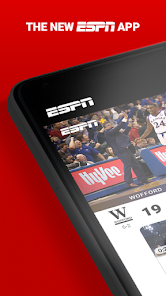
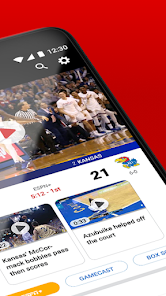
ESPN, from The Walt Disney Company, is basically the go-to hub for sports fans who want scores, news, and live game updates without flipping through a dozen different websites. It's a sports media app that lives on your phone, pulling in coverage from major leagues like the NFL, NBA, MLB, and Premier League, plus college sports and even some niche stuff like MMA. Most people download it because they want real-time score alerts, video highlights, or maybe a quick way to check their fantasy football stats while stuck in line at the grocery store. After you install it from Google Play or the App Store — it's free to grab, with over 10 million installs easily — the first launch hits you with a pretty clean layout. You get a dark mode by default, a bottom menu with "Home," "Scores," "Watch," and "More," plus a big video playing right at the top. It feels a bit like opening a sports news site but optimized for a smaller screen, and there's no forced sign-up right away, which I appreciate when I just want to glance at a game.
Once you start using it, the experience flows pretty intuitively for the most part. The home screen throws a mix of top stories, trending videos, and a quick scoreboard, and you can swipe left to jump straight into scores for your preferred leagues. Setting up your favorite teams takes maybe a minute — you tap the "More" tab, hit "Settings," then "Favorite Teams," and pick from a giant list. After that, notifications start rolling in for close games, big plays, and final scores, which is exactly what you'd want if you're following a tight playoff race or just waiting for your team's kickoff. The video section, "Watch," is where things get a bit messy: you get free clips and short shows, but some content is locked behind a cable subscription or an ESPN+ login, so you'll hit a paywall now and then. For daily use, I usually jump into the "Scores" tab, scroll through the league schedule, tap a game to see box scores and play-by-play, and then maybe watch a 30-second highlight. It's smooth, but the ads pop up regularly between articles or after videos, which gets a little old.
After spending a few weeks with ESPN, I'd say it's really solid for anyone who wants a one-stop sports dashboard without digging through Twitter or league-specific apps. Casual fans might love the free video clips and quick headlines, but hardcore followers could find the paywalled content frustrating — like needing a subscription to watch certain live events or full replays. Compared to theScore or Bleacher Report, ESPN covers way more sports and has deeper analysis, but those other apps feel lighter and less cluttered with ads. What keeps me from uninstalling it is the fantasy sports integration and the custom alerts for specific players — I can set it to ping me whenever my fantasy quarterback throws a touchdown, which is a nice touch. On the flip side, the constant "Subscribe to ESPN+" nudges and the occasional crash when loading video streams make me wonder if I'd be happier with a simpler alternative. I'd keep it around if I'm deep into the NBA season, but once football wraps up, it might be the first app I trim from my home screen.
features
- 📊 Live score customization: You can pick your favorite teams across multiple sports, and the app sends you push alerts for scoring changes, quarter ends, or key plays. TheScore does this too, but ESPN lets you fine-tune it down to specific players in a way most rivals don't.
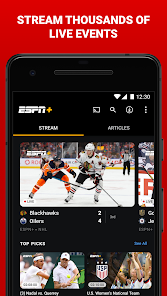
- 📹 Integrated video hub: From short highlights to full studio shows like "SportsCenter," there's a lot of free video. But the big edge over something like Bleacher Report is that ESPN also hosts live games if you have a cable login or ESPN+ — so one app handles both clips and live action.
- 📈 Fantasy sports tools: You can directly link your ESPN Fantasy Football or Basketball league inside the app, and it'll show your team's stats, matchup breakdowns, and player news on the main feed. Yahoo Sports offers fantasy tracking too, but ESPN's version feels more baked into the overall content, so you don't have to switch tabs as much.
pros
- 🛡️ Massive league coverage: From the NFL to the WNBA to international soccer, you'll find nearly every major league, which is rare. CBS Sports has a similar breadth, but ESPN often updates news faster and includes more local team coverage.
- 🛡️ Deep editorial content: If you like reading analysis, long-form pieces, or insider reports, ESPN has a bigger writing staff than most competitors. The articles are written by well-known names, so you get better quality than, say, the short blurbs on theScore.
- 🛡️ Reliable video streaming: For live events you have access to, the stream quality is consistently strong — fewer buffering issues than Bleacher Report's live coverage, especially during big games like Monday Night Football.
cons
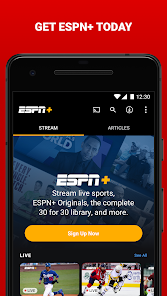
- ⚠️ Annoying paywalls: Too much content — like full game replays or exclusive shows — is locked behind ESPN+. Even free users see constant "Upgrade" ads. theScore, by contrast, keeps almost everything open without a subscription.
- ⚠️ Cluttered interface: The home screen loads ads between every three stories, and the article pages themselves have banners that slow things down. CBS Sports feels cleaner with fewer interruptions while browsing.
- ⚠️ Inconsistent video playback: Sometimes a highlight video will freeze for a few seconds or fail to load entirely, which is frustrating when you just want a quick recap. Bleacher Report's video player is generally snappier on this front.
- ⚠️ Notification overload: Even after setting preferences, I'll still get alerts for random sports I don't follow. You can tweak it, but it takes more effort than theScore's straightforward notification manager.
Articles
![]()
Guide
How to Update Google Play Store on Android 2026
![]()
Guide
How to Download Older Versions of Android Apps
![]()
Guide
How to Download Apps Without Google Play Store
![]()
Guide
What Is an APK File for Android?
If you use an Android phone, you may have seen the term APK while searching for apps or games online. Some websites offer an APK download instead of a Google Play install button. Some users also mention APK files when talking about apps that are not available in their region, older app versions, or Android games downloaded outside the Play Store.
![]()
Guide
How to Install Games from Google Play for Beginners
Installing games on an Android phone is usually simple, but for beginners, the process can still feel confusing at first. You may not know where to search, which button to tap, whether the game is safe, or why Google Play sometimes asks for account settings, storage access, or payment information. If you are using an Android phone for the first time, learning how to install games from Google Play is one of the easiest ways to get started.
![]()
Guide
How Useful Gemini Is for Everyday Questions and Quick Tasks
emini feels different from many AI apps because it is not only trying to be a chatbot. After using it for everyday questions, quick writing, image understanding, and planning, I think its biggest strength is convenience.
![]()
Guide
What to Know Before Downloading APKs
For many Android users, downloading an APK is a common way to install apps and games. Sometimes an app is not available in a certain country.
![]()
Guide
ChatGPT Review: Is It Still the Best AI App in 2026?
![]()
Guide
Seedance 2.0 vs Sora: The Future of AI Video Generation
The AI video race has intensified dramatically over the past two years. Platforms like Sora from OpenAI and Luma Dream Machine pushed the boundaries of text-to-video realism. Yet, despite their impressive outputs, most tools still operate as probabilistic generators—you describe a scene, and the model interprets it. Control remains limited. With the February 2026 release of Seedance 2.0, developed by ByteDance, the paradigm shifted. Internally known as Jimeng 2.0, Seedance does not position itself as just another video model. It positions itself as an AI Director. Rather than guessing what you want, Seedance 2.0 allows you to direct what happens. This distinction defines everything that follows.









Recommended Apps
![]()
Home Design 3D
Anuman4.2
![]()
Truth or Dare Game - Party App
Chouic4.8
![]()
Photo Collage Maker
Scoompa4.7![]()
Learn to Draw Flower
Creative APPS4.2![]()
FIFA World Cup 2026™
FIFA2.8![]()
Mirror Plus: Mirror with Light
Digitalchemy, LLC4.4![]()
Meitu- Photo Editor & AI Art
Meitu (China) Limited4.5![]()
Perplexity - Ask Anything
PerplexityAI4.7![]()
GhostTube SLS Camera Alternate
GhostTube4![]()
Boom Chip Blast: 2-Player
Black Pyramid 3D Games Studio0![]()
Healthy Benefits+
Solutran, Inc.4.5![]()
Deepcheck AI Search Assistant
rohe.ai4![]()
Idol Prank Video Call & Chat
LightCode Solutions4![]()
Face Shape - Pretty Scale
GlintTec Apps3.9![]()
Plant App - Plant Identifier
ScaleUp4.6












































