

Amazon Shopping

500,000,000+
Installs
Amazon Mobile LLC
Developer
-
Shopping
Category
-
Rated for 12+
Content Rating
-
feedback-amazon-app-android@amazon.com
Developer Email
-
https://www.amazon.com/gp/help/customer/display.html?ie=UTF8&nodeId=468496
Privacy Policy
Screenshots

editor reviews
I downloaded the Amazon Shopping app from Google Play last week, and honestly, I was surprised by the sheer number of installs over a billion. It's a retail app, plain and simple, letting you buy nearly anything from the massive online marketplace. You can browse for electronics, clothes, groceries, or home goods, all from your phone. The first impression after launching is a bit overwhelming the homepage is packed with deals, personalized recommendations, and a search bar right at the top. You don't need to register if you already have an account, but signing up takes less than a minute. It's free to download and use, though in-app purchases happen every time you check out. Ads for sponsored products pop up sometimes, but they're not too intrusive.
Using the app feels pretty smooth once you get past the busy layout. The onboarding asks you about your interests to tailor suggestions, which is a nice touch. I mainly use it to search for specific items, add them to my cart, and then checkout with a few taps. The interface is clean enough, but scrolling through search results can get cluttered with too many sponsored listings. One practical tip I found is scanning barcodes or using the camera to search for products it works surprisingly well for price comparisons. There were moments where the app lagged when loading product details, but overall, navigating between categories, reading reviews, and tracking orders is straightforward. Daily use feels like habit-forming once you start paying for Prime shipping benefits.
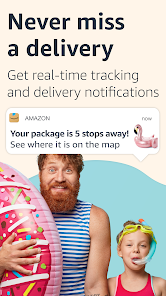
After using it for a while, I think this app is great for people who like convenience and have a Prime membership, but it might not be ideal if you're on a strict budget since you can easily impulse buy. Compared to eBay, Amazon feels more polished but less community-oriented. What makes it different is how integrated everything is you can order groceries, stream music, or manage subscriptions all from one app. I ended up keeping it installed because tracking deliveries is so convenient, but I could see someone uninstalling it if they prefer local stores or want to avoid Amazon's dominance. It's a solid tool, but not magical.
features
- 📦 Amazon's search bar includes a “Scan” feature that lets you use your phone's camera to instantly identify products. eBay has a similar tool, but Amazon's version feels faster and more accurate, especially for books or electronics. No need to type out long product names.
- 📦 One-click ordering is built into the app, making checkout a breeze. Walmart's app also offers quick checkout, but Amazon's integration with your stored payment and shipping details feels seamless. You just tap once and the purchase is done.
- 📦 The “Buy Again” section brings up past purchases for easy reordering. This is handy for household staples like detergent or snack foods.
- 📦 Amazon's app syncs with Alexa and Ring devices, letting you check delivery status or reorder from your Echo screen. Other shopping apps don't touch this level of ecosystem integration.
pros
- 👍 Fast and reliable shipping choices Amazon Prime offers two-day, same-day, or even one-hour delivery in many areas. eBay sellers usually rely on standard postal services, so delivery times vary wildly. This makes Amazon feel more predictable.
- 👍 Consistent return policy Amazon's app has a simple return flow you can print labels or drop items at Whole Foods. Walmart's app requires you to visit a store for some returns, which is less convenient for online shoppers.
- 👍 Huge product variety with reviews You can find almost anything on Amazon, and the review system helps you decide. Smaller apps like Etsy focus on handmade goods but lack the same breadth of categories and user feedback.
- 👍 Integrated subscription management for household items like toilet paper or detergent saves time. You never run out of essentials, and you can manage all schedules from the app.
cons
- 👎 Too many sponsored products in search results. I often scroll past three or four ads before seeing actual organic results. eBay shows fewer ads, making it easier to browse naturally.
- 👎 The app is slow on older phones. On my Android device from three years ago, loading product pages takes noticeably longer than Walmart's app, which runs smoother on low-end hardware.
- 👎 Customer support through the app is hit or miss. Getting a real person is tedious you have to tap through chatbots first. eBay's in-app support can connect you to a human faster, which is less frustrating.
- 👎 No real price negotiation or auctions. Amazon is fixed-price, while eBay lets you haggle or bid, which feels more engaging for secondhand items. If you love the hunt, Amazon feels too rigid.
Articles
![]()
Guide
How to Update Google Play Store on Android 2026
![]()
Guide
How to Download Older Versions of Android Apps
![]()
Guide
How to Download Apps Without Google Play Store
![]()
Guide
What Is an APK File for Android?
If you use an Android phone, you may have seen the term APK while searching for apps or games online. Some websites offer an APK download instead of a Google Play install button. Some users also mention APK files when talking about apps that are not available in their region, older app versions, or Android games downloaded outside the Play Store.
![]()
Guide
How to Install Games from Google Play for Beginners
Installing games on an Android phone is usually simple, but for beginners, the process can still feel confusing at first. You may not know where to search, which button to tap, whether the game is safe, or why Google Play sometimes asks for account settings, storage access, or payment information. If you are using an Android phone for the first time, learning how to install games from Google Play is one of the easiest ways to get started.
![]()
Guide
How Useful Gemini Is for Everyday Questions and Quick Tasks
emini feels different from many AI apps because it is not only trying to be a chatbot. After using it for everyday questions, quick writing, image understanding, and planning, I think its biggest strength is convenience.
![]()
Guide
What to Know Before Downloading APKs
For many Android users, downloading an APK is a common way to install apps and games. Sometimes an app is not available in a certain country.
![]()
Guide
ChatGPT Review: Is It Still the Best AI App in 2026?
![]()
Guide
Seedance 2.0 vs Sora: The Future of AI Video Generation
The AI video race has intensified dramatically over the past two years. Platforms like Sora from OpenAI and Luma Dream Machine pushed the boundaries of text-to-video realism. Yet, despite their impressive outputs, most tools still operate as probabilistic generators—you describe a scene, and the model interprets it. Control remains limited. With the February 2026 release of Seedance 2.0, developed by ByteDance, the paradigm shifted. Internally known as Jimeng 2.0, Seedance does not position itself as just another video model. It positions itself as an AI Director. Rather than guessing what you want, Seedance 2.0 allows you to direct what happens. This distinction defines everything that follows.









Recommended Apps
![]()
Home Design 3D
Anuman4.2
![]()
Truth or Dare Game - Party App
Chouic4.8
![]()
Photo Collage Maker
Scoompa4.7![]()
Learn to Draw Flower
Creative APPS4.2![]()
FIFA World Cup 2026™
FIFA2.8![]()
Mirror Plus: Mirror with Light
Digitalchemy, LLC4.4![]()
Meitu- Photo Editor & AI Art
Meitu (China) Limited4.5![]()
Perplexity - Ask Anything
PerplexityAI4.7![]()
GhostTube SLS Camera Alternate
GhostTube4![]()
Boom Chip Blast: 2-Player
Black Pyramid 3D Games Studio0![]()
Healthy Benefits+
Solutran, Inc.4.5![]()
Deepcheck AI Search Assistant
rohe.ai4![]()
Idol Prank Video Call & Chat
LightCode Solutions4![]()
Face Shape - Pretty Scale
GlintTec Apps3.9![]()
Plant App - Plant Identifier
ScaleUp4.6












































