

TuneIn Radio: News, Music & FM

100,000,000+
Installs
TuneIn Inc
Developer
-
Entertainment
Category
-
Rated for 12+
Content Rating
-
android-support@tunein.com
Developer Email
-
http://tunein.com/policies/privacy/
Privacy Policy
Screenshots

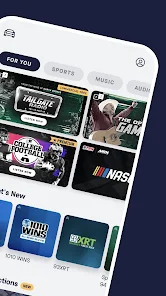
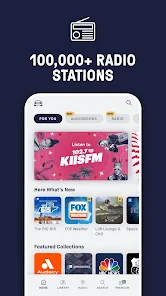
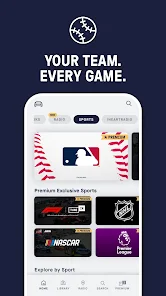
editor reviews
TuneIn Radio is an app that brings together live radio stations, podcasts, audiobooks, and even live sports coverage all in one place. It's essentially a streaming hub for audio content, and it sits somewhere between a dedicated radio app like iHeartRadio and a full-featured podcast platform like Spotify. For a normal user, the main draw is the sheer variety you get without having to hop between different services. You might install it because you want to listen to your hometown AM station while traveling, or because you heard about a live baseball game that's only broadcasting through TuneIn. The first time you open it, the interface feels a bit overwhelming—there's a lot of text, categories, and suggested stations right on the home screen. You're greeted with a mix of trending news stations, music genres, and sports options all at once. It's not exactly minimalistic, but after a few minutes, you start to see the logic behind it. It's free to download, with over 50 million installs on Google Play, though you'll quickly notice ads popping up between tracks or segments. You don't need to register to listen right away, but creating a free account lets you save favorites and follow specific shows.
Actually using TuneIn Radio is a bit of a mixed bag once you get past the initial setup. After tapping through the onboarding screens that just ask about your interests—music, news, sports, talk, or podcasts—you land on the main feed. The navigation sits at the bottom with tabs for Home, Browse, My Stuff, and Search. Tapping Browse opens up a grid of categories, and from there, you can pick something like “Classic Rock” and see a list of stations from all over the world. A smooth moment is when you're searching for a specific sports team or league; the app pulls up live games, pre-game shows, and related talk radio pretty fast. But there are confusing moments too. For example, when you try to listen to a local FM station, sometimes it's not available due to licensing, and you just get a muted “currently unavailable” message with no explanation. Another practical tip: if you're on a paid subscription (TuneIn Premium), you get commercial-free access to MLB and NFL games, plus audiobooks. Without it, you'll hear a lot of the same auto insurance ads over and over. A small thing that helps is using the “recently played” feature under My Stuff to pick up where you left off on a podcast episode.
After spending a couple of weeks with TuneIn Radio, I'd say it's a solid choice for someone who listens to live radio or sports regularly, but not so much for podcast lovers who want exclusive content. The app feels different from something like iHeartRadio, which focuses more on curated playlists and local stations, or Spotify, which excels at on-demand music and podcast recommendations. TuneIn's standout feature is the live sports coverage for major leagues, especially if you're a fan of out-of-market games—only TuneIn really offers that for radio. That said, the ads are relentless in the free version, and the interface can feel cluttered compared to SiriuXM's streamlined car-friendly design. I kept it installed because I travel a lot and it's handy for catching news from my hometown station without having to search for a live stream elsewhere. But I considered uninstalling it when I realized the free version blocks certain stations entirely without a clear reason. It's useful, but it asks for patience with the ads and licensing hiccups.
features
- 🔍 Live event access is TuneIn's big sell—you can listen to over 90,000 radio stations and live sports like MLB and NFL games. In comparison, iHeartRadio focuses more on its own stations and offers fewer sports options, making TuneIn a better bet for game day listening.
- 💤 Audio bookmarking and sleep timer let you mark a moment in a podcast or station stream and set the app to stop after a set time. Spotify has a sleep timer too, but it doesn't let you bookmark specific spots within a live radio stream, which is handy for catching news headlines later.
- 🎧 Multi-platform syncing means your favorites and listening history follow you from your phone to a web browser or smart speaker. Unlike apps like Simple Radio, which lose your preferences between devices, TuneIn keeps everything in sync once you log in through a TuneIn account.
pros
- ✅ Massive station library—TuneIn aggregates tens of thousands of stations from all over the world, including obscure local stations that other apps like iHeartRadio or Audacy don't cover. If you're into discovering radio from different countries, it's unmatched.
- ✅ Live sports without cable—TuneIn Premium gives you commercial-free access to MLB, NFL, and NHL games, which is a big plus over free apps like MyTuner Radio that only offer music and talk without any sports deals.
- ✅ Dedicated news section—the app groups news stations by region and topic, making it easy to follow breaking stories from outlets like BBC or CNN. Apps like Streema have a similar idea but with less polish and more dead links.
cons
- ❌ Aggressive ad load—the free version throws in short ad breaks every few minutes, even during music segments, which is more frequent than what you get with iHeartRadio's free tier that spaces ads between songs more politely.
- ❌ Licensing gaps—some popular stations are simply marked as unavailable due to licensing restrictions in your country, without offering an alternative. Simple Radio handles this better by suggesting similar stations when one is blocked.
- ❌ Clunky podcast integration—podcasts are listed alongside live stations, making it hard to quickly find episodes or manage subscriptions. Spotify and Apple Podcasts have far cleaner podcast browsers with better search filters and download options.
Articles
![]()
Guide
How to Update Google Play Store on Android 2026
![]()
Guide
How to Download Older Versions of Android Apps
![]()
Guide
How to Download Apps Without Google Play Store
![]()
Guide
What Is an APK File for Android?
If you use an Android phone, you may have seen the term APK while searching for apps or games online. Some websites offer an APK download instead of a Google Play install button. Some users also mention APK files when talking about apps that are not available in their region, older app versions, or Android games downloaded outside the Play Store.
![]()
Guide
How to Install Games from Google Play for Beginners
Installing games on an Android phone is usually simple, but for beginners, the process can still feel confusing at first. You may not know where to search, which button to tap, whether the game is safe, or why Google Play sometimes asks for account settings, storage access, or payment information. If you are using an Android phone for the first time, learning how to install games from Google Play is one of the easiest ways to get started.
![]()
Guide
How Useful Gemini Is for Everyday Questions and Quick Tasks
emini feels different from many AI apps because it is not only trying to be a chatbot. After using it for everyday questions, quick writing, image understanding, and planning, I think its biggest strength is convenience.
![]()
Guide
What to Know Before Downloading APKs
For many Android users, downloading an APK is a common way to install apps and games. Sometimes an app is not available in a certain country.
![]()
Guide
ChatGPT Review: Is It Still the Best AI App in 2026?
![]()
Guide
Seedance 2.0 vs Sora: The Future of AI Video Generation
The AI video race has intensified dramatically over the past two years. Platforms like Sora from OpenAI and Luma Dream Machine pushed the boundaries of text-to-video realism. Yet, despite their impressive outputs, most tools still operate as probabilistic generators—you describe a scene, and the model interprets it. Control remains limited. With the February 2026 release of Seedance 2.0, developed by ByteDance, the paradigm shifted. Internally known as Jimeng 2.0, Seedance does not position itself as just another video model. It positions itself as an AI Director. Rather than guessing what you want, Seedance 2.0 allows you to direct what happens. This distinction defines everything that follows.









Recommended Apps
![]()
Home Design 3D
Anuman4.2
![]()
Truth or Dare Game - Party App
Chouic4.8
![]()
Photo Collage Maker
Scoompa4.7![]()
Learn to Draw Flower
Creative APPS4.2![]()
FIFA World Cup 2026™
FIFA2.8![]()
Mirror Plus: Mirror with Light
Digitalchemy, LLC4.4![]()
Meitu- Photo Editor & AI Art
Meitu (China) Limited4.5![]()
Perplexity - Ask Anything
PerplexityAI4.7![]()
GhostTube SLS Camera Alternate
GhostTube4![]()
Boom Chip Blast: 2-Player
Black Pyramid 3D Games Studio0![]()
Healthy Benefits+
Solutran, Inc.4.5![]()
Deepcheck AI Search Assistant
rohe.ai4![]()
Idol Prank Video Call & Chat
LightCode Solutions4![]()
Face Shape - Pretty Scale
GlintTec Apps3.9![]()
Plant App - Plant Identifier
ScaleUp4.6












































