
Gmail

10,000,000,000+
Installs
Google LLC
Developer
-
Social
Category
-
Rated for 3+
Content Rating
-
apps-help@google.com
Developer Email
-
http://www.google.com/policies/privacy
Privacy Policy
Screenshots
editor reviews
Gmail is the email service that Google built, deeply integrated into the Android and Google ecosystem. If you have a smartphone, you almost certainly ended up creating a Gmail account just to access the Play Store or backup your contacts. Most people download it because it comes pre-installed or is the default email client on Android, with over a billion installs on the Play Store. Racing through the initial setup is incredibly smooth thanks to Google's one-tap account sync from your device. The first thing you see after launching the app is a clean, white interface with your most recent emails in your main inbox, organized neatly. The search bar sits right at the top, reminding you this is a Google product where finding something is a priority. It's completely free to use, though you will see occasional, non-intrusive ads in the Promotions and Social tabs based on what's in your messages. The initial experience feels fast and familiar, like stepping into any other well-designed Google app.
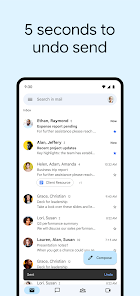
Once you start using Gmail, the actual hands-on experience is all about speed and organization. The default inbox splits things into Primary, Social, and Promotions tabs by default, which helps keep newsletters and Facebook alerts from burying an important message. Swiping left or right on a conversation gives you quick archive or delete options out of the box. Composing a new email takes one tap on the floating + button, and the editor is fast partly because it loads in the background as you browse. One practical tip is that long-pressing on any email lets you select multiple messages at once for batch actions. Smart replies appear below a message after a quick scan, saving you from typing out “Got it, thanks” fifty times a week. Although the interface is mostly smooth, dealing with large attachments on a weak connection can stall the conversation list briefly. The onboard AI that suggests replies and reminds you to follow up on unanswered emails feels genuinely useful after a few days of use.
After living with this app for months, my honest judgment is that Gmail is the best choice for someone who uses multiple Google services regularly. If you rely on Google Drive, Google Calendar, or Google Meet, having everything threaded together in one app is a huge time saver. People who value strict privacy might skip it because Google does scan your emails for ad personalization, which is why some users prefer ProtonMail or Tutanota. What sets it apart from competitors like Apple Mail or Outlook is the insane search capability—finding an email from years ago usually works in seconds. I keep it installed because it's the default on my phone and works seamlessly, but I could see someone switching away if they want more granular spam control or offline access without a subscription. For the average person, it's the solid, go-to email client that just works without needing tweaks, even if it's not the most exciting app on your phone.
features
- ✉️ The outstanding smart inbox categorization into Primary, Social, and Promotions tabs automatically sorts emails so you can check Facebook notifications without seeing a marketing newsletter first. In comparison, Apple Mail dumps everything into one list, forcing you to create manual rules or dig through clutter.
- ✉️ Nudges and smart replies are a standout feature where Gmail gently reminds you to follow up on an email you forgot to reply to and suggests three brief taps for quick responses. Outlook does offer similar AI suggestions, but Gmail's implementation feels faster and less intrusive since it learns your pattern over time.
- ✉️ The Giphy integration inside the compose window lets you quickly add animated GIFs to emails, which is a fun twist for casual conversations. No other major email client, including ProtonMail or Yahoo Mail, offers this directly within the editor without third-party addons.
pros
- ➕ 15GB of free storage across Gmail, Google Drive, and Google Photos is a generous starting point that beats Apple Mail's 5GB free iCloud limit. This means your inbox won't choke on attachments as quickly if you manage a few gigabytes of emails.
- ➕ The universal search bar that scans the full text of every email, including attachments and PDFs, is unmatched in accuracy. Microsoft's Outlook desktop client searches well, but the mobile version lags behind Gmail's instant results even with thousands of messages.
- ➕ Seamless integration with Google Calendar appointments, Google Meet links, and Drive attachments automatically appears as chips within the email body. Setting up a meeting or sharing a file takes two taps without leaving the conversation.
cons
- ➖ The mandatory five-category tab system cannot be disabled without switching to a third-party app, which forces you to manually check each tab if you want to see every new email. Apple Mail simply shows you everything sorted by time with no artificial separation.
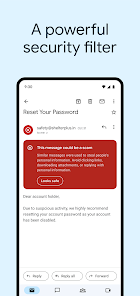
- ➖ Spam filtering can be overly aggressive, occasionally flagging legitimate newsletters from trusted senders into the Spam folder. Outlook's filter seems more conservative, letting through more noise but rarely losing important messages.
- ➖ Offline access is limited to recent emails and requires a Google One subscription for true offline search and compose. ProtonMail offers full offline functionality for free on its mobile app, which is more reliable for travelers without constant data.
Articles
![]()
Guide
How to Update Google Play Store on Android 2026
![]()
Guide
How to Download Older Versions of Android Apps
![]()
Guide
How to Download Apps Without Google Play Store
![]()
Guide
What Is an APK File for Android?
If you use an Android phone, you may have seen the term APK while searching for apps or games online. Some websites offer an APK download instead of a Google Play install button. Some users also mention APK files when talking about apps that are not available in their region, older app versions, or Android games downloaded outside the Play Store.
![]()
Guide
How to Install Games from Google Play for Beginners
Installing games on an Android phone is usually simple, but for beginners, the process can still feel confusing at first. You may not know where to search, which button to tap, whether the game is safe, or why Google Play sometimes asks for account settings, storage access, or payment information. If you are using an Android phone for the first time, learning how to install games from Google Play is one of the easiest ways to get started.
![]()
Guide
How Useful Gemini Is for Everyday Questions and Quick Tasks
emini feels different from many AI apps because it is not only trying to be a chatbot. After using it for everyday questions, quick writing, image understanding, and planning, I think its biggest strength is convenience.
![]()
Guide
What to Know Before Downloading APKs
For many Android users, downloading an APK is a common way to install apps and games. Sometimes an app is not available in a certain country.
![]()
Guide
ChatGPT Review: Is It Still the Best AI App in 2026?
![]()
Guide
Seedance 2.0 vs Sora: The Future of AI Video Generation
The AI video race has intensified dramatically over the past two years. Platforms like Sora from OpenAI and Luma Dream Machine pushed the boundaries of text-to-video realism. Yet, despite their impressive outputs, most tools still operate as probabilistic generators—you describe a scene, and the model interprets it. Control remains limited. With the February 2026 release of Seedance 2.0, developed by ByteDance, the paradigm shifted. Internally known as Jimeng 2.0, Seedance does not position itself as just another video model. It positions itself as an AI Director. Rather than guessing what you want, Seedance 2.0 allows you to direct what happens. This distinction defines everything that follows.









Recommended Apps
![]()
Home Design 3D
Anuman4.2
![]()
Truth or Dare Game - Party App
Chouic4.8
![]()
Photo Collage Maker
Scoompa4.7![]()
Learn to Draw Flower
Creative APPS4.2![]()
FIFA World Cup 2026™
FIFA2.8![]()
Mirror Plus: Mirror with Light
Digitalchemy, LLC4.4![]()
Meitu- Photo Editor & AI Art
Meitu (China) Limited4.5![]()
Perplexity - Ask Anything
PerplexityAI4.7![]()
GhostTube SLS Camera Alternate
GhostTube4![]()
Boom Chip Blast: 2-Player
Black Pyramid 3D Games Studio0![]()
Healthy Benefits+
Solutran, Inc.4.5![]()
Deepcheck AI Search Assistant
rohe.ai4![]()
Idol Prank Video Call & Chat
LightCode Solutions4![]()
Face Shape - Pretty Scale
GlintTec Apps3.9![]()
Plant App - Plant Identifier
ScaleUp4.6












































