

ALDI Grocery Pickup & Delivery

5M+
Installs
ALDI International Services SE & Co. oHG
Developer
-
Shopping
Category
-
Everyone
Content Rating
-
appstorefeedback@aldi.us
Developer Email
-
https://info.aldi.us/online-privacy-notice
Privacy Policy
Screenshots
editor reviews
For anyone who regularly shops for groceries, the ALDI Grocery Pickup & Delivery app is a practical tool available on Google Play that brings the store's well-known low prices into a digital ordering experience. It is free to download and install, though users will need to create an account to place orders. The app itself does not include additional ads, but the shopping process naturally involves browsing weekly specials and standard items, with delivery fees and tip expectations varying by location. It seems designed to make the process of getting ALDI groceries feel more manageable, especially for those who prefer not to navigate the store's often busy aisles in person.
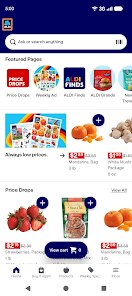
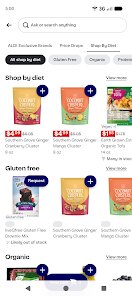
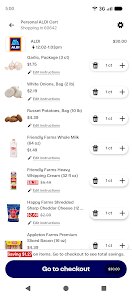
Once you open the app, the interface presents a clean layout focused on the current ALDI Finds and weekly ad, which is where many of the best deals appear. Adding items to your cart works much like any other grocery app, though the experience feels slightly different because ALDI does not offer the same breadth of brand-name alternatives found elsewhere. The browsing process is straightforward, though I noticed that searching for specific items does not always pull up the most relevant results on the first try. Still, selecting a pickup or delivery window is smooth, and the app clearly communicates when your order will be ready, which I found helpful for planning meals around a tight schedule.
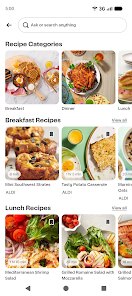
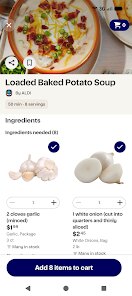
Compared to other grocery apps like Walmart Grocery or Kroger's platform, the ALDI app feels more streamlined but also somewhat limited. It does not try to replicate the massive inventory or sorting options of larger competitors, which can actually be a relief if you know exactly what you want. The design feels more utilitarian, lacking some of the visual polish found in other apps, but it manages the core task without unnecessary complexity. I personally prefer its simplicity for a quick weekly shop, even though I sometimes miss the detailed product descriptions or recipe suggestions found in competing services.
features
- The app integrates the ALDI Finds section directly into the shopping flow, which makes it easy to spot limited-time items without needing to check a separate flyer. I found this convenient for adding seasonal products to my order spontaneously.
- Order tracking is fairly transparent, allowing you to see when a shopper is picking items and when your order moves to delivery or pickup. This felt reassuring during busy days, though the updates are not always immediate.
- Compared to Instacart, the ALDI app feels more tailored to the store's specific inventory, avoiding the confusion of out-of-stock substitutions from unrelated retailers. However, the substitution options are less flexible, which might bother users with strict preferences.
- The ability to save favorite items and past orders speeds up repeat shopping, though the list management could be more intuitive. I often had to re-add items because the saved list did not always reflect my most recent purchases.
pros
- Saving time by avoiding in-store queues and checkout lines, especially during peak hours when ALDI locations tend to be crowded.
- Accessing the weekly ad and deals directly through the app helps me plan meals around discounts without extra effort.
- The straightforward interface reduces decision fatigue, making it easier to stick to a shopping list without impulse buying.
cons
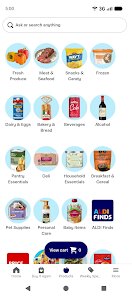
- Search functionality sometimes returns inaccurate results, requiring you to browse categories manually for certain products.
- The app occasionally lags when loading the full inventory, which can be frustrating when you are in a hurry to place an order.
- Substitution options are limited, and the app does not always communicate changes clearly before pickup or delivery.
- No option to schedule recurring orders, which would be convenient for regular shoppers who buy the same staples weekly.
Articles
![]()
Guide
How to Update Google Play Store on Android 2026
![]()
Guide
How to Download Older Versions of Android Apps
![]()
Guide
How to Download Apps Without Google Play Store
![]()
Guide
What Is an APK File for Android?
If you use an Android phone, you may have seen the term APK while searching for apps or games online. Some websites offer an APK download instead of a Google Play install button. Some users also mention APK files when talking about apps that are not available in their region, older app versions, or Android games downloaded outside the Play Store.
![]()
Guide
How to Install Games from Google Play for Beginners
Installing games on an Android phone is usually simple, but for beginners, the process can still feel confusing at first. You may not know where to search, which button to tap, whether the game is safe, or why Google Play sometimes asks for account settings, storage access, or payment information. If you are using an Android phone for the first time, learning how to install games from Google Play is one of the easiest ways to get started.
![]()
Guide
How Useful Gemini Is for Everyday Questions and Quick Tasks
emini feels different from many AI apps because it is not only trying to be a chatbot. After using it for everyday questions, quick writing, image understanding, and planning, I think its biggest strength is convenience.
![]()
Guide
What to Know Before Downloading APKs
For many Android users, downloading an APK is a common way to install apps and games. Sometimes an app is not available in a certain country.
![]()
Guide
ChatGPT Review: Is It Still the Best AI App in 2026?
![]()
Guide
Seedance 2.0 vs Sora: The Future of AI Video Generation
The AI video race has intensified dramatically over the past two years. Platforms like Sora from OpenAI and Luma Dream Machine pushed the boundaries of text-to-video realism. Yet, despite their impressive outputs, most tools still operate as probabilistic generators—you describe a scene, and the model interprets it. Control remains limited. With the February 2026 release of Seedance 2.0, developed by ByteDance, the paradigm shifted. Internally known as Jimeng 2.0, Seedance does not position itself as just another video model. It positions itself as an AI Director. Rather than guessing what you want, Seedance 2.0 allows you to direct what happens. This distinction defines everything that follows.









Recommended Apps
![]()
Home Design 3D
Anuman4.2
![]()
Truth or Dare Game - Party App
Chouic4.8
![]()
Photo Collage Maker
Scoompa4.7![]()
Learn to Draw Flower
Creative APPS4.2![]()
FIFA World Cup 2026™
FIFA2.8![]()
Mirror Plus: Mirror with Light
Digitalchemy, LLC4.4![]()
Meitu- Photo Editor & AI Art
Meitu (China) Limited4.5![]()
Perplexity - Ask Anything
PerplexityAI4.7![]()
GhostTube SLS Camera Alternate
GhostTube4![]()
Boom Chip Blast: 2-Player
Black Pyramid 3D Games Studio0![]()
Healthy Benefits+
Solutran, Inc.4.5![]()
Deepcheck AI Search Assistant
rohe.ai4![]()
Idol Prank Video Call & Chat
LightCode Solutions4![]()
Face Shape - Pretty Scale
GlintTec Apps3.9![]()
Plant App - Plant Identifier
ScaleUp4.6












































