

American Airlines

10M+
Installs
American Airlines, Inc.
Developer
-
Travel & Local
Category
-
Everyone
Content Rating
-
aa.mobile@aa.com
Developer Email
-
https://www.aa.com/i18n/customer-service/support/privacy-policy.jsp
Privacy Policy
Screenshots

editor reviews
For anyone who flies regularly, the official American Airlines app, available on Google Play, offers a centralized way to manage travel. It's a free download focused on streamlining the entire journey, from booking to boarding. The app includes features like mobile check-in, digital boarding passes, flight status tracking, and the ability to manage AAdvantage accounts. While the core functions are free, there are in-app purchases for seat upgrades and booking additional flights, along with targeted ads for car rentals and hotels. Given the airline's extensive network, the install base is significant, making it a common tool for both business and leisure passengers.
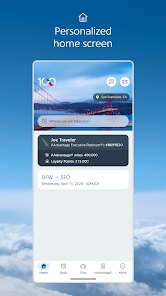
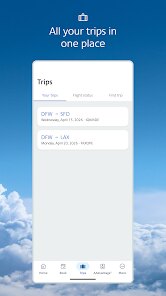
Navigating the app feels intuitive, with a clean layout that prioritizes your next trip. Upon opening, the home screen displays your upcoming flight details, including departure time and gate information, which automatically updates. The check-in process is streamlined; you can complete it in a few taps and add the pass to your phone's wallet. Searching for a future flight or accessing your account settings is handled through the bottom tab menu. I found the live map and gate change notifications particularly useful, as they provide real-time updates without needing to scroll through multiple screens. The integration with the airline's 'Trips' section is also seamless, pulling together all your itineraries in one place.
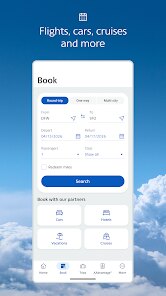
Compared to something like the Delta app, American's feels slightly more transactional and less focused on personalized recommendations or a modern visual design. Delta's interface, for instance, uses more vibrant colors and offers a more social feel with its 'Fly Delta' tab. The American app, however, excels in sheer functionality; its flight tracker is more detailed, and the bag tracking feature is integrated directly into the trip view rather than a separate section. While United's app is comparable in terms of utility, I've found American's real-time alerts to be a bit faster during delays. Overall, it prioritizes efficiency over aesthetics, which suits many travelers who just want to get through the airport quickly.
features
- Real-Time Flight Tracking: The app's live map for your flight is excellent. You can see the plane's position, speed, and altitude, along with a detailed flight path. This is far more informative than the basic status bars on many competitors, and it genuinely reduces anxiety during long or weather-impacted journeys.
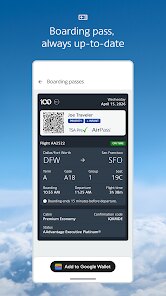
- Streamlined Check-In and Boarding: The integration of check-in with digital boarding passes is smooth. The passes clearly display the terminal, gate, and seat, and they update instantly if there's a gate change. The countdown timer for boarding is a practical touch that simplifies rushing to the gate.
- Bag Tracking: This feature works reliably. After dropping a bag, you receive a notification with a tracking number. The app then shows the progress through the 'Tagged,' 'Loaded,' and 'Arrived' stages. It's a simple but effective way to know your luggage is on the same plane, which is a feature not all airlines offer as smoothly.
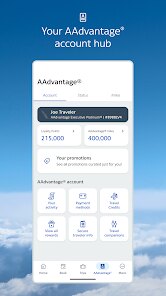
- Seamless AAdvantage Management: Viewing your miles, status, and upcoming benefits is straightforward. You can search award flights directly from the app, and the calendar view helps identify the cheapest dates. It's functional and avoids the confusing navigation of the airline's main website.
pros
- Checking in and getting a digital boarding pass saves time at the airport kiosk. I usually just open the app before security.
- Real-time gate change alerts have saved me from long, needless walks across the terminal. The notifications are clear and timely.
- Managing a reservation is easy. Changing a seat or adding a pet to the booking can be done directly, avoiding a phone call.
cons
- While functional, the app's design feels a bit dated compared to newer competitors like Alaska. It lacks a modern, polished look.
- The search interface for new flights is clunky. It sometimes takes a long time to load results or shows poorly filtered options.
- Push notifications can become excessive, especially for promotions, though you can adjust them in the settings. The default is on for everything.
Articles
![]()
Guide
How to Update Google Play Store on Android 2026
![]()
Guide
How to Download Older Versions of Android Apps
![]()
Guide
How to Download Apps Without Google Play Store
![]()
Guide
What Is an APK File for Android?
If you use an Android phone, you may have seen the term APK while searching for apps or games online. Some websites offer an APK download instead of a Google Play install button. Some users also mention APK files when talking about apps that are not available in their region, older app versions, or Android games downloaded outside the Play Store.
![]()
Guide
How to Install Games from Google Play for Beginners
Installing games on an Android phone is usually simple, but for beginners, the process can still feel confusing at first. You may not know where to search, which button to tap, whether the game is safe, or why Google Play sometimes asks for account settings, storage access, or payment information. If you are using an Android phone for the first time, learning how to install games from Google Play is one of the easiest ways to get started.
![]()
Guide
How Useful Gemini Is for Everyday Questions and Quick Tasks
emini feels different from many AI apps because it is not only trying to be a chatbot. After using it for everyday questions, quick writing, image understanding, and planning, I think its biggest strength is convenience.
![]()
Guide
What to Know Before Downloading APKs
For many Android users, downloading an APK is a common way to install apps and games. Sometimes an app is not available in a certain country.
![]()
Guide
ChatGPT Review: Is It Still the Best AI App in 2026?
![]()
Guide
Seedance 2.0 vs Sora: The Future of AI Video Generation
The AI video race has intensified dramatically over the past two years. Platforms like Sora from OpenAI and Luma Dream Machine pushed the boundaries of text-to-video realism. Yet, despite their impressive outputs, most tools still operate as probabilistic generators—you describe a scene, and the model interprets it. Control remains limited. With the February 2026 release of Seedance 2.0, developed by ByteDance, the paradigm shifted. Internally known as Jimeng 2.0, Seedance does not position itself as just another video model. It positions itself as an AI Director. Rather than guessing what you want, Seedance 2.0 allows you to direct what happens. This distinction defines everything that follows.









Recommended Apps
![]()
Home Design 3D
Anuman4.2
![]()
Truth or Dare Game - Party App
Chouic4.8
![]()
Photo Collage Maker
Scoompa4.7![]()
Learn to Draw Flower
Creative APPS4.2![]()
FIFA World Cup 2026™
FIFA2.8![]()
Mirror Plus: Mirror with Light
Digitalchemy, LLC4.4![]()
Meitu- Photo Editor & AI Art
Meitu (China) Limited4.5![]()
Perplexity - Ask Anything
PerplexityAI4.7![]()
GhostTube SLS Camera Alternate
GhostTube4![]()
Boom Chip Blast: 2-Player
Black Pyramid 3D Games Studio0![]()
Healthy Benefits+
Solutran, Inc.4.5![]()
Deepcheck AI Search Assistant
rohe.ai4![]()
Idol Prank Video Call & Chat
LightCode Solutions4![]()
Face Shape - Pretty Scale
GlintTec Apps3.9![]()
Plant App - Plant Identifier
ScaleUp4.6












































