
Naughty or Nice Photo Scanner

1M+
Installs
Droidheads
Developer
-
Video Players & Editors
Category
-
Rated for 3+
Content Rating
-
droidheads@gmail.com
Developer Email
-
https://tappden.com/privacy-policy/
Privacy Policy
Screenshots

editor reviews
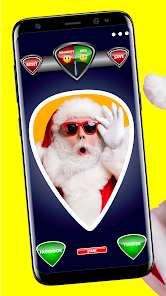
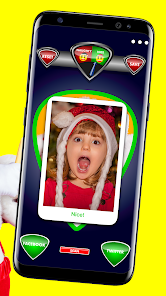
Naughty or Nice Photo Scanner is one of those seasonal gag apps that pops up around the holidays, designed purely to entertain rather than serve any serious purpose. It's a camera-based app that scans your face—or anyone else's—and then tells you whether you've been naughty or nice this year, complete with a little digital score and a festive animation. People typically download it from stores like Google Play or the App Store when they're looking for something silly to do at a Christmas party or with family. Once you launch it, the first impression is pretty straightforward: the interface is bright, heavily themed with reds, greens, and snowflakes, and the app immediately asks for camera access. There aren't any forced registrations or accounts to create, which is nice. It's free to install, though you might notice some ads after a scan or two, and there's a small prompt for an in-app purchase to remove those ads. The install count seems decent for a holiday app, but it's clearly not something you'd keep year-round.
After actually using the app, the experience is mostly about pointing the camera at someone, snapping a photo, and waiting for the result. The scanning process itself is quick—maybe two or three seconds—and then the app overlays a naughty or nice meter on the image. The onboarding is minimal: you just tap the big button in the center to start. The most common flow is people in a group taking turns, laughing at the random outcomes. Sometimes the scan feels accurate based on expression, but honestly it's mostly random luck. The interface is simple but a bit clunky—the button placement feels off on larger screens, and I've hit the back arrow accidentally a few times. A practical tip: make sure there's good lighting, because darker shots lead to weird cropping. There's no tutorial or guide, but you don't really need one. It works fine as a party trick, and the silly sound effects add to the mood. Still, it's not something you'd use more than a handful of times.
After a few sessions, my honest take is that this app is fun in short bursts, especially for kids or groups looking for a cheap laugh. I can see it being a hit at school holiday events or family gatherings where everyone wants a quick laugh. But for anyone who's not in the holiday spirit or prefers more polished apps, this will feel like a throwaway download. Compared to something like Snapchat's holiday lenses, which offer similar face-based effects but with better production value and more variety, Naughty or Nice Photo Scanner feels barebones. What sets it apart is how focused it is—it's literally one joke, and it commits. That simplicity is charming, but also limiting. I kept it installed for about a week before deleting it because there's no reason to open it past December. It's not a bad app, just very seasonal. If you're okay with ads and limited replay value, it's worth a download for one party night.
features
- 🎅 Instant naughty or nice verdict – After snapping a photo, the app runs its algorithm and slaps a score on you within seconds. It's not deep or scientific, but the quick result keeps the momentum going in a group setting. In contrast, apps like FaceApp or YouCam Perfect offer more polished filters but lack this kind of instant, themed judgment gimmick.
- 🎅 Holiday-themed animations and effects – The app dresses up the photo with snow, garlands, and a digital naughty/nice meter bar. The overlay changes based on the result—bad kids get a little coal icon. This is way more festive than generic photo editors like Adobe Lightroom, where you'd have to manually add holiday overlays.
- 🎅 No account or sign-up needed – You can jump straight into scanning without creating a profile or sharing email. That's a big plus compared to many social apps like Instagram, which force you to log in before accessing any camera feature. It respects your privacy for a quick laugh.
- 🎅 Shareable output – The app saves the final image with the overlay directly to your gallery, making it easy to post on social media or send via messaging. Apps like Candy Camera often require export steps, but here the image is ready to share immediately after scanning.
pros
- 👍 No learning curve – Unlike more complex apps like FaceApp, which have layered editing tools, this app is just a tap-and-scan. Great for kids or older relatives who aren't tech-savvy and just want a laugh.
- 👍 Fully free core functionality – You don't have to pay to use the main scan feature. Some apps, like PicsArt, lock fun filters behind a subscription, but this one keeps the gimmick accessible even with free ads.
- 👍 Perfect for holiday gatherings – It's a specific niche but fills it well. Apps like Snapchat are great for everyday filters, but they don't have a dedicated “naughty or nice” theme that's ready to go without setup.
cons
- 👎 Extremely limited replay value – After a dozen scans, you've seen everything. Apps like TikTok's effect studio let you create endless variations, but this one runs out of novelty fast, making it feel like a one-trick pony.
- 👎 Ads can feel intrusive – A full-screen ad plays after every scan, which disrupts the flow when you're in a group. Competing apps like Instagram's Boomerang mode don't show ads at all since they're part of a bigger platform.
- 👎 Camera cropping issues – The app sometimes cuts off parts of faces or backgrounds awkwardly, especially in portrait orientation. In comparison, Google Camera's portrait mode handles framing much better even in third-party integrations.
- 👎 No offline mode – You need a stable internet connection to run the scan, which is annoying if you're at a cabin or somewhere with poor signal. Apps like BeautyPlus let you apply filters offline, so this limitation feels unnecessary for a simple algorithm.
Articles
![]()
Guide
How to Update Google Play Store on Android 2026
![]()
Guide
How to Download Older Versions of Android Apps
![]()
Guide
How to Download Apps Without Google Play Store
![]()
Guide
What Is an APK File for Android?
If you use an Android phone, you may have seen the term APK while searching for apps or games online. Some websites offer an APK download instead of a Google Play install button. Some users also mention APK files when talking about apps that are not available in their region, older app versions, or Android games downloaded outside the Play Store.
![]()
Guide
How to Install Games from Google Play for Beginners
Installing games on an Android phone is usually simple, but for beginners, the process can still feel confusing at first. You may not know where to search, which button to tap, whether the game is safe, or why Google Play sometimes asks for account settings, storage access, or payment information. If you are using an Android phone for the first time, learning how to install games from Google Play is one of the easiest ways to get started.
![]()
Guide
How Useful Gemini Is for Everyday Questions and Quick Tasks
emini feels different from many AI apps because it is not only trying to be a chatbot. After using it for everyday questions, quick writing, image understanding, and planning, I think its biggest strength is convenience.
![]()
Guide
What to Know Before Downloading APKs
For many Android users, downloading an APK is a common way to install apps and games. Sometimes an app is not available in a certain country.
![]()
Guide
ChatGPT Review: Is It Still the Best AI App in 2026?
![]()
Guide
Seedance 2.0 vs Sora: The Future of AI Video Generation
The AI video race has intensified dramatically over the past two years. Platforms like Sora from OpenAI and Luma Dream Machine pushed the boundaries of text-to-video realism. Yet, despite their impressive outputs, most tools still operate as probabilistic generators—you describe a scene, and the model interprets it. Control remains limited. With the February 2026 release of Seedance 2.0, developed by ByteDance, the paradigm shifted. Internally known as Jimeng 2.0, Seedance does not position itself as just another video model. It positions itself as an AI Director. Rather than guessing what you want, Seedance 2.0 allows you to direct what happens. This distinction defines everything that follows.









Recommended Apps
![]()
Home Design 3D
Anuman4.2
![]()
Truth or Dare Game - Party App
Chouic4.8
![]()
Photo Collage Maker
Scoompa4.7![]()
Learn to Draw Flower
Creative APPS4.2![]()
FIFA World Cup 2026™
FIFA2.8![]()
Mirror Plus: Mirror with Light
Digitalchemy, LLC4.4![]()
Meitu- Photo Editor & AI Art
Meitu (China) Limited4.5![]()
Perplexity - Ask Anything
PerplexityAI4.7![]()
GhostTube SLS Camera Alternate
GhostTube4![]()
Boom Chip Blast: 2-Player
Black Pyramid 3D Games Studio0![]()
Healthy Benefits+
Solutran, Inc.4.5![]()
Deepcheck AI Search Assistant
rohe.ai4![]()
Idol Prank Video Call & Chat
LightCode Solutions4![]()
Face Shape - Pretty Scale
GlintTec Apps3.9![]()
Plant App - Plant Identifier
ScaleUp4.6












































