
Cut Paste Photo Seamless Edit

50M+
Installs
Peml Art FZC LLC
Developer
-
Video Players & Editors
Category
-
Rated for 3+
Content Rating
-
support@peml.art
Developer Email
-
https://peml.art/privacy-policy.html
Privacy Policy
Screenshots

editor reviews
Cut Paste Photo Seamless Edit is a mobile image editing app that focuses on one specific task: cutting out subjects from photos and blending them into new backgrounds. It's the kind of tool you'd grab when you want to remove a person from a vacation shot or swap a dull sky for something dramatic. The app sits in the utility photo editor category, but with a sharper focus on masking and layering rather than general filters or color tweaks. I came across it on Google Play where it's free to download, though the install count is modest compared to giants like Snapseed. After launching it for the first time, the interface hits you as straightforward but not exactly polished. The main screen is just a big upload button and a few tool icons. No overwhelming onboarding, which I appreciated. I was cutting out my own photo in under a minute, and that quick entry point makes it feel useful right away.
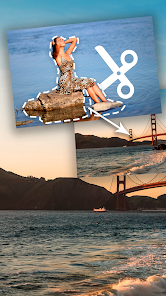
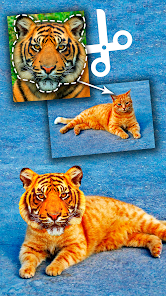
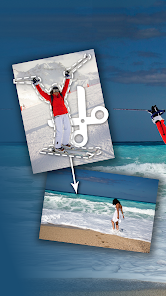
Once you actually start editing, the cutout tool becomes the main event. You tap to select the area you want to keep, and the app uses automatic detection to separate the subject from the background. It's not perfect, especially with tricky edges like hair or leaves, but for a quick job it saves time over doing it manually. After the cut, you're led to a second screen where you can paste the subject onto a new image. You can scale, rotate, or nudge it around. I found that the feathering tool helps blend the edges so the cutout doesn't look so rigid. One thing that slowed me down was that the undo button isn't immediately obvious. I accidentally deleted a selection and had to restart. Over time, I learned to save intermediate cuts as separate files, which is a small trick that kept me from getting frustrated again.
After a few weeks of using this app on and off, I'd say it's perfect for casual users who need quick cutouts for social media posts or silly photo mashups. If you're a professional editor who demands pixel-level precision, the automatic detection might not cut it. Compared to something like Adobe Photoshop Mix or even the built-in iOS markup tool, Cut Paste Photo Seamless Edit feels more beginner-friendly but less capable. The real differentiator is its simplicity. You don't need to learn layers or masks. Just cut, paste, and save. I keep it installed because it does one job well enough for my needs. I could see someone uninstalling it once they realize they rarely need to cut out photos, or if they move to a more powerful app like PicsArt that does the same thing with extra features.
features
- ✂️ Smart cutout tool that does a solid job detecting the main subject with just a tap. Compared to Adobe Photoshop Express, this one feels faster for casual tasks, though it sometimes misses fine hair details. The manual refinement brush helps fix those spots without much fuss.
- 🖼️ Seamless background blending with a feather edge slider that softens hard cut lines. You don't get this level of edge control in Snapseed without using extra tools. It makes pasted subjects look more natural, especially in bright or contrasty photos.
- 🔄 Simple layer adjustment for scaling and rotating the cutout before finalizing. Background Eraser app requires more steps for the same result. Here, you just pinch and drag, and the preview updates in real time, which saves time when you're experimenting.
pros
- 💡 Free to use without watermarks on exported images, unlike YouCam Perfect which slaps a logo on free exports unless you pay. That alone made me stick with it for casual edits.
- 💡 No learning curve at all. For someone who just wants to cut a friend into a funny picture, this app beats PicsArt's cluttered interface hands down. The minimal layout keeps you focused on the task.
- 💡 Works offline after initial download. Most similar apps like PhotoRoom require an internet connection for the AI cutout feature. This one does everything locally, which is handy when you're on a subway or in a low-signal area.
cons
- ⚠️ The cutout quality is hit or miss on complex edges like fur or transparent objects. Background Eraser app handles those better with its manual edge detection mode. For a true seamless edit, the auto tool here might frustrate you if you have high standards.
- ⚠️ Limited export resolution unless you pay. The free version caps output at around 1080p, which is fine for social media but not for printing. Snapseed lets you export at original resolution for free, so this feels like a gatekeeping move.
- ⚠️ No text or sticker layers, which means you'll need another app like Canva to complete a full design. For a dedicated cutout tool this is fine, but if you want an all-in-one editor, you'll feel shortchanged.
Articles
![]()
Guide
How to Update Google Play Store on Android 2026
![]()
Guide
How to Download Older Versions of Android Apps
![]()
Guide
How to Download Apps Without Google Play Store
![]()
Guide
What Is an APK File for Android?
If you use an Android phone, you may have seen the term APK while searching for apps or games online. Some websites offer an APK download instead of a Google Play install button. Some users also mention APK files when talking about apps that are not available in their region, older app versions, or Android games downloaded outside the Play Store.
![]()
Guide
How to Install Games from Google Play for Beginners
Installing games on an Android phone is usually simple, but for beginners, the process can still feel confusing at first. You may not know where to search, which button to tap, whether the game is safe, or why Google Play sometimes asks for account settings, storage access, or payment information. If you are using an Android phone for the first time, learning how to install games from Google Play is one of the easiest ways to get started.
![]()
Guide
How Useful Gemini Is for Everyday Questions and Quick Tasks
emini feels different from many AI apps because it is not only trying to be a chatbot. After using it for everyday questions, quick writing, image understanding, and planning, I think its biggest strength is convenience.
![]()
Guide
What to Know Before Downloading APKs
For many Android users, downloading an APK is a common way to install apps and games. Sometimes an app is not available in a certain country.
![]()
Guide
ChatGPT Review: Is It Still the Best AI App in 2026?
![]()
Guide
Seedance 2.0 vs Sora: The Future of AI Video Generation
The AI video race has intensified dramatically over the past two years. Platforms like Sora from OpenAI and Luma Dream Machine pushed the boundaries of text-to-video realism. Yet, despite their impressive outputs, most tools still operate as probabilistic generators—you describe a scene, and the model interprets it. Control remains limited. With the February 2026 release of Seedance 2.0, developed by ByteDance, the paradigm shifted. Internally known as Jimeng 2.0, Seedance does not position itself as just another video model. It positions itself as an AI Director. Rather than guessing what you want, Seedance 2.0 allows you to direct what happens. This distinction defines everything that follows.









Recommended Apps
![]()
Home Design 3D
Anuman4.2
![]()
Truth or Dare Game - Party App
Chouic4.8
![]()
Photo Collage Maker
Scoompa4.7![]()
Learn to Draw Flower
Creative APPS4.2![]()
FIFA World Cup 2026™
FIFA2.8![]()
Mirror Plus: Mirror with Light
Digitalchemy, LLC4.4![]()
Meitu- Photo Editor & AI Art
Meitu (China) Limited4.5![]()
Perplexity - Ask Anything
PerplexityAI4.7![]()
GhostTube SLS Camera Alternate
GhostTube4![]()
Boom Chip Blast: 2-Player
Black Pyramid 3D Games Studio0![]()
Healthy Benefits+
Solutran, Inc.4.5![]()
Deepcheck AI Search Assistant
rohe.ai4![]()
Idol Prank Video Call & Chat
LightCode Solutions4![]()
Face Shape - Pretty Scale
GlintTec Apps3.9![]()
Plant App - Plant Identifier
ScaleUp4.6











































