
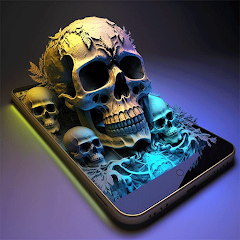
Parallax: 4K 3D Live Wallpaper

10M+
Installs
Nebuchadnezzar DOO
Developer
-
Productivity
Category
-
Rated for 3+
Content Rating
-
mailto:unsoood@gmail.com
Developer Email
-
https://volkraft.com/wallcraftparallax/privacy_policy_en
Privacy Policy
Screenshots
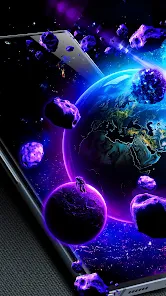
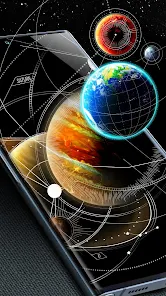
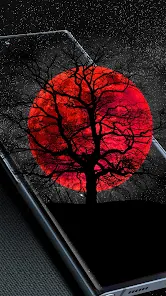

editor reviews
So I downloaded Parallax, which is a live wallpaper app from Nebuchadnezzar DOO, and honestly, I wasn't sure what to expect. It's basically one of those apps that turns your phone's lock screen or home screen into something that actually moves when you tilt your device. The main draw here is the 4K 3D effect, where the image shifts depth as you move your phone around. When I first launched it after grabbing it from Google Play (I think it's free to download but has stuff locked behind in-app purchases), the initial impression was pretty solid. The sample wallpapers they show you right away look sharp, and the 3D parallax effect is noticeable immediately. You don't need to register or sign up for anything, which I appreciated. Just download, install, and you're already browsing through a decent gallery of animated backgrounds. It felt like a polished intro, no annoying ads interrupting the first few minutes.
Once you actually get into using it, the experience is mostly straightforward but has a few quirks. The interface is clean, with categories like landscapes, space, and abstract. You tap one, it previews, and you can set it as your wallpaper with a single button. The 3D parallax works by using your phone's gyroscope, so as you tilt the phone, the layers of the image shift independently, creating that depth effect. That part works great on my device. However, the onboarding isn't super guided, so I spent a minute figuring out how to adjust the depth intensity or speed of the motion. There's a settings panel where you can tweak these sliders, but it's buried a bit. A common use case is just picking a cool space nebula wallpaper, setting it as both home and lock screen, and then tilting your phone to see the stars move. It's smooth, no lag, and the 4K resolution actually holds up on my screen. One tip I found useful: turn down the motion sensitivity a notch unless you want your wallpaper shifting every time you breathe.
After using Parallax for a week, I think it's a solid choice for someone who likes their phone to feel more dynamic without installing a heavy, battery-draining live wallpaper. Compared to something like Walli or the standard Google wallpapers, Parallax stands out because of that real 3D depth effect, not just a simple video loop. But honestly, I can see it not being for everyone. People who don't care about screen movement or just want a static image will find this unnecessary. It's also a bit of a battery drain if you crank up the frame rate, but that's expected. What makes it different from apps like Muzei or Kustom Live Wallpaper is that Parallax focuses purely on the visual 3D spectacle rather than customization or art sources. I'll probably keep it installed because it's a nice conversation starter when someone picks up my phone, but if the free selection runs thin or the battery hit becomes annoying, I could see uninstalling it. For a free app that does one thing well, it's worth a try.
features
- 🌌 The standout feature is the true 3D parallax effect using the gyroscope. Unlike standard live wallpapers that just loop a video, Parallax actually creates layered depth that shifts as you tilt your phone. Compared to something like the basic Google wallpapers, this feels much more immersive and responsive, almost like a holographic screen saver.
- 🎨 The 4K resolution support makes a real difference. Many live wallpaper apps like Zedge offer high-quality images, but Parallax ensures every wallpaper maintains sharpness even on large, high-res screens. The landscapes and space scenes look crisp without any pixelation, which keeps the effect convincing.
- 🛠️ There's a built-in parallax editor where you can adjust depth intensity, motion speed, and even apply filters. This gives you control that apps like Walli or Muzei don't always provide for live wallpapers. You're not stuck with default settings; you can fine-tune how much the image moves and how fast it reacts.
pros
- 🎯 One major strength is the low impact on system performance. Compared to video-based live wallpapers, Parallax uses the gyroscope and static images with depth layers, so it's far less likely to slow down your phone or drain your battery as quickly. This makes it more practical for daily use than something like a full-motion video background.
- 🖼️ The free collection is actually decent. Unlike many apps that give you just a few low-quality samples, Parallax offers a solid selection of well-designed 4K wallpapers out of the box. You don't feel forced to pay immediately, which is a plus over apps like Kustom where the free content is minimal.
- 🔧 Customization options for depth settings let you tailor the experience. You can slow down or speed up the parallax effect, which is something basic wallpaper apps often ignore. This small touch makes it feel more personal and less gimmicky.
cons
- 🔄 The app has a limited free wallpaper selection over time. After the first week, you'll notice you've seen most of the good free ones, and the rest are locked behind a paywall. Apps like Walli or Muzei offer larger, regularly updated libraries without forcing a purchase.
- ⚙️ The depth effect can be a bit too sensitive out of the box. Sometimes even a tiny tilt makes the wallpaper shift, which can be distracting. You have to manually dial down the sensitivity in settings, and that's not clearly explained during setup, unlike in apps like Google Wallpapers where it's simpler.
- 📱 Not all wallpapers are optimized for every phone's aspect ratio. Some of the 4K images get cropped awkwardly on taller or wider screens, leading to parts of the image being cut off. This doesn't happen as often with apps like Zedge, which lets you preview and adjust cropping easily.
Articles
![]()
Guide
How to Update Google Play Store on Android 2026
![]()
Guide
How to Download Older Versions of Android Apps
![]()
Guide
How to Download Apps Without Google Play Store
![]()
Guide
What Is an APK File for Android?
If you use an Android phone, you may have seen the term APK while searching for apps or games online. Some websites offer an APK download instead of a Google Play install button. Some users also mention APK files when talking about apps that are not available in their region, older app versions, or Android games downloaded outside the Play Store.
![]()
Guide
How to Install Games from Google Play for Beginners
Installing games on an Android phone is usually simple, but for beginners, the process can still feel confusing at first. You may not know where to search, which button to tap, whether the game is safe, or why Google Play sometimes asks for account settings, storage access, or payment information. If you are using an Android phone for the first time, learning how to install games from Google Play is one of the easiest ways to get started.
![]()
Guide
How Useful Gemini Is for Everyday Questions and Quick Tasks
emini feels different from many AI apps because it is not only trying to be a chatbot. After using it for everyday questions, quick writing, image understanding, and planning, I think its biggest strength is convenience.
![]()
Guide
What to Know Before Downloading APKs
For many Android users, downloading an APK is a common way to install apps and games. Sometimes an app is not available in a certain country.
![]()
Guide
ChatGPT Review: Is It Still the Best AI App in 2026?
![]()
Guide
Seedance 2.0 vs Sora: The Future of AI Video Generation
The AI video race has intensified dramatically over the past two years. Platforms like Sora from OpenAI and Luma Dream Machine pushed the boundaries of text-to-video realism. Yet, despite their impressive outputs, most tools still operate as probabilistic generators—you describe a scene, and the model interprets it. Control remains limited. With the February 2026 release of Seedance 2.0, developed by ByteDance, the paradigm shifted. Internally known as Jimeng 2.0, Seedance does not position itself as just another video model. It positions itself as an AI Director. Rather than guessing what you want, Seedance 2.0 allows you to direct what happens. This distinction defines everything that follows.









Recommended Apps
![]()
Home Design 3D
Anuman4.2
![]()
Truth or Dare Game - Party App
Chouic4.8
![]()
Photo Collage Maker
Scoompa4.7![]()
Learn to Draw Flower
Creative APPS4.2![]()
FIFA World Cup 2026™
FIFA2.8![]()
Mirror Plus: Mirror with Light
Digitalchemy, LLC4.4![]()
Meitu- Photo Editor & AI Art
Meitu (China) Limited4.5![]()
Perplexity - Ask Anything
PerplexityAI4.7![]()
GhostTube SLS Camera Alternate
GhostTube4![]()
Boom Chip Blast: 2-Player
Black Pyramid 3D Games Studio0![]()
Healthy Benefits+
Solutran, Inc.4.5![]()
Deepcheck AI Search Assistant
rohe.ai4![]()
Idol Prank Video Call & Chat
LightCode Solutions4![]()
Face Shape - Pretty Scale
GlintTec Apps3.9![]()
Plant App - Plant Identifier
ScaleUp4.6











































