

Home AI - AI Interior Design

10M+
Installs
HubX
Developer
-
Lifestyle
Category
-
Everyone
Content Rating
-
info@homeinterior.ai
Developer Email
-
https://homeinterior.ai/privacy
Privacy Policy
Screenshots




editor reviews
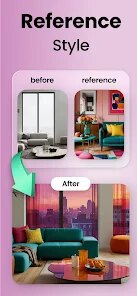
So you've just moved into a new place and staring at blank walls feels overwhelming. Home AI steps in as a design assistant that doesn't need you to learn CAD or measure anything. It's a photo-based room transformation tool. You point your phone at your current space, upload one shot, tell it what vibe you want — boho, industrial, scandi, whatever — and within seconds it spits out a redesigned version of that room. It's free to download from Google Play and the App Store, with both have a few hundred thousand installs. No forced registration when you first launch it. You just tap, snap a picture, and watch the magic happen. You do hit a paywall pretty fast if you want more than a handful of generations, but for a quick peek at what your old couch could look like surrounded by tropical plants, it hits that curiosity itch immediately.
The first time you use it, you pick a photo from your gallery or take a fresh one. There's a clean interface with style cards — like Modern, Minimalist, Rustic — each with a small preview. You tap one, wait a few seconds, and the app overlays furniture, lighting, new textures right onto your original photo. It blends surprisingly well. You can swipe between before and after, and that's where the wow moment lives. I tried it on my messy living room corner, selected Japandi, and got back an image that made me actually consider decluttering. The process felt smooth overall. One hiccup: the app sometimes misreads angles. If your room has a ceiling fan or an oddly placed door, the AI might spawn a floor lamp in the middle of a walkway. You can redo it by tapping regenerate, which costs credits. Those credits run out fast. But if you just want to experiment with three or four ideas, you won't feel cheated.
After a week of playing around, I think Home AI is a decent tool for quick inspiration. It's not a professional interior design app, and it doesn't pretend to be. If you're planning a major renovation and need accurate measurements or material lists, you're better off with something like Planner 5D. But if you want to see whether your grandmother's armchair fits in a maximalist den, this does the job in twenty seconds. The main gripe is the credit system. You get maybe five free tries, then it asks you to subscribe. At that point I uninstalled it. It's fun for a few minutes, but not something I'd pay for every month. I'd recommend it to anyone who enjoys visualizing before making small changes, like repainting or buying new throw pillows.
features
- 🎨 Room style transfer in seconds: Unlike Houzz or Pinterest, where you scroll endless photos hoping something resembles your room, Home AI takes your actual photo and redesigns it. You select a style, and the AI fills in furniture, rugs, and lighting directly on your image. No guesswork, no comparing angles.
- 📸 Real-time before-and-after slider: This is the standout feature. You drag a slider and watch your boring wall turn into a statement feature. Competing apps like MagicPlan focus on floor plans, but this one nails the visual transformation. It feels like Instagram filters for your entire house.
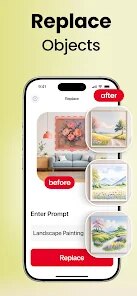
- 🔄 Redo with different styles: You can change from mid-century to industrial without retaking the photo. The AI remembers the room layout and swaps out the decor. That flexibility beats most design catalogs, which just show generic rooms.
- ⚡ No sign-up required: You open the app and use it immediately. Many similar tools force you to create an account before previewing anything. Home AI respects your time there, at least for the first few tries.
pros
- ✨ Quick visualization without skill: Compared to apps like SketchUp, you don't need any design knowledge. Just point, tap, and see. It's great for impulse decorators.
- 📷 Real photo integration: Unlike Pinterest boards, this app blends design elements into your actual space. The lighting and perspective match surprisingly well for an AI tool.
- 🔁 Instant style hopping: Switching between designs takes seconds. That speed is its biggest edge over browsing magazines or hiring a consultant.
- 🧩 Lightweight and fast: The app launches quickly and doesn't drain your battery like some 3D modeling apps. Ideal for casual users.
cons
- 💸 Aggressive credit system: You get very few free generations before hitting a paywall. Houzz gives you unlimited browsing for inspiration without charging per view.
- 🧐 Inconsistent corner handling: If your room has unusual angles or obstacles, the AI sometimes places furniture awkwardly. Planner 5D lets you manually adjust positioning.
- 🏠 No floor plan capability: It only works on single photo views. You can't design an entire apartment layout like you can with MagicPlan.
- 📉 Limited style depth: The style categories are broad. If you want a very specific niche look, say Brutalist or Boho Chic with cactus accents, it struggles. Most style apps have bigger databases.
Articles
![]()
Guide
How to Update Google Play Store on Android 2026
![]()
Guide
How to Download Older Versions of Android Apps
![]()
Guide
How to Download Apps Without Google Play Store
![]()
Guide
What Is an APK File for Android?
If you use an Android phone, you may have seen the term APK while searching for apps or games online. Some websites offer an APK download instead of a Google Play install button. Some users also mention APK files when talking about apps that are not available in their region, older app versions, or Android games downloaded outside the Play Store.
![]()
Guide
How to Install Games from Google Play for Beginners
Installing games on an Android phone is usually simple, but for beginners, the process can still feel confusing at first. You may not know where to search, which button to tap, whether the game is safe, or why Google Play sometimes asks for account settings, storage access, or payment information. If you are using an Android phone for the first time, learning how to install games from Google Play is one of the easiest ways to get started.
![]()
Guide
How Useful Gemini Is for Everyday Questions and Quick Tasks
emini feels different from many AI apps because it is not only trying to be a chatbot. After using it for everyday questions, quick writing, image understanding, and planning, I think its biggest strength is convenience.
![]()
Guide
What to Know Before Downloading APKs
For many Android users, downloading an APK is a common way to install apps and games. Sometimes an app is not available in a certain country.
![]()
Guide
ChatGPT Review: Is It Still the Best AI App in 2026?
![]()
Guide
Seedance 2.0 vs Sora: The Future of AI Video Generation
The AI video race has intensified dramatically over the past two years. Platforms like Sora from OpenAI and Luma Dream Machine pushed the boundaries of text-to-video realism. Yet, despite their impressive outputs, most tools still operate as probabilistic generators—you describe a scene, and the model interprets it. Control remains limited. With the February 2026 release of Seedance 2.0, developed by ByteDance, the paradigm shifted. Internally known as Jimeng 2.0, Seedance does not position itself as just another video model. It positions itself as an AI Director. Rather than guessing what you want, Seedance 2.0 allows you to direct what happens. This distinction defines everything that follows.









Recommended Apps
![]()
Home Design 3D
Anuman4.2
![]()
Truth or Dare Game - Party App
Chouic4.8
![]()
Photo Collage Maker
Scoompa4.7![]()
Learn to Draw Flower
Creative APPS4.2![]()
FIFA World Cup 2026™
FIFA2.8![]()
Mirror Plus: Mirror with Light
Digitalchemy, LLC4.4![]()
Meitu- Photo Editor & AI Art
Meitu (China) Limited4.5![]()
Perplexity - Ask Anything
PerplexityAI4.7![]()
GhostTube SLS Camera Alternate
GhostTube4![]()
Boom Chip Blast: 2-Player
Black Pyramid 3D Games Studio0![]()
Healthy Benefits+
Solutran, Inc.4.5![]()
Deepcheck AI Search Assistant
rohe.ai4![]()
Idol Prank Video Call & Chat
LightCode Solutions4![]()
Face Shape - Pretty Scale
GlintTec Apps3.9![]()
Plant App - Plant Identifier
ScaleUp4.6











































