

Pregnancy App & Baby Tracker

10M+
Installs
BabyCenter
Developer
-
Health & Fitness
Category
-
Teen
Content Rating
-
customerservice@babycenter.com
Developer Email
-
http://www.babycenter.com/help-privacy
Privacy Policy
Screenshots

editor reviews
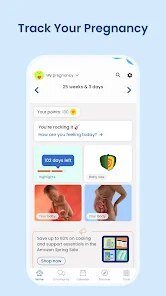
So you just found out you're pregnant, and suddenly your phone is filled with browser tabs about due dates, baby size comparisons to fruit, and what you can and can't eat. That's where BabyCenter's Pregnancy App & Baby Tracker comes in. It's basically a pregnancy companion app, one of the most popular ones out there, with millions of downloads on both Google Play and the App Store. You download it for free, and right after installation, it asks for your due date or your baby's birth date if you've already given birth. The first impression is straightforward: a clean layout with a big countdown timer and a daily article tailored to your week. There's no forced registration immediately, which is nice, though you'll eventually want to create an account to save your progress. There are optional in-app purchases for extra content, and you'll see some ads, but they aren't too intrusive. Honestly, the first thing I did was check what fruit my baby was compared to this week, and it gave me a good laugh.
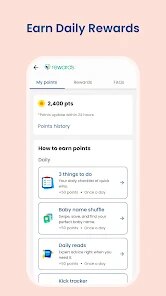
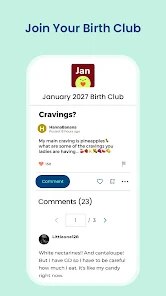
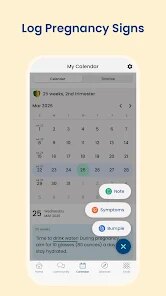
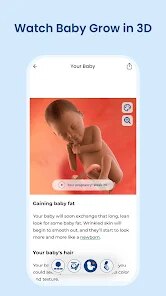
Once you're past the welcome screen, the real experience starts. The main screen shows your baby's development for the current week, with a short video or illustration and a summary of what's happening inside. You can tap through daily articles, which cover everything from symptoms to tips for your partner. The app includes a kick counter, a contraction timer, a to-do list, and a weight tracker. For a normal day, I'd open the app in the morning to read the article of the day, then maybe log my weight after breakfast. The community section is huge — forums divided by due date month where you can ask questions or just read what others are going through. That part can be overwhelming because there's so much activity, but it's useful if you're looking for reassurance at 3 AM. The interface feels smooth overall, though sometimes the articles load a bit slowly, and navigating back from the community to your dashboard isn't the most intuitive. A practical tip: bookmark the kick counter if you're in the third trimester, because digging through menus while trying to count kicks is annoying.
After using it for a few weeks, I'd say this app is perfect for first-time parents who want daily guidance and a sense of community. It's less suited for people who prefer a minimalist tracker without all the articles and forum noise. Compared to apps like Ovia Pregnancy or The Bump, BabyCenter stands out because of its massive, active community — you'll almost always find someone asking the exact same weird question you have. But that also means the app feels a bit bloated at times, with too many sections vying for your attention. What I appreciate most is that it doesn't just focus on pregnancy; it smoothly transitions into newborn and baby tracking after birth, so you don't need to switch apps. I kept it installed because the daily articles gave me something to look forward to, and the community made me feel less alone. But if you're someone who just wants a simple due date countdown and nothing else, this probably isn't for you.
features
- 🎯 Daily articles tailored exactly to your pregnancy week or baby's age, making every read feel relevant and timely instead of generic.
- 🎯 An enormous active community forum grouped by due date month, where you can ask anything at any hour and get responses from real parents going through the same stage.
- 🎯 Built-in kick counter, contraction timer, weight tracker, and baby log all in one place, so you don't need to juggle multiple apps for different tracking needs.
- 🎯 The app seamlessly transitions from pregnancy to baby mode after birth, continuing to provide age-specific advice without forcing you to download a separate app like some competitors do.
pros
- ✅ The community is unmatched in size and activity. While Ovia has forums too, BabyCenter's user base is so large that you'll almost always find someone awake to answer a question, even in the middle of the night.
- ✅ The daily content is consistently updated and actually readable. Unlike some apps that recycle the same generic tips, BabyCenter's articles feel written by people who understand what pregnant women actually worry about.
- ✅ The app does a great job balancing medical info with lighthearted content. You get serious development milestones but also fun stuff like baby size comparisons to animals or junk food, which keeps it from feeling too clinical.
- ✅ The transition from pregnancy to postpartum tracking is smoother here than in The Bump, which tends to drop off after birth. BabyCenter keeps delivering relevant content as your baby grows.
cons
- ❌ The app can feel bloated with too many sections and features. Compared to something like Sprout, which is clean and minimalist, BabyCenter throws articles, forums, videos, and tools at you all at once, which can be overwhelming.
- ❌ The community forums, while active, have minimal moderation at times. You'll run into inaccurate advice or fear-mongering posts that can stress you out more than help, unlike the more controlled environments of Ovia or Glow.
- ❌ Some features are locked behind a premium subscription. The full library of expert Q&As and ad-free experience requires payment, whereas apps like Pregnancy+ offer more free content upfront.
- ❌ The app drains battery more than its competitors because of the heavy media content and live forum feeds. If you're already tired, having your phone die faster is the last thing you need.
Articles
![]()
Guide
How to Update Google Play Store on Android 2026
![]()
Guide
How to Download Older Versions of Android Apps
![]()
Guide
How to Download Apps Without Google Play Store
![]()
Guide
What Is an APK File for Android?
If you use an Android phone, you may have seen the term APK while searching for apps or games online. Some websites offer an APK download instead of a Google Play install button. Some users also mention APK files when talking about apps that are not available in their region, older app versions, or Android games downloaded outside the Play Store.
![]()
Guide
How to Install Games from Google Play for Beginners
Installing games on an Android phone is usually simple, but for beginners, the process can still feel confusing at first. You may not know where to search, which button to tap, whether the game is safe, or why Google Play sometimes asks for account settings, storage access, or payment information. If you are using an Android phone for the first time, learning how to install games from Google Play is one of the easiest ways to get started.
![]()
Guide
How Useful Gemini Is for Everyday Questions and Quick Tasks
emini feels different from many AI apps because it is not only trying to be a chatbot. After using it for everyday questions, quick writing, image understanding, and planning, I think its biggest strength is convenience.
![]()
Guide
What to Know Before Downloading APKs
For many Android users, downloading an APK is a common way to install apps and games. Sometimes an app is not available in a certain country.
![]()
Guide
ChatGPT Review: Is It Still the Best AI App in 2026?
![]()
Guide
Seedance 2.0 vs Sora: The Future of AI Video Generation
The AI video race has intensified dramatically over the past two years. Platforms like Sora from OpenAI and Luma Dream Machine pushed the boundaries of text-to-video realism. Yet, despite their impressive outputs, most tools still operate as probabilistic generators—you describe a scene, and the model interprets it. Control remains limited. With the February 2026 release of Seedance 2.0, developed by ByteDance, the paradigm shifted. Internally known as Jimeng 2.0, Seedance does not position itself as just another video model. It positions itself as an AI Director. Rather than guessing what you want, Seedance 2.0 allows you to direct what happens. This distinction defines everything that follows.









Recommended Apps
![]()
Home Design 3D
Anuman4.2
![]()
Truth or Dare Game - Party App
Chouic4.8
![]()
Photo Collage Maker
Scoompa4.7![]()
Learn to Draw Flower
Creative APPS4.2![]()
FIFA World Cup 2026™
FIFA2.8![]()
Mirror Plus: Mirror with Light
Digitalchemy, LLC4.4![]()
Meitu- Photo Editor & AI Art
Meitu (China) Limited4.5![]()
Perplexity - Ask Anything
PerplexityAI4.7![]()
GhostTube SLS Camera Alternate
GhostTube4![]()
Boom Chip Blast: 2-Player
Black Pyramid 3D Games Studio0![]()
Healthy Benefits+
Solutran, Inc.4.5![]()
Deepcheck AI Search Assistant
rohe.ai4![]()
Idol Prank Video Call & Chat
LightCode Solutions4![]()
Face Shape - Pretty Scale
GlintTec Apps3.9![]()
Plant App - Plant Identifier
ScaleUp4.6












































