
PhotoDirector: AI Photo Editor

50M+
Installs
Cyberlink Corp
Developer
-
Video Players & Editors
Category
-
Rated for 3+
Content Rating
-
PhotoDirector_Android@cyberlink.com
Developer Email
-
https://www.cyberlink.com/prog/ap/app-privacy-redirect.jsp?
Privacy Policy
Screenshots
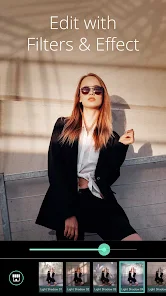
editor reviews
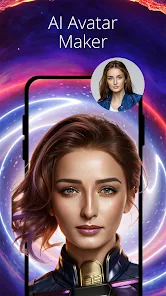
PhotoDirector, from Cyberlink Corp, is a mobile photo editing app that sits somewhere between a quick fix tool and a full creative suite. You can grab it for free on both Google Play and the App Store, where it's been downloaded over 100 million times, which gives you a sense of its reach. After launching it for the first time, I was hit with a fairly standard onboarding screen asking about my editing skill level and what I wanted to do—remove objects, change sky, retouch portraits, that sort of thing. It felt like the app was trying to size me up, but it wasn't pushy about it. The main interface is clean, with the editing tools laid out along the bottom, and a big “AI” button front and center, which is clearly the star of the show.
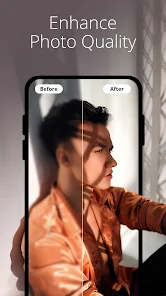
Getting into the actual editing, the experience is pretty smooth. You pick a photo from your gallery, and the app immediately suggests a few AI-powered actions like “Enhance” or “Remove Background.” The onboarding doesn't force you through a tutorial, so I just tapped around to figure things out. For a quick edit, I used the AI Sky tool, which automatically detected the horizon and swapped a dull gray sky for a sunset. It took maybe three seconds, and the result looked natural—no weird edges or color bleeding. The object removal tool is also slick; you just brush over something you don't want, like a stray person in a landscape shot, and the app fills it in. One small tip: if you zoom in close before using the removal brush, it handles finer details like tree branches much better. The retouch section for portraits handles skin smoothing and blemish removal, but it can be a bit heavy-handed if you don't dial down the intensity slider. Overall, the interface is responsive, though I did notice a slight lag when applying multiple layers of effects on an older phone.
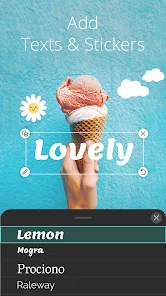
After using PhotoDirector for a couple of weeks, I think it's a solid pick for someone who wants advanced edits without learning Photoshop. It's great for social media users who frequently post landscape or travel shots, since the sky swap and object removal save tons of time. That said, if you're a purist who prefers manual control over sliders and curves, apps like Snapseed or Lightroom Mobile offer more granular adjustments without the AI magic. What keeps PhotoDirector on my phone is the sheer convenience—I can fix a photo in under a minute. But I could see someone uninstalling it if they find the premium features too tempting, since a lot of the best tools, like the full AI effects and batch editing, require a subscription. Compared to something like PicsArt, which tries to be a full social network, PhotoDirector feels more focused and less cluttered, even if it's not as playful with stickers and text.
features
- ⚡ AI Sky Replacement: This is the standout feature. Unlike Adobe Lightroom, where you have to manually mask areas, PhotoDirector detects the sky instantly and lets you swap it with dozens of realistic options, including weather effects like rain or snow. The results are often indistinguishable from the original scene.
- 🎨 Object Removal Tool: It works similarly to the clone stamp in Photoshop Express, but it's much easier. You just highlight the unwanted item with a brush, and the AI fills it in. It handles basic distractions well, though it sometimes struggles with complex backgrounds like overlapping fences.
- 🖼️ AI Portrait Retouch: This goes beyond simple blemish removal. It offers targeted adjustments for skin tone, face shape, and even eye size, which is more than what you'll find in Snapseed's portrait tools. The default settings can be too aggressive, but lowering the intensity gives a natural finish.
pros
- ✅ Fast AI Processing: The app processes most AI edits within seconds, which is faster than what you'll get with Adobe Lightroom's auto settings. This makes it ideal for quick batch edits before posting.
- ✅ Clean User Interface: Unlike PicsArt, which bombards you with ads and social feeds, PhotoDirector keeps the editing tools upfront. You can focus on the task without constant distractions from pop-ups or community posts.
- ✅ Flexible Export Options: You can save in high resolution, crop to specific social media ratios, and even export as a transparent PNG, something you rarely get in free photo editors like Canva's mobile app.
cons
- ❌ Heavy Subscription Prompt: While the app is free to download, many of the advanced AI tools—like full sky packs and batch processing—are locked behind a premium subscription. Snapseed, by comparison, offers all its features for free with no ads.
- ❌ Occasional AI Glitches: The object removal tool can leave faint artifacts when you're working on textures like grass or water. Photoshop Express handles these fine details more reliably, especially when cloning from a clean source.
- ❌ Slower Performance on Older Devices: The app tends to stutter when applying multiple layers of effects or high-resolution images. Lightroom Mobile runs more smoothly on the same hardware, likely due to better optimization.
Articles
![]()
Guide
How to Update Google Play Store on Android 2026
![]()
Guide
How to Download Older Versions of Android Apps
![]()
Guide
How to Download Apps Without Google Play Store
![]()
Guide
What Is an APK File for Android?
If you use an Android phone, you may have seen the term APK while searching for apps or games online. Some websites offer an APK download instead of a Google Play install button. Some users also mention APK files when talking about apps that are not available in their region, older app versions, or Android games downloaded outside the Play Store.
![]()
Guide
How to Install Games from Google Play for Beginners
Installing games on an Android phone is usually simple, but for beginners, the process can still feel confusing at first. You may not know where to search, which button to tap, whether the game is safe, or why Google Play sometimes asks for account settings, storage access, or payment information. If you are using an Android phone for the first time, learning how to install games from Google Play is one of the easiest ways to get started.
![]()
Guide
How Useful Gemini Is for Everyday Questions and Quick Tasks
emini feels different from many AI apps because it is not only trying to be a chatbot. After using it for everyday questions, quick writing, image understanding, and planning, I think its biggest strength is convenience.
![]()
Guide
What to Know Before Downloading APKs
For many Android users, downloading an APK is a common way to install apps and games. Sometimes an app is not available in a certain country.
![]()
Guide
ChatGPT Review: Is It Still the Best AI App in 2026?
![]()
Guide
Seedance 2.0 vs Sora: The Future of AI Video Generation
The AI video race has intensified dramatically over the past two years. Platforms like Sora from OpenAI and Luma Dream Machine pushed the boundaries of text-to-video realism. Yet, despite their impressive outputs, most tools still operate as probabilistic generators—you describe a scene, and the model interprets it. Control remains limited. With the February 2026 release of Seedance 2.0, developed by ByteDance, the paradigm shifted. Internally known as Jimeng 2.0, Seedance does not position itself as just another video model. It positions itself as an AI Director. Rather than guessing what you want, Seedance 2.0 allows you to direct what happens. This distinction defines everything that follows.









Recommended Apps
![]()
Home Design 3D
Anuman4.2
![]()
Truth or Dare Game - Party App
Chouic4.8
![]()
Photo Collage Maker
Scoompa4.7![]()
Learn to Draw Flower
Creative APPS4.2![]()
FIFA World Cup 2026™
FIFA2.8![]()
Mirror Plus: Mirror with Light
Digitalchemy, LLC4.4![]()
Meitu- Photo Editor & AI Art
Meitu (China) Limited4.5![]()
Perplexity - Ask Anything
PerplexityAI4.7![]()
GhostTube SLS Camera Alternate
GhostTube4![]()
Boom Chip Blast: 2-Player
Black Pyramid 3D Games Studio0![]()
Healthy Benefits+
Solutran, Inc.4.5![]()
Deepcheck AI Search Assistant
rohe.ai4![]()
Idol Prank Video Call & Chat
LightCode Solutions4![]()
Face Shape - Pretty Scale
GlintTec Apps3.9![]()
Plant App - Plant Identifier
ScaleUp4.6












































