
Horoscopes

1M+
Installs
Horoscope TV
Developer
-
Lifestyle
Category
-
Rated for 3+
Content Rating
-
contact@dailyhoroscopes.net
Developer Email
-
http://www.dailyhoroscopes.net/privacy.html
Privacy Policy
Screenshots
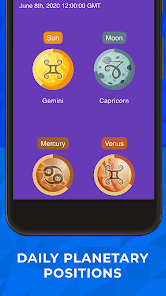
editor reviews
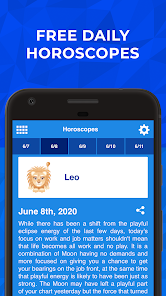
So, Horoscopes by Horoscope TV is basically your daily, weekly, and monthly astrological fix wrapped in a single mobile app. You open it up from the Google Play or App Store, and it's free to download, though you'll quickly spot the in-app purchases and occasional ads nudging you toward a premium sub. I grabbed it out of pure curiosity, honestly—who doesn't want to see if Mercury retrograde is about to mess up their week? First impression after launching? The interface feels clean but a bit busy, like stepping into a crowded cosmic newsstand with glittery icons and daily predictions screaming for attention. It's not the most zen start, but the zodiac wheel splash screen does make you feel like you're about to get some real insight.
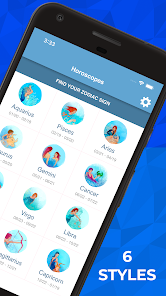
Moving into the real use, the onboarding is pretty straightforward: pick your sign, and boom, you're in. The main screen shows your daily horoscope right away, with tabs for weekly and monthly reads. I found myself thumbing through the love, career, and health sections more than I'd like to admit—the predictions are written in a friendly, almost gossipy tone that pulls you in. There's also a matchmaking feature where you can compare signs, which is fun for a laugh with friends. The smooth part? Swiping between days feels natural, and the loading times are quick. The confusing moment? The app throws a ton of extra content like tarot draws and compatibility charts at you without much explanation, so I spent a few minutes tapping around figuring out what was what. A practical tip: turn off notifications unless you want a daily reminder that your stars are “shifting”—got old fast.
After a couple weeks, I've got mixed feelings. This app is perfect if you're into casual astrology and want quick, digestible forecasts without drowning in spiritual jargon. But if you're looking for deep astrological analysis or personalized birth chart breakdowns, you'll probably find it shallow compared to something like Co–Star or The Pattern. What sets it apart is the sheer volume of content—daily, weekly, monthly, plus partner compatibility—but the constant push to upgrade for “premium insights” gets annoying. I kept it installed because it's easy to check during coffee breaks, but I can see someone uninstalling it after a week if the ads start feeling intrusive. For a free app, it's a decent scroll, just don't expect life-altering revelations.
features
- 🌟 Daily, weekly, and monthly horoscopes presented in a clear, tabbed layout. Compared to Co–Star, which uses cryptic, algorithm-driven language, this app feels more accessible—you actually understand what the prediction means without needing a decoder ring. It's perfect for a quick check while waiting in line.
- 🌟 Compatibility matching between zodiac signs, letting you compare love, friendship, and career dynamics with a partner. Unlike The Pattern, which focuses heavily on deep personal analysis, this feature is more playful and surface-level, great for casual fun with friends over coffee.
- 🌟 A built-in tarot card section that offers random draws and interpretations. While apps like AstroMatrix provide detailed astrological charts with less extras, this one bundles fortune-telling tools in one place, saving you from jumping between separate apps for a quick reading.
- 🌟 Notification reminders for daily horoscopes and celestial events. In contrast to TimePassages, which sends more verbose technical alerts, these are short and punchy—good for a quick motivator, though they can feel repetitive if you don't tweak the settings.
pros
- 👍 Free to download with a generous amount of content accessible without paying. Compared to Co–Star, which locks deeper compatibility insights behind a paywall, this app gives you a decent slice of daily readings for zero cost. You don't feel cheated sticking with the free version.
- 👍 Simple interface that doesn't require astrology knowledge to navigate. Unlike The Pattern, which overwhelms you with personality traits and long text blocks, this app lets you jump right into your horoscope with minimal tapping. It's beginner-friendly in the best way.
- 👍 Regular updates with new content, like holiday-specific predictions and new moon guides. Apps like AstroMatrix update slowly with static chart data, while this one feels fresh weekly. It keeps you coming back just to see what changed.
cons
- 👎 Too many ads and aggressive prompts to upgrade to premium. While Co–Star keeps ads minimal and unobtrusive, this app throws a popup for a subscription every few swipes. It breaks the flow when you're just trying to read your forecast for the day.
- 👎 Lack of personalized birth chart calculations based on exact birth time and location. TimePassages excels at this, giving you a deep dive into house placements, but this app sticks to generic sun sign readings. Hardcore astrology fans will feel shortchanged.
- 👎 Content can feel repetitive over time. The daily horoscopes reuse similar phrases and themes, unlike The Pattern, which tailors updates to your specific profile. After a month, I started noticing the same “new opportunities on the horizon” line cropping up—got old quick.
- 👎 Some features like the compatibility tool lack depth. You just input two signs and get a generic blurb, whereas apps like AstroMatrix let you compare full charts. It's fine for a laugh, but not for serious matching.
Articles
![]()
Guide
How to Update Google Play Store on Android 2026
![]()
Guide
How to Download Older Versions of Android Apps
![]()
Guide
How to Download Apps Without Google Play Store
![]()
Guide
What Is an APK File for Android?
If you use an Android phone, you may have seen the term APK while searching for apps or games online. Some websites offer an APK download instead of a Google Play install button. Some users also mention APK files when talking about apps that are not available in their region, older app versions, or Android games downloaded outside the Play Store.
![]()
Guide
How to Install Games from Google Play for Beginners
Installing games on an Android phone is usually simple, but for beginners, the process can still feel confusing at first. You may not know where to search, which button to tap, whether the game is safe, or why Google Play sometimes asks for account settings, storage access, or payment information. If you are using an Android phone for the first time, learning how to install games from Google Play is one of the easiest ways to get started.
![]()
Guide
How Useful Gemini Is for Everyday Questions and Quick Tasks
emini feels different from many AI apps because it is not only trying to be a chatbot. After using it for everyday questions, quick writing, image understanding, and planning, I think its biggest strength is convenience.
![]()
Guide
What to Know Before Downloading APKs
For many Android users, downloading an APK is a common way to install apps and games. Sometimes an app is not available in a certain country.
![]()
Guide
ChatGPT Review: Is It Still the Best AI App in 2026?
![]()
Guide
Seedance 2.0 vs Sora: The Future of AI Video Generation
The AI video race has intensified dramatically over the past two years. Platforms like Sora from OpenAI and Luma Dream Machine pushed the boundaries of text-to-video realism. Yet, despite their impressive outputs, most tools still operate as probabilistic generators—you describe a scene, and the model interprets it. Control remains limited. With the February 2026 release of Seedance 2.0, developed by ByteDance, the paradigm shifted. Internally known as Jimeng 2.0, Seedance does not position itself as just another video model. It positions itself as an AI Director. Rather than guessing what you want, Seedance 2.0 allows you to direct what happens. This distinction defines everything that follows.









Recommended Apps
![]()
Home Design 3D
Anuman4.2
![]()
Truth or Dare Game - Party App
Chouic4.8
![]()
Photo Collage Maker
Scoompa4.7![]()
Learn to Draw Flower
Creative APPS4.2![]()
FIFA World Cup 2026™
FIFA2.8![]()
Mirror Plus: Mirror with Light
Digitalchemy, LLC4.4![]()
Meitu- Photo Editor & AI Art
Meitu (China) Limited4.5![]()
Perplexity - Ask Anything
PerplexityAI4.7![]()
GhostTube SLS Camera Alternate
GhostTube4![]()
Boom Chip Blast: 2-Player
Black Pyramid 3D Games Studio0![]()
Healthy Benefits+
Solutran, Inc.4.5![]()
Deepcheck AI Search Assistant
rohe.ai4![]()
Idol Prank Video Call & Chat
LightCode Solutions4![]()
Face Shape - Pretty Scale
GlintTec Apps3.9![]()
Plant App - Plant Identifier
ScaleUp4.6












































